
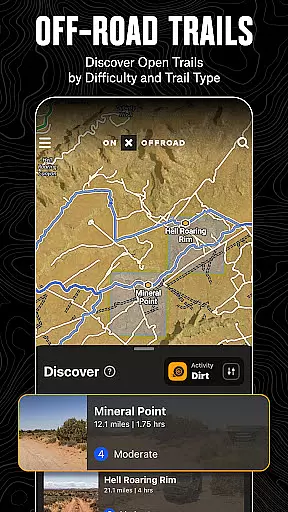
onX Offroad is a premier navigation application designed for off-road enthusiasts who seek adventure beyond paved roads. It offers advanced GPS mapping, 3D trail visualization, and compass navigation to help users discover nearby trails or plan new explorations effortlessly.
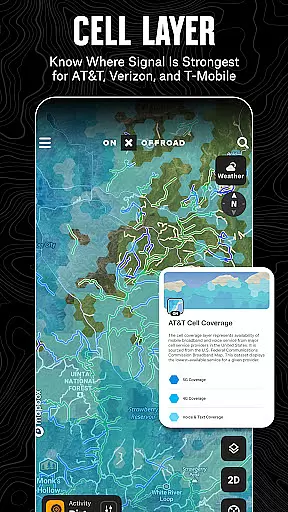
This app caters to various outdoor activities by providing specialized trail filters for different vehicles, including 4x4s, side-by-sides, and dirt bikes. Additionally, it incorporates valuable safety features such as wildfire tracking and cell coverage layers, ensuring users stay connected and informed during their journeys.
Whether you're planning a weekend getaway or an extended expedition, onX Offroad equips you with the tools needed to navigate confidently and return safely. Its robust feature set makes it an indispensable companion for any off-road adventure.
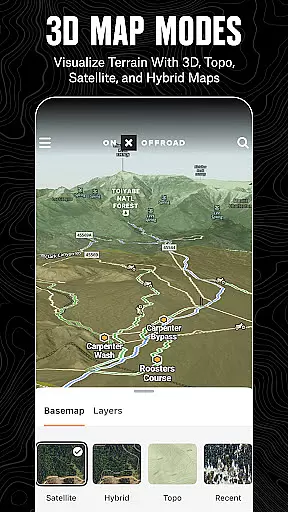
onX Offroad stands out with its comprehensive mapping capabilities tailored for off-road adventures. The app provides users with detailed 3D trail maps, GPS navigation, and essential tools like compass orientation.
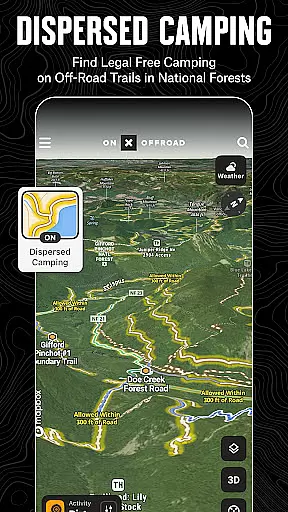
One of the key highlights is its ability to filter trails based on vehicle accessibility, such as 4x4s, ATVs, and dirt bikes. Users can also identify legal camping areas and track wildfires using real-time data from authoritative sources. This ensures a safe and informed journey even in remote locations.
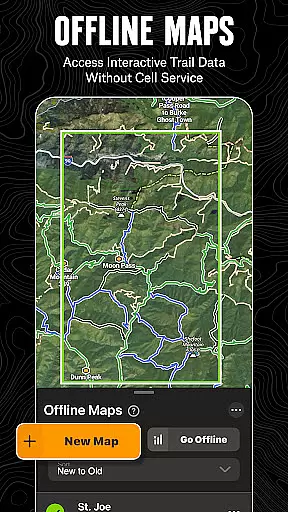
The offline functionality allows adventurers to save maps and access them without internet connectivity. With turn-by-turn navigation that syncs with Android Auto, users can confidently navigate challenging terrains while receiving voice-guided directions.
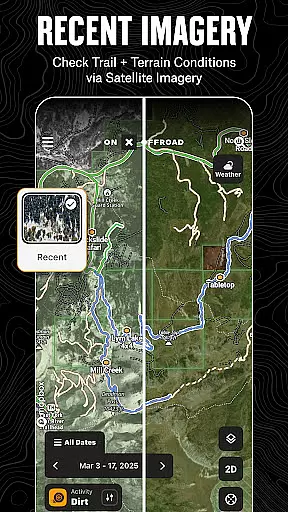
Map accuracy is crucial for off-road navigation, and onX Offroad excels in this area. The app provides detailed 3D trail maps, topographic maps, and satellite imagery that ensure users can rely on the information displayed.
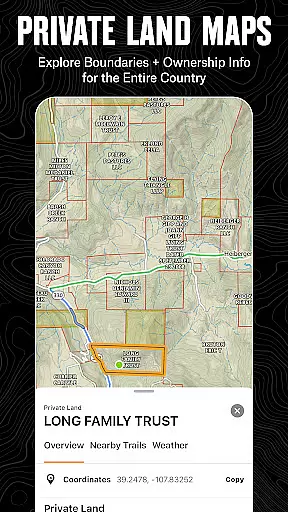
The application uses verified data from sources like the USDA Forest Service to provide precise property lines and land ownership details. This level of detail helps users identify public lands, private properties, and motorized dispersed camping areas with confidence.
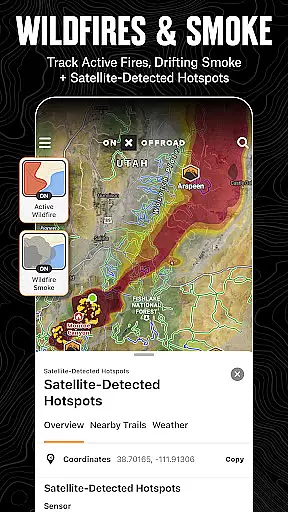
onX Offroad also incorporates real-time data layers such as wildfire activity and cell coverage for major providers. These features not only enhance map accuracy but also contribute to user safety by providing critical information when planning routes or during emergencies.
With these accurate mapping capabilities, adventurers can explore new terrains knowing they have a trustworthy tool at their disposal, which ultimately enriches their outdoor experience while ensuring they stay informed about their surroundings.
Effective route planning is essential for any off-road adventure, and onX Offroad offers advanced tools to facilitate this process. Users can create routes that automatically snap to existing roads and trails, streamlining the planning phase and reducing errors.
The app's turn-by-turn navigation feature supports voice commands and integrates seamlessly with Android Auto. This functionality allows drivers to focus on the trail without needing to constantly check their devices, enhancing both convenience and safety.
Additionally, onX Offroad enables users to save offline maps, which retain interactive land and trail data even without cell service. This ensures continuous access to vital navigation information regardless of location, empowering explorers to venture into remote areas confidently.
By combining comprehensive map layers with intuitive route-building tools, onX Offroad equips users with everything needed to plan successful trips, making it an indispensable companion for off-road enthusiasts seeking reliable guidance through challenging landscapes.
Comprehensive map data
Real-time wildfire updates
Offline map availability
Turn-by-turn navigation
Customizable waypoints
Limited free features
Subscription required
Offline maps need pre-download
Occasional bugs
Heavy data usage

Find AI powered cameras, ALPRs, and other surveillance infrastructure near you
 4.70
4.70
Discover over 800 points of interest along the canal.
3.70
Find trails, organize your locations and navigate with offline maps.
4.60
Airport parking, with airport shuttle (TPS shuttle), reservations, and Spot Club
4.80
America’s largest public fast charging network, with over 500 charging stations.
4.50
Find routes fast with GPS Maps, GPS Navigation & driving directions.
4.10
Truck Safe GPS Navigation & Maps: Parking, Fuel, Diesel, Weight Station
4.80
Explore Earth with live GPS, satellite view & street navigation
3.60
Neshan: map & navigation app with 20M+ monthly active users
4.50
LIRR and Metro-North tickets and trips
4.80
Find EV & Tesla charging stations with PlugShare
4.70
Navigate with your watch and keep the phone in your pocket!
4.60
Lets explore the world's famous places by using Live Cams, GPS & Satellite View.
4.20
Number locator, real connection map
4.10
Avoid delays. Get real-time GPS navigation, safety alerts and live traffic.
4.10
Easy, Moderate and difficult offroad adventures.
4.00
OpenCPN is a full featured ChartPlotter and Navigator for Android.
3.60
Explore offline maps with radar, satellite view, and real-time alerts.
3.60
Explore the world with Live Satellite View, 3D Maps, GPS Navigation & Earth Map.
2.90
Complete Waymo autonomous vehicle review—how it works, safety record, pricing vs Uber, service areas, and the real experience of riding without a driver.



User Reviews