
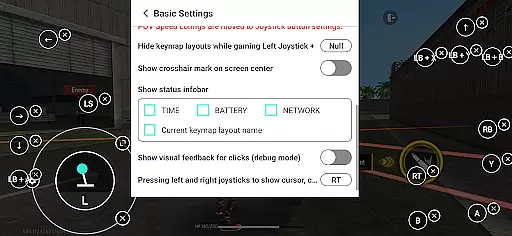
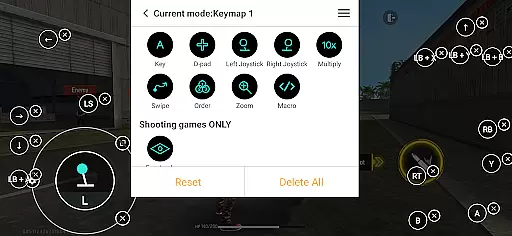
Panda Gamepad Pro is a powerful tool designed to enhance mobile gaming experiences by enabling gamepad controls. This app allows gamers to enjoy their favorite mobile games with the precision and comfort of a physical controller, eliminating the limitations of touch-based controls. With support for nearly all gamepad brands and extensive compatibility with various game genres, it ensures an immersive experience across different devices.
The application stands out through its unique features like Direct Game Launch, which lets users jump straight into gameplay without any cloning processes. Additionally, Panda Gamepad Pro offers secure Google Play login and ban-proof technology, ensuring safe and uninterrupted gaming sessions. Whether you're playing on Android 11+ or older versions, activation is straightforward, making this tool accessible to both casual and hardcore gamers alike.
Panda Gamepad Pro boasts several innovative features that set it apart from other gaming tools. One key aspect is its universal compatibility; the app supports almost every gamepad brand available today, from modern controllers to classic ones. This ensures that no matter what type of controller you own, you can use it seamlessly with your mobile games.
Another standout feature is the Direct Game Launch capability, allowing players to start their games instantly without needing to clone apps. The app also provides secure Google Play login options and employs advanced technology to prevent bans in games sensitive to duplication running issues. Furthermore, users benefit from hassle-free activation methods tailored to different Android versions, including automatic activation for rooted devices. These comprehensive functionalities make Panda Gamepad Pro an essential tool for enhancing mobile gaming performance.
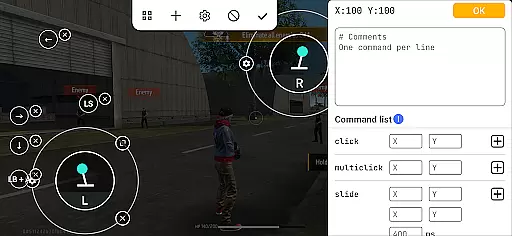
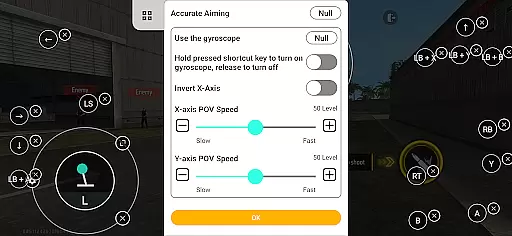
Panda Gamepad Pro excels in delivering precise and effective control for mobile gaming. The app is designed to maximize the functionality of your gamepad, ensuring every button press translates directly into in-game actions.
Through advanced mapping technology, the application guarantees accurate input registration across a wide range of games. Whether you're playing a fast-paced shooter or a strategic MOBA, each command is executed exactly as intended, providing an authentic console-like experience on your mobile device.
The direct game launch feature eliminates unnecessary steps, allowing gamers to jump straight into the action. This seamless integration not only enhances gameplay accuracy but also significantly reduces setup time, making gaming sessions more efficient and enjoyable.
With support for nearly all gamepad brands, Panda Gamepad Pro ensures that users can enjoy consistent performance regardless of their hardware choice. This universal compatibility reinforces the app's commitment to delivering reliable and effective gaming experiences.
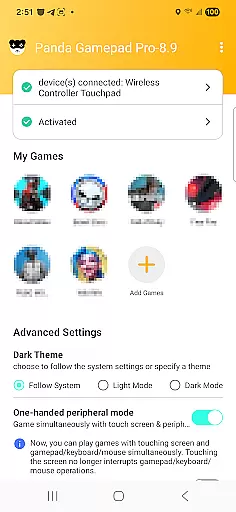
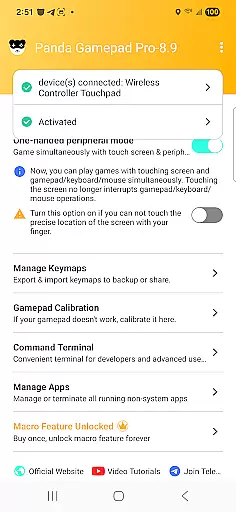
The interface of Panda Gamepad Pro is crafted to provide a straightforward and intuitive user experience. Upon launching the app, users are greeted with a clean layout that prioritizes ease of navigation and quick access to essential features.
Activation processes are streamlined to ensure users can start gaming with minimal hassle. For Android 11 and above, direct activation on the device removes barriers to entry, while clear instructions for older versions facilitate a smooth setup via PC or Mac.
Within the app, game selection and controller configuration are presented through simple menus that guide users step-by-step. This logical flow minimizes the learning curve, enabling even novice users to quickly grasp how to optimize their controllers for different games.
By focusing on clarity and simplicity, Panda Gamepad Pro empowers gamers to concentrate on what truly matters - enjoying their favorite titles without being bogged down by complex settings or confusing options.
Enhanced game control
Ban-proof technology
Universal gamepad support
Direct game launch
Secure login options
Requires initial setup
Limited free version
Activation complexity
Device compatibility
Premium cost

 4.50
4.50
This app unlocks the Pro features of the Central for DayZ app
3.60
Quickly & easily calculate the spacing of handrail balusters
4.20
An open-source APK explorer for Android!
4.10
VESC Tool can monitor and configure VESC-compatible devices over BLE and Wifi
4.20
WiFi Signal Strength Meter help you detect WiFi Signal Strength in real time.
4.80
Remote Play with FSR upscaling, low latency & full controller support
4.80
Screen recorder with audio to record high-quality videos and take screenshots.
4.40
Enhance your Beats
3.70
Change your GPS location instantly. Simulate routes anywhere in the world.
4.90
Excellent scientific calculator with symbolic algebra, integrals, derivatives
4.80
NFC Tools can read and write NFC tags.
4.70
Just swipe the edge to do something!
4.40
An easy-to-use calculator designed to save time calculating and bending conduit
4.30
Quickly check the frequency of the Earth
4.30
Just one-tap to easy translate in any language after calls within seconds.
4.20
Screen Mirroring with sound for Samsung TV, LG TV, Sony TV, Smart TV and Browser
4.20
1-Click close all background apps on Android TV
3.90
Family Locator, Share location, StayConnect with your family in real time
3.90


User Reviews