
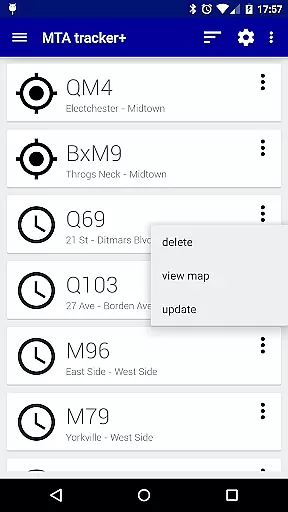
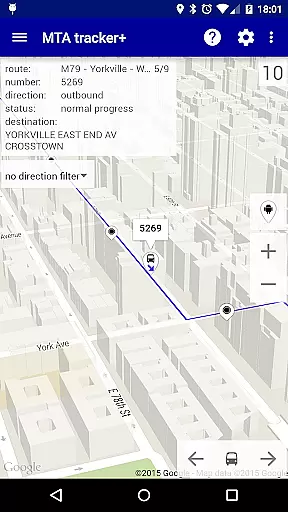
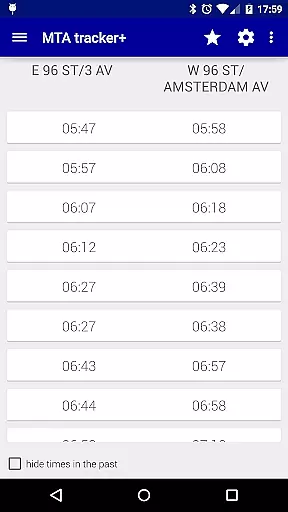
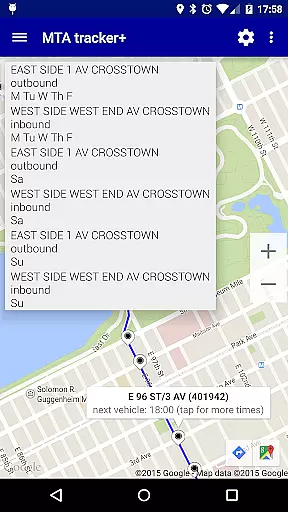
Transit Tracker+ is a comprehensive navigation app designed for New York City's Metropolitan Transportation Authority (MTA) users. This ad-free version offers advanced features beyond the basic Transit Tracker, including real-time vehicle tracking, route schedules, and proximity alerts. The app leverages MTA's public APIs to provide accurate data on bus and train movements, ensuring that commuters can efficiently plan their journeys across NYC.
One of the standout features of Transit Tracker+ is its ability to deliver timely notifications based on user-defined parameters such as specific routes or stops. Whether you're waiting for a bus in Manhattan or need to catch a train in Brooklyn, this app ensures you are always informed about arrival times and service updates. Additionally, it provides detailed route maps and schedule tables, making it an indispensable tool for daily commuters and tourists alike.
Transit Tracker+ boasts a variety of robust features tailored to enhance the commuting experience. Users can input multiple route numbers, stop IDs, or individual vehicle numbers to view real-time locations of buses and trains on a map interface. The inclusion of downloadable route schedules allows offline access to timetables, which is particularly useful in areas with poor connectivity.
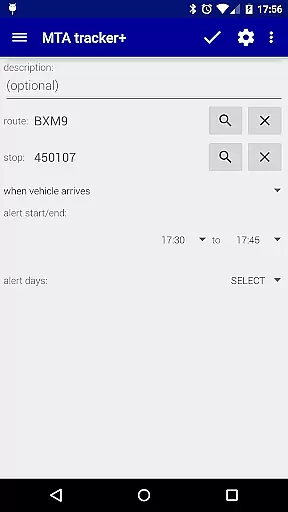
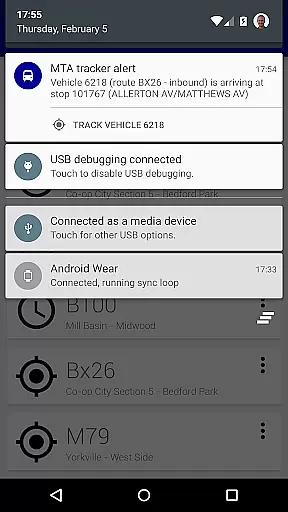
The alert system is another key feature, enabling users to set custom notifications for when vehicles approach or arrive at designated stops. These alerts consider both distance and predefined routes provided by the MTA, although detours may affect accuracy. Furthermore, the app supports light and dark themes, satellite imagery, traffic data overlays, and customizable update intervals for vehicle locations, providing a personalized and visually rich user experience.
Map accuracy is a crucial feature for any navigation app, and Transit Tracker+ - NYC excels in this area. The application uses real-time data provided by the Metropolitan Transportation Authority (MTA) to ensure that users have access to the most up-to-date transit information available.
The app's map displays vehicle locations with precision, allowing users to track buses and trains as they move along their routes. This level of detail helps commuters make informed decisions about their travel plans, whether it's catching the next bus or planning a route across town.
Additionally, Transit Tracker+ offers features such as satellite imagery and color-coded traffic data on the map, enhancing situational awareness. These tools help users understand not only where their transit options are but also how external factors like traffic might affect arrival times.
By providing accurate mapping capabilities, Transit Tracker+ ensures that its users can rely on the app for timely and dependable transit updates, making daily commutes more predictable and less stressful.
Route planning is an essential aspect of Transit Tracker+ - NYC, empowering users to navigate the city's complex public transportation system with ease. By entering a route number, stop number, or vehicle number, riders gain access to detailed schedules and real-time tracking of MTA vehicles.
The ability to view schedules as origin/destination tables or on a map adds another layer of convenience. Users can tap on a stop within the map interface to see when the next bus or train is scheduled to arrive, streamlining the process of planning oneu2019s journey down to the minute.
Transit Tracker+ goes beyond simple route tracking by offering close stops functionality. Commuters can search for nearby MTA stops based on their current location or an entered address, specifying filters such as maximum number of stops and preferred routes.
This comprehensive approach to route planning not only simplifies daily commutes but also enhances overall user experience by ensuring that travelers have all necessary information at their fingertips, enabling them to plan efficient journeys through New York City's bustling streets.
User-friendly interface
Real-time tracking
Customizable alerts
Offline schedule access
Comprehensive route info
Limited route coverage
No official MTA support
Potential detour issues
Ad-free version cost
Dependent on MTA data

Easy, Moderate and difficult offroad adventures.
 4.00
4.00
Navigate with your watch and keep the phone in your pocket!
4.60
Route tracker, Speedometer, Odometer, Fuel, HUD mode, save route as .GPX
4.40
Ride CTA, Metra & Pace: Manage your fares, buy Metra tickets, get arrivals.
3.00
Maps, Driving Directions & GPS navigation using directions app & GPS App
4.30
Live Satellite view app for find GPS navigation Direction and live location map
3.70
Navigate seamlessly with Real-Time Traffic, Offline Maps, and Voice Navigation.
4.10
GPS phone tracker, family locator, secure location sharing app
4.20
Get matched with a nearby driver — you’ll be on your way in minutes.
4.30
Truck Safe GPS Navigation & Maps: Parking, Fuel, Diesel, Weight Station
4.80
GPX Viewer PRO shows tracks, routes and waypoints from gpx and kml files.
4.60
Voice GPS with driving directions, offline maps navigation GPS for safe travel
4.50
The fastest and most convenient way to pay for parking on our lots.
4.40
Find routes fast with GPS Maps, GPS Navigation & driving directions.
4.10
Use GPS Maps and GPS Voice Navigation to find your way and get directions
4.10
Get real-time bus and train schedules for easy, hassle-free city transportation.
3.90
Drive safe with real-time speed camera radar, police, and traffic alerts
3.80
OpenCPN is a full featured ChartPlotter and Navigator for Android.
3.60
Turn your tablet or Android powered unit into a full blow Android Auto headunit.
2.30
Honest Uber review—pricing surge charges, driver quality, safety features, hidden fees, and how it compares to Lyft and local taxis.



User Reviews