
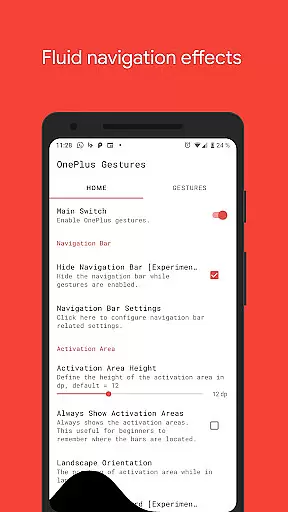
Vivid Navigation Gestures is a powerful tool that revolutionizes the way you interact with your Android device. This app allows users to control their devices through intuitive gestures, eliminating the need for traditional button presses. With compatibility across various Android versions and devices, it brings next-generation navigation to everyone.
The app's standout feature is its ability to provide fluid visual effects during gesture interactions, making navigation not only functional but also visually appealing. Whether you're looking to launch Google Assistant, toggle split-screen mode, or take screenshots, Vivid Navigation Gestures offers a comprehensive suite of actions triggered by customizable gestures. Its versatility makes it an essential tool for power users seeking enhanced productivity and ease of use.
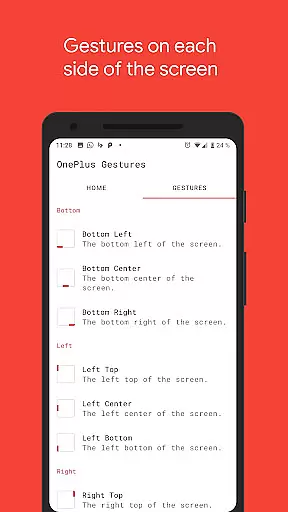
Vivid Navigation Gestures boasts an impressive array of features designed to enhance user interaction. The app supports multiple gesture triggers from different screen areas, including bottom left, center, right, and more. These triggers can be customized to perform a wide range of actions such as navigating back, opening recent apps, or even controlling media playback.
One of the key innovations is the ability to hide the stock navigation bar while using gestures, creating a cleaner, more immersive interface. Although this feature requires ADB or root access, detailed instructions are provided to help users enable it safely. Additionally, the app leverages accessibility services to execute complex actions programmatically without collecting any personal data, ensuring both functionality and privacy.
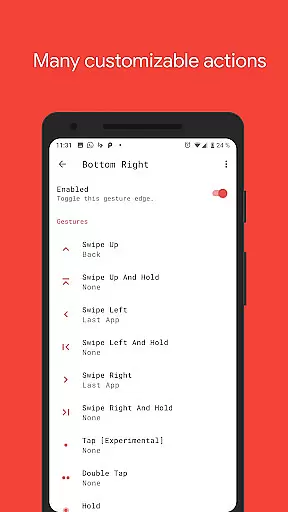
Vivid Navigation Gestures excels in delivering accurate and effective gesture controls, replacing traditional button presses with intuitive swipes and taps. The app supports a wide array of gestures, including swipe up, swipe left, and double tap, each precisely mapped to essential device actions like launching Google Assistant or navigating back.
What sets this tool apart is its seamless integration with the device's existing functionality. By utilizing accessibility services, it programmatically executes actions such as toggling split-screen mode or opening quick settings without any noticeable lag. This ensures that users experience fluid and responsive interactions every time they use a gesture.
The app also offers advanced customization options, allowing users to assign specific gestures to various actions based on their preferences. Whether it's skipping to the next music track or taking a screenshot, each gesture performs its designated task reliably, enhancing overall usability.
For power users, Vivid Navigation Gestures provides additional functionalities like hiding the navigation bar, which requires ADB or root access. This feature not only declutters the screen but also maximizes the display real estate, making the overall user experience more immersive and efficient.
The interface of Vivid Navigation Gestures is designed with simplicity and intuitiveness in mind, ensuring that users can easily navigate and customize their gesture controls without a steep learning curve. Upon opening the app, users are greeted with a straightforward layout that categorizes gestures and actions into clear sections.
Each gesture trigger, ranging from bottom left to right top, is visually represented, making it easy for users to understand and configure their preferred actions. This visual approach eliminates confusion and allows even novice users to quickly adapt to using gestures instead of traditional button presses.
In addition to its intuitive design, the app includes beautiful fluid effects during gesture execution, providing immediate feedback and enhancing the overall user experience. These effects not only make the interactions feel more natural but also help users confirm that their gestures have been recognized by the system.
Furthermore, Vivid Navigation Gestures offers extensive support documentation and community resources, such as installation guides and troubleshooting tips available on platforms like Reddit. This commitment to user support ensures that everyone, regardless of technical expertise, can take full advantage of the app's capabilities.
Intuitive gesture controls
Beautiful fluid effects
Wide range of customizable actions
Compatibility with various Android versions
Enhanced productivity features
ADB setup required for some features
Root access needed for full functionality
Learning curve for new users
Limited iOS support
Complex configuration options

 4.10
4.10
Easily install aab(Android App Bundle) files on your Android device with our app
4.80
Quickly switch to an encrypted DNS server on Android TV
4.50
Keep track of your Palia friendships, tasks, and inventory with Palia Notebook
4.60
card-reader app
2.20
Smart and comfortable browsing experience.
3.80
Signal Strength, Mobile, Wifi, Speed Test, Bad Signals, Cellular, 5G, LTE, 4G
4.20
Monitor car performance in real time and troubleshoot malfunctions.
4.80
Download any file easily and quickly with Downloader
4.5
Best leveling tool for your Android device. Hang paintings like a pro.
4.90
Extremely fast, secure, and protects your privacy
4.80
Optimize your WiFi network, turn your phone into Wifi Analyzer
4.70
Protect your device with antivirus, storage cleanup, and system monitoring
4.70
Canon PRINT is a companion app for your Canon printer.
4.60
Play your X-Box games remotely in 1080p with any controller and zero latency
4.60
Mirror your screen to Fire TV - Super fast and simple
4.40
Family Locator, Share location, StayConnect with your family in real time
3.90
Create your own live wallpaper or check out thousands already made presets
3.90
Safely recover deleted photos, videos, and files with a single easy tap.
3.70


User Reviews