

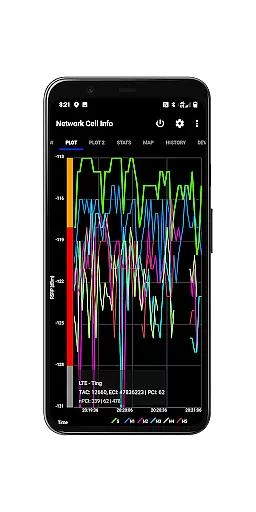
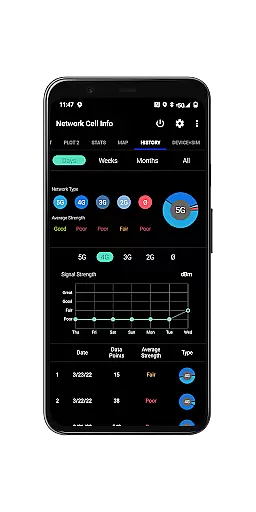
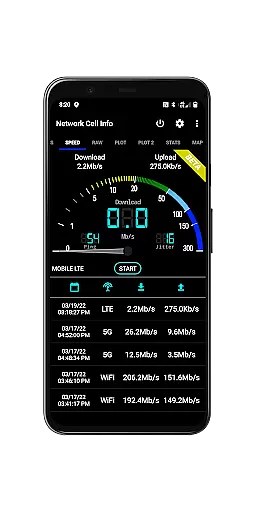
Network Cell Info & Wifi is a comprehensive mobile network monitoring tool designed for users seeking to optimize their connectivity experience. The app provides detailed insights into cellular and Wi-Fi signals, supporting technologies like 5G, LTE, CDMA, and GSM. With its advanced diagnostic features, users can troubleshoot reception issues, monitor signal strength in real-time, and identify connected cell towers.
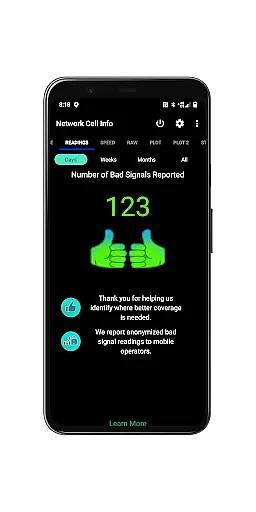
A standout feature of the app is the Bad Signal Reporter, which allows users to automatically report poor signal areas to their mobile network operators. This functionality not only empowers users to improve their personal network experience but also contributes to enhancing overall network quality. Whether you're a tech enthusiast or someone looking to maximize your device's performance, Network Cell Info & Wifi offers valuable tools to achieve stronger and more reliable connections.
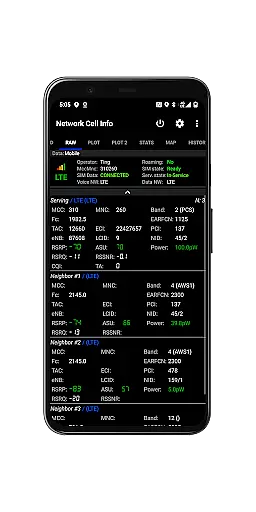
Network Cell Info & Wifi stands out with its robust set of features tailored for network diagnostics and optimization. One of its core capabilities is the almost real-time monitoring of cellular and Wi-Fi signals, providing updates every second through intuitive gauge and raw data tabs. The app supports multiple network types including 5G, LTE+, and CDMA, ensuring compatibility across various devices and carriers.
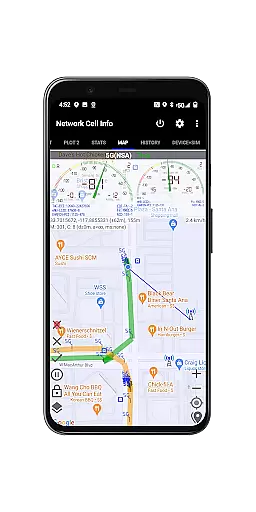
In addition to signal monitoring, the app includes advanced tools such as a one-tap speed test for measuring internet performance metrics like download, upload, ping, and jitter. Users can also access historical logs, signal plots, and personalized signal strength maps. These features enable users to analyze their network performance over time and locate areas with the best coverage. Dual-SIM support and detailed SIM/device information further enhance its utility, making it an indispensable tool for anyone serious about managing their mobile connectivity.
Network Cell Info provides an extensive suite of tools designed to monitor and diagnose mobile network and Wi-Fi signals with remarkable precision. The app supports a wide range of network types including 5G, LTE+, LTE, CDMA, WCDMA, and GSM, ensuring comprehensive compatibility across different carriers and devices.
One of the standout features is its almost real-time monitoring capability, which updates cellular carrier and WiFi signal data every second. This allows users to troubleshoot reception and connectivity issues effectively. Additionally, the inclusion of one-tap speed tests for download, upload, ping, and jitter offers a convenient way to assess mobile internet performance.
For users seeking optimal signal strength, Network Cell Info includes advanced functionalities like the Personal Best Signal Finder and Crowdsourced Best Signal Finder. These tools not only help in identifying the strongest signals available but also provide historical data and graphical representations to track signal strength over time.
The app's dual-SIM support and detailed connection statistics further enhance its utility, making it an invaluable tool for anyone looking to improve their mobile experience. By delivering accurate and actionable insights, Network Cell Info empowers users to achieve the best possible network performance.
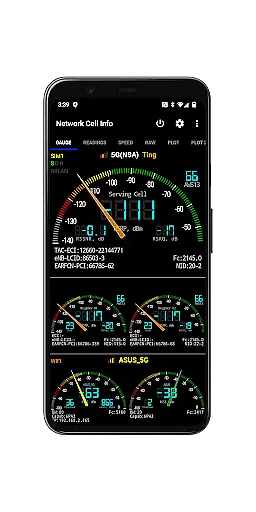
Despite its technical depth, Network Cell Info maintains an intuitive and user-friendly interface that simplifies complex network diagnostics. The app organizes its extensive features into clearly labeled tabs such as Gauge, Raw, Map, and History Logs, allowing users to navigate effortlessly between different monitoring views.
The main dashboard presents key information through easy-to-read signal-meter gauges for both SIM cards and WiFi connections. Users can quickly assess their current signal strength and network status without needing to interpret complicated data. This visual approach makes the app accessible even to those who may not be technically inclined.
Additional features like the Bad Signal Reporter are implemented with straightforward mechanics. Users can report poor signal experiences with minimal effort, contributing valuable data to help improve network quality. The app also provides clear indicators for cell locations and band numbers, enhancing situational awareness without overwhelming the user.
Overall, Network Cell Info strikes an excellent balance between functionality and usability. Its clean layout and logical structure ensure that both casual users and network professionals can utilize its powerful features without facing a steep learning curve.
Comprehensive network monitoring
Real-time signal tracking
Advanced diagnostic tools
Dual-SIM device support
Free Bad Signal Reporter
Complex for beginners
Requires technical knowledge
Limited CDMA mapping
Premium features locked
Heavy on battery usage

Just swipe the edge to do something!
 4.40
4.40
1-Click close all background apps on Android TV
3.90
Complete kernel toolbox with features to manage and tweak your rooted device
4.30
Use your phone as a webcam on your computer over WiFi or USB.
4.40
Save any video in HD - paste the link, download fast and watch offline.
4.5
Keep track of your Palia friendships, tasks, and inventory with Palia Notebook
4.60
The ultimate tool for network analysis, wifi scanning and problem detection.
4.90
The Ultimate Flex Drivers Utility App - Convenient Tapping & Block Filters
4.70
Fast VPN USA for any country. Super secure VPN for calls, streaming, games, TV.
4.40
Connect wirelessly to your computer to watch movies, browse the web, play games
5.00
Powerful collection of electronics tools and reference.A must for any enthusiast
4.90
Enjoy smooth gameplay with Game Booster
4.90
FV File Manager Pro, Fast and powerful file manager for Android
4.60
Mirror your screen to Chromecast and Android TV - Super fast and simple
4.60 4.50
4.50
Forza Tuning Calculator App for Forza Horizon 5, Motorsport and Earlier Titles
4.40
pdf merge, word to pdf, jpg to pdf, edit pdf, convert to pdf and much more!
4.20
Create your own live wallpaper or check out thousands already made presets
3.90
Unlock your Essential Key. Create custom shortcuts to your favorite apps!
4.1


User Reviews