
The Everything Key is a powerful utility app designed to unlock the hidden potential of your device's hardware button. With its intuitive remapping capabilities, this tool allows you to customize the button's functionality, transforming it into an instant productivity booster.
Through a clean and minimalist interface inspired by the Nothing aesthetic, users can easily assign specific actions to both double-press and triple-press gestures. Whether launching your camera, favorite messaging app, or most-used utility, The Everything Key puts speed and personalization at your fingertips.
This app is especially useful for owners of specific device models like the Nothing Phone series and CMF Phone, offering a personalized experience that integrates seamlessly with your device's design.
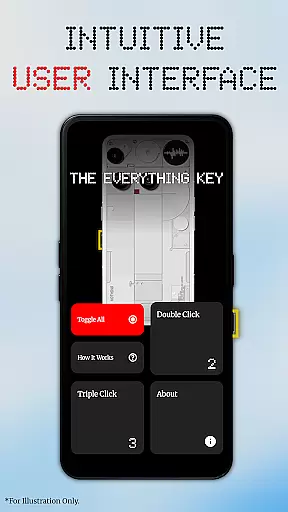
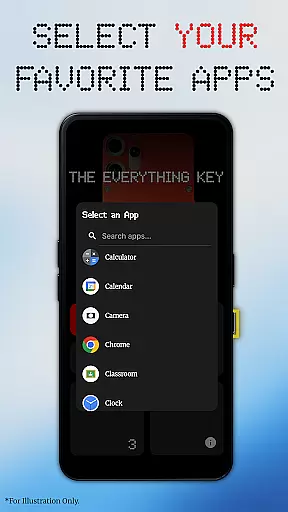
The Everything Key stands out with its powerful remapping features. Users can assign any app to both double-press and triple-press actions, providing unparalleled customization options. The app's minimalist UI ensures ease of use, allowing users to quickly see which apps are mapped and toggle their activation status.
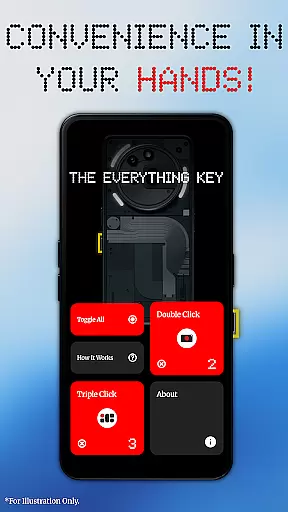
Advanced control features include the ability to enable or disable actions with a single tap, un-map apps using the 'X' icon, and use the 'Toggle All' feature to manage all mappings simultaneously. Importantly, no root access is required, as the app works with standard Android features.
Privacy is a top priority, and The Everything Key uses Android's Accessibility Service solely to detect hardware key presses. It does not access on-screen content, passwords, or personal information, ensuring a secure and trustworthy user experience.
The Everything Key excels in providing accurate and effective core functionality by enabling users to remap their device's special hardware button. This app leverages Android's Accessibility Service to detect specific hardware key presses, ensuring that each double or triple press triggers the intended action without fail.
With a clean, intuitive interface inspired by the Nothing aesthetic, users can easily assign apps to both double-press and triple-press actions. The app supports advanced control features, allowing users to enable or disable actions quickly, un-map apps permanently, and toggle all mappings at once. These capabilities ensure that users have precise control over their remapping preferences.
This powerful remapping functionality works out of the box using standard Android features, eliminating the need for complex computer commands or rooting. Users can personalize their experience further by selecting their specific device model and color, which displays a stunning, integrated background on first launch.
Ultimately, The Everything Key empowers users to unlock the full potential of their device's hardware button, transforming it into an instant productivity tool. By focusing on speed, personalization, and ease of use, this app delivers a seamless and efficient user experience.
The Everything Key offers a beautifully minimalist and intuitive user interface that makes remapping your device's hardware button a breeze. Inspired by the Nothing aesthetic, the app provides a clean design where users can effortlessly see which apps are mapped and whether they are active, ensuring a streamlined experience.
Upon launching the app, users are greeted with an easy-to-navigate interface that highlights mapped actions clearly. Each mapped card can be tapped to quickly enable or disable its action, while the 'X' icon allows for permanent un-mapping of apps. Additionally, the 'Toggle All' feature lets users activate or deactivate all mappings simultaneously, enhancing usability.
Personalization is at the forefront of the user experience, as the app helps users select their specific device model and color during the first launch. This selection displays a stunning, integrated background that aligns with the deviceu2019s design, offering both aesthetic appeal and functional clarity.
By prioritizing simplicity and intuitiveness, The Everything Key ensures that users of all technical backgrounds can take full advantage of their device's special hardware button without any hassle. This approach not only enhances productivity but also maintains user satisfaction through thoughtful design.
Highly customizable
User-friendly interface
No root required
Strong privacy protection
Device-specific optimization
Limited device compatibility
Requires accessibility permission
No advanced automation
Basic UI design
Independent developer support

Quickly switch to an encrypted DNS server on Android TV
 4.50
4.50
A recovery soft,it features photo recovery, video recovery, file recovery.
3.40
PDF Reader - Document Viewer: Read, Manage & Organize Your Documents
3.10
Learn the vast amount of system information about device and monitor it's state
4.70
An open-source APK explorer for Android!
4.10
Best leveling tool for your Android device. Hang paintings like a pro.
4.90
Making emulation easy for everyone!
4.30
A clean app.
4.50
Screen recorder with audio to record high-quality videos and take screenshots.
4.40
NFC Tools can read and write NFC tags.
4.70 4.50
4.50
PC precision for mobile gaming: dominate with keyboard and mouse!
4.30
Signal Strength, Mobile, Wifi, Speed Test, Bad Signals, Cellular, 5G, LTE, 4G
4.20 4.10
4.10
A convenient photo, video, and file recovery tool.
4.00
Smart and comfortable browsing experience.
3.80
Fun lie-detection pranks for friends and parties.
3.80
Safely recover deleted photos, videos, and files with a single easy tap.
3.70
Transfer Files, APK from Phone to Watch & Install.
4.4


User Reviews