
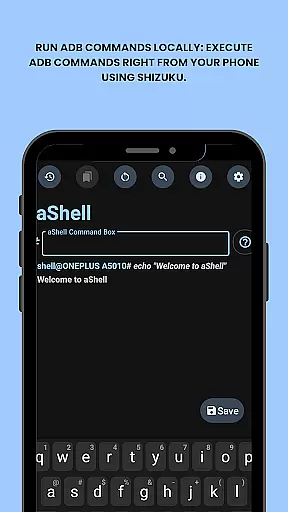
aShell is a specialized mobile application designed for Android users who require direct access to ADB commands without the need for a PC. This tool operates within a Shizuku-supported environment, making it possible to execute advanced system-level operations directly from your smartphone. The app is particularly beneficial for developers and power users who seek to manage their device's internal settings with precision.
Key features of aShell include executing ADB commands locally on the device, preloaded command examples for ease of use, live command output support, and the ability to search within command results. Additionally, users can save command outputs to files, switch between dark and light modes, and bookmark frequently used commands. These capabilities make aShell an indispensable tool for anyone looking to gain deeper control over their Android device.
The app is ideal for scenarios where quick debugging or system checks are necessary without access to traditional computing resources. Its open-source nature also allows tech enthusiasts to contribute to its development or customize it according to specific needs.
aShell stands out due to its unique set of features tailored for Android power users. One of the primary functionalities is the ability to run ADB commands locally on the device, which is made possible through the integration with Shizuku. This feature alone transforms how users interact with their device's system architecture, providing unprecedented access and control.
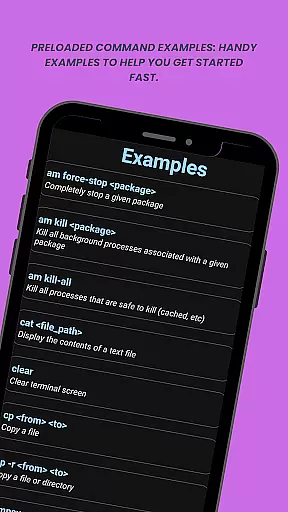
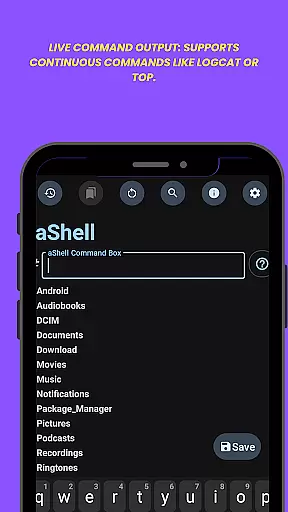
In addition to local command execution, aShell offers preloaded examples of common ADB commands, aiding users in quickly getting started with the app. It supports continuous commands such as logcat or top, allowing real-time monitoring of system processes. Users can also search within the command output, making it easier to locate specific information among potentially vast data sets.
Further enhancing its utility, aShell includes options to save command outputs to text files, automatic adaptation to dark or light modes based on system settings, and the ability to bookmark frequently used commands for quick access. These features collectively ensure that aShell not only meets but exceeds the expectations of its target audience by offering a comprehensive and user-friendly approach to managing Android devices via ADB commands.
aShell is designed to provide an accurate and effective way for users to execute ADB commands directly on their Android devices. This eliminates the need for a PC, making it highly convenient for developers and power users.
The app leverages a fully functional Shizuku environment to ensure that all ADB operations are performed with precision. By supporting continuous commands like logcat or top, aShell guarantees real-time feedback and reliable performance.
With features such as live command output and the ability to search within the output, users can quickly find specific information they need. This functionality enhances productivity by allowing users to troubleshoot and analyze their device's internals efficiently.
Additionally, aShell supports saving command outputs to .txt files, providing a practical way to document and share results. This ensures that users can maintain records of their operations, further emphasizing the app's commitment to accuracy and effectiveness in task management.
aShell offers a straightforward and intuitive interface that caters to both novice and experienced users. Despite its powerful capabilities, the app maintains a user-friendly design that simplifies the execution of complex ADB commands.
Preloaded command examples help new users get started quickly without needing extensive knowledge of ADB/Linux operations. These examples serve as practical guides, reducing the learning curve and enhancing the overall user experience.
The app also includes modern UI features such as dark/light mode support, which automatically adapts to the system theme. This ensures visual comfort and consistency across different usage scenarios, contributing to an intuitive user interface.
Furthermore, aShell allows users to bookmark frequently used commands, streamlining access to essential functions. This thoughtful design choice minimizes unnecessary navigation, making the app not only simple but also efficient to use on a daily basis.
User-friendly interface
Live command output
Dark mode support
Open-source project
Bookmark functionality
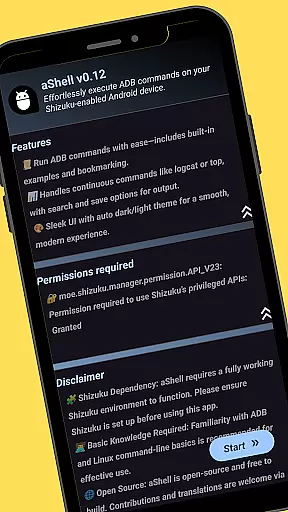
Requires Shizuku
Limited to Android
Needs ADB knowledge
No iOS version
Paid app

pdf merge, word to pdf, jpg to pdf, edit pdf, convert to pdf and much more!
 4.20
4.20
Just one-tap to easy translate in any language after calls within seconds.
4.20
Enjoy smooth gameplay with Game Booster
4.90
Small and simple app to Verify Root Access and BusyBox Install!
4.70
Bedrock Together: Join any bedrock server on Xbox/PS
4.80
Play your X-Box games remotely in 1080p with any controller and zero latency
4.60
Create your own custom widget with endless possibilities
3.90
Clean up your phone, find files, play media, and share files offline
4.50
The ideal app to be the digital eye of your family
3.40
Support Fossify apps with a warm thank you!
5.00
Connect wirelessly to your computer to watch movies, browse the web, play games
5.00
Fluid navigation gestures for all of us!
4.30
An open-source APK explorer for Android!
4.10
Automate everything from settings to photos, SMS to speech. ADC2 prize winner.
4.10
1-Click close all background apps on Android TV
3.90
Safely recover deleted photos, videos, and files with a single easy tap.
3.70
This app unlocks the Pro features of the Central for DayZ app
3.60
Transfer Files, APK from Phone to Watch & Install.
4.4
Download any file easily and quickly with Downloader
4.0


User Reviews