
AutoPad is a versatile ambient pad loop application designed to enhance live performances and recordings with seamlessly looped soundscapes. The app provides musicians with an easy way to incorporate tasteful, drone-based background textures that can be triggered instantly and played for any duration.
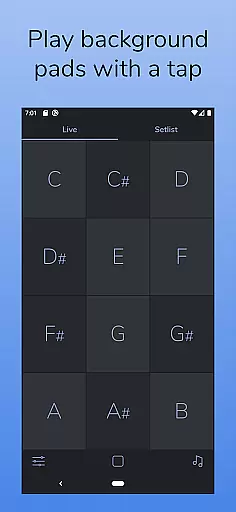
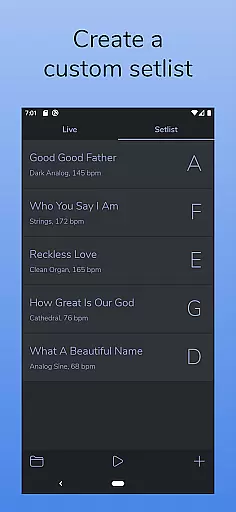
The app features two distinct modes - LIVE mode for instant access to all twelve musical keys, and SETLIST mode for creating customized song lists. With its natural crossfade functionality between keys, adjustable effects, and MIDI compatibility, AutoPad offers both convenience and creative control for musicians across different genres.
Whether used in worship settings or during band performances, AutoPad serves as an invaluable tool for adding atmospheric depth to musical pieces without overpowering the main instrumentation. Its carefully designed sounds work harmoniously with live instruments, making it perfect for creating subtle yet impactful ambient backdrops.
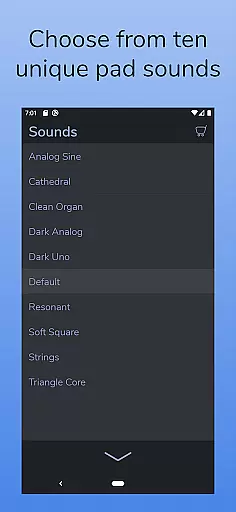
AutoPad distinguishes itself through its comprehensive feature set tailored specifically for musicians. The app comes equipped with 10 expertly crafted pad sounds, each available in all 12 musical keys, providing users with diverse atmospheric options right out of the box.
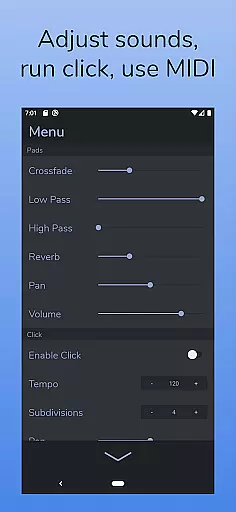
For those seeking expanded possibilities, AutoPad supports additional sound packs and custom WAV file imports (Android version). The built-in metronome ensures tight synchronization during performances while advanced controls including crossfade time, dual filters, reverb, pan, and volume adjustments allow for precise sound shaping.
Notably, AutoPad's MIDI compatibility enables integration with external controllers, though Android users should note the current limitation regarding virtual and Bluetooth MIDI support. The app's thoughtful design extends to its stage-friendly dark color scheme, ensuring optimal visibility under various lighting conditions.
AutoPad offers a diverse music library that caters to various ambient sound needs. With 10 carefully designed pad sounds included, each provides a unique atmosphere across all 12 musical keys.
The app allows for expansion of the sound library through in-app purchases or by importing personal WAV files, ensuring users have access to a wide range of high-quality audio options.
While the Android version currently supports only WAV files, this does not detract from the authenticity and richness of the content provided, giving musicians flexibility and creative freedom.
AutoPad ensures premium audio quality with its meticulously crafted pad sounds. The seamless looping feature delivers continuous playback without any disruptions, making it ideal for live performances.
Users can adjust various parameters such as crossfade time, filters, reverb amount, pan, and volume via an intuitive menu system, allowing precise control over the auditory experience.
Additionally, AutoPad's compatibility with MIDI controllers enables musicians to trigger pads using a keyboard, enhancing both convenience and performance quality during their sessions.
Seamless looping
Two playback modes
MIDI controller support
Built-in metronome
Customizable sound library
Limited file format support
No virtual MIDI on Android
Basic free sound selection
Interface learning curve
In-app purchases required

Gorgeous UI, Powerful music Search and Equalizer, the great choice for you!
 4.70
4.70
Most Advanced AI Song Generator and Music Creator. Rap, Pop, Rock, Gospel & more
4.70
Brian Eno and Peter Chilvers’ acclaimed music app Bloom, radically reinvented.
4.80
Listen radio AM / FM Stations. Live AM / FM Radio App Station. Radio Com.
4.70
Enjoy singing any song, no matter how high or low it is
4.30
Versatile MP3 recorder with auto-backup to Dropbox and Google Drive
4.10
Responsive piano with great sounds, graphics, and songs
4.80
Uninterrupted Tunes, Unmatched Vibes
3.90
Listen to offline music and sounds from all categories
4.70
Make songs with AI! Any genre, custom lyric, song generator for music creation!
4.80
Learn the notes on the guitar fretboard fast with this easy and fun app
4.60
A synth that really lets you shape your sounds!
4.50
Ringtone Maker is free app create ringtone from music files or your recording.
4.40
A High-Precision Audio Spectrum Analysis App
4.20
Sing, record, and create music together — enhanced by smart voice tools.
4.00
Turn your phone into a musical instrument from the future!
3.90
The ultimate media player for Android devices
3.90
The iconic iOS metronome app is now on Android.
3.70
Make music anywhere. Turn your device into an instrument.
4.1


User Reviews