
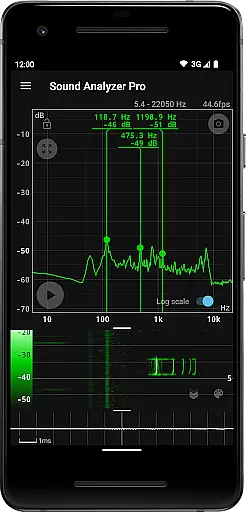
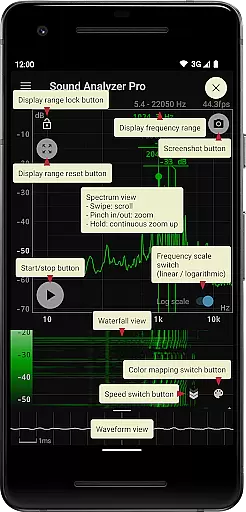
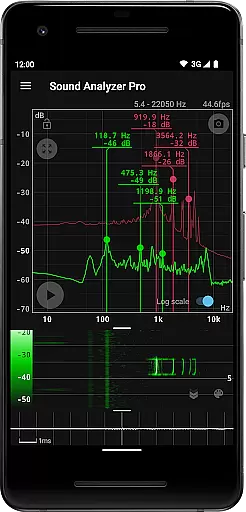
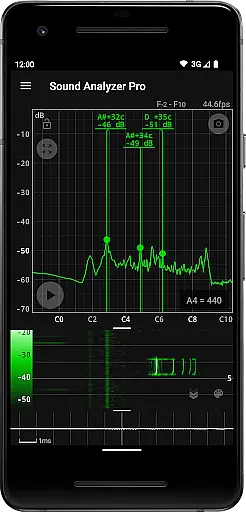
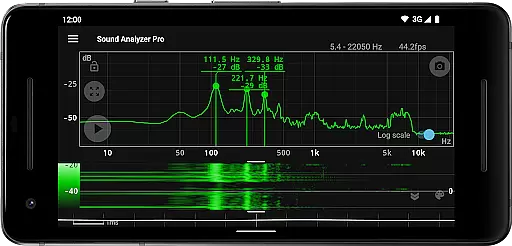
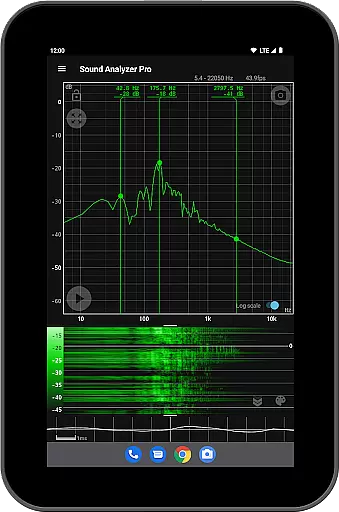
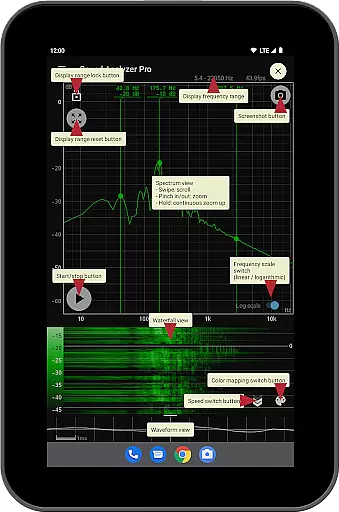
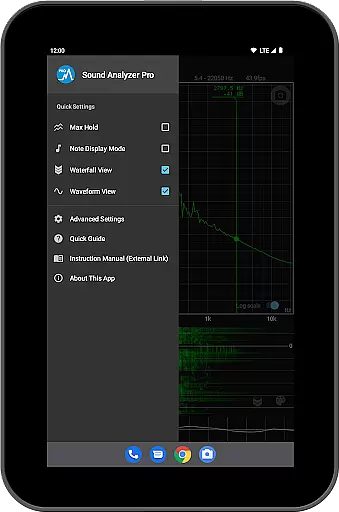
Sound Analyzer is a sophisticated audio analysis tool designed for both professionals and enthusiasts in the Music & Audio field. The app's core functionality lies in its ability to display real-time frequency (Hz) and amplitude (dB) spectra, providing users with precise insights into audio signals. It also supports advanced features like waterfall view, which tracks spectral changes over time, and waveform view for visualizing sound waveforms.
One of the standout aspects of Sound Analyzer is its high measurement accuracy. In low-noise environments, the frequency measurement error typically stays within 0.1 Hz when using default settings. This makes it an ideal choice for tasks requiring precision, such as tuning musical instruments or conducting acoustic research. Additionally, the app offers unique modes like note display, which translates frequencies into musical notes, further enhancing its versatility.
This application is particularly useful for musicians, audio engineers, and researchers who need detailed audio analysis without relying on bulky equipment. By delivering professional-grade tools directly to mobile devices, Sound Analyzer empowers users to conduct comprehensive audio evaluations anytime, anywhere.
Sound Analyzer boasts a rich set of features that cater to various audio analysis needs. One of its primary capabilities is the peak frequency display function, which identifies and showcases prominent spectral components in real time, complete with their corresponding frequencies (Hz) and amplitudes (dB). This feature is complemented by an intuitive touch-based interface that allows users to adjust the display range effortlessly.
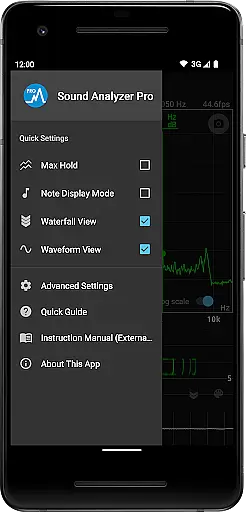
The app provides flexibility through its switchable frequency axis scale, enabling users to toggle between logarithmic and linear scales based on their preferences. For those requiring extended observation, the max hold function ensures that peak values remain visible. Furthermore, Sound Analyzer includes specialized views such as the waterfall view, which illustrates how spectra evolve over time, and the waveform view, offering a graphical representation of sound waves.
Additional functionalities include a note display mode that converts frequencies into musical notes, making it invaluable for musicians. The built-in screenshot function, complete with a timer, allows users to capture and save critical data seamlessly. With no advertisements disrupting the experience, Sound Analyzer delivers a clean and focused environment for all audio analysis tasks.
Sound Analyzer does not focus on providing a vast music library but rather emphasizes real-time audio signal analysis. The app allows users to analyze any audio input, making it versatile for various sound sources.
While the app doesn't directly deal with copyrighted music tracks, its ability to display frequency and amplitude spectra in real time ensures that users can examine audio details accurately. This feature is crucial for professionals who need precise data without worrying about copyright infringement.
The application's strength lies in its adaptability to different audio inputs, whether they are live recordings or pre-existing tracks. Users can trust the authenticity of their analyses since the app measures frequencies with an impressive accuracy of within 0.1 Hz error in low-noise environments.
Moreover, Sound Analyzer offers unique functionalities such as note display mode, which translates pitches into musical notes, further enhancing its utility for musicians and audio engineers who require exact pitch information.
Sound Analyzer excels in delivering high-quality audio analysis options, catering to both amateur enthusiasts and professional audio technicians. With features like waveform view and waterfall view, users can visualize sound waveforms and spectral changes over time, respectively.
The app supports a maximum frequency setting of up to 96 kHz, primarily targeting high-performance devices. While most standard devices filter out data above 22 kHz, this capability ensures that those with advanced equipment can fully utilize their deviceu2019s potential for detailed audio examination.
Users benefit from multiple display modes including logarithmic and linear scale adjustments, max hold function, and peak frequency display. These options allow for comprehensive customization based on individual preferences and specific analytical needs.
Additionally, the absence of advertisements enhances user experience by providing an uninterrupted interface focused solely on delivering accurate and reliable audio quality assessments.
High measurement accuracy
Real-time spectrum analysis
No advertisements
Advanced visualization options
Musical note conversion
Limited high-frequency support
Complex for beginners
Device compatibility issues
Requires quiet environment
Interface may feel cluttered

Simply convert wav to mp3. Clear. Reliable. Safe.
 4.5
4.5
Tune in to the greatest hits on UK Radio | The home of Capital, Smooth & Heart.
4.90
10-Band Audio Equalizer, Sound / Bass Booster for Spotify Users & Music Players
4.40
Listen to live FM radio stations, sports, music and news on global radios online
4.70
Your song collections with lyrics and chords on Android smartphones and tablets.
4.80
Super Sound Editor, Song Maker & Mixer, Vocal Remover, Voice Recorder & Changer!
4.60
Play your hearts out on TouchTunes jukeboxes & connect with fellow music lovers.
4.80
Manage your Sonos system directly from your home-screen!
4.40
Reverse your voice & songs instantly! Fun singing challenge with cool effects.
4.60
Music, News & Sports Radio Tuner App. Tune in Live FM & AM Radio Stations.
4.80
Gorgeous UI, Powerful music Search and Equalizer, the great choice for you!
4.70
A complete sound package for the sound engineer or enthusiast
4.60
Save hundreds of dollars for a physical strobe tuner and instead use this app.
4.50
DJ Music Mixer - DJ Remix: remix songs, make beat music & record mix of DJ.
4.40
A sleek, no-frills player designed for true music lovers.
4.20
Turn your phone into a musical instrument from the future!
3.90
Learn to play the piano using falling notes!
3.80
The Cubase remote control app
3.60
Music Streaming suite for Ampache, Nextcloud Music and compatible backends.
4.2


User Reviews