
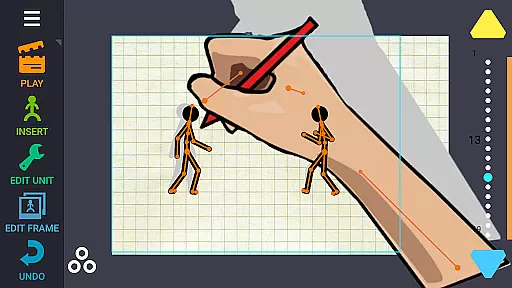
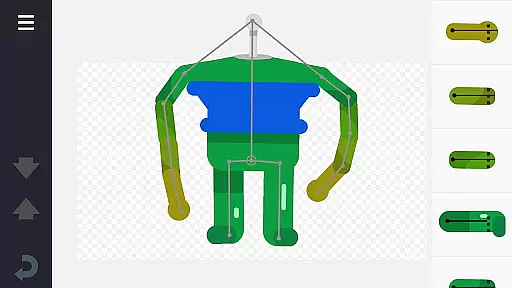
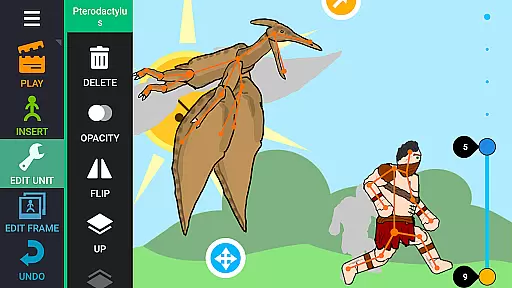
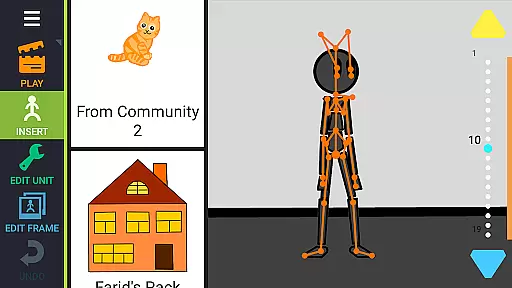
Draw Cartoons 2 PRO is a comprehensive 2D animation application designed for both beginners and advanced animators. The app simplifies the complex process of cartoon creation through innovative motion smoothing techniques, allowing users to set only the start and end positions of characters. With an extensive library of ready-made characters and objects, including dragons, people, and vehicles, it offers limitless creative possibilities. The built-in character editor enables users to design unique creatures and objects using 'bones', while supporting image cutting from photos.
In addition to basic animation tools, the app provides advanced features such as dramatic camera close-ups and speed effects for creating slow-motion scenes. Users can enhance their cartoons with music or voiceovers, and export animations in MP4 or GIF formats. The active community allows sharing creations via YouTube using #drawingcartoons2, and exchanging custom character models as separate files.
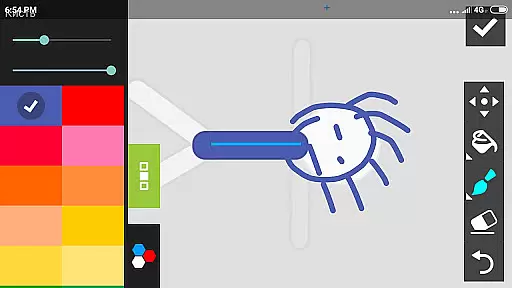
Draw Cartoons 2 PRO stands out with its robust feature set tailored for 2D animation enthusiasts. The app's motion smoothing technology automatically generates smooth transitions between keyframes, significantly reducing the complexity of traditional frame-by-frame animation. The comprehensive library contains various pre-designed characters and objects, while the powerful character editor lets users create custom elements by combining bones and drawing directly within the app.
Advanced animation tools include a virtual camera system for dynamic shots and speed control for manipulating time in animations. The app supports audio integration, enabling users to add background music or voice acting to their projects. Finished animations can be exported in industry-standard MP4 format or as animated GIFs. The unique sharing system allows animators to exchange custom character models and collaborate on projects through the active online community.
In Draw Cartoons 2 PRO, the suite of creative tools is both extensive and versatile, ensuring that animators have everything they need to bring their visions to life.
The application provides a comprehensive library of characters and objects, including dragons, people, cars, and much more, all ready for use in your animations. Beyond this, the built-in character editor allows you to craft unique creatures and objects out of 'bones', which form the skeleton of each character.
For those seeking more advanced features, the app does not disappoint. It includes a virtual camera for dramatic close-ups, akin to techniques used in horror films, and speed effects that allow for slowing down or speeding up individual fragmentsu2014perfect for creating slow-motion scenes.
This complete set of tools ensures that whether you're a novice or an experienced animator, you'll find the resources you need to create professional-quality 2D cartoons with ease.
Draw Cartoons 2 PRO offers remarkable canvas and format flexibility, empowering animators to customize their workspace and export options to suit their specific needs.
Users can draw bones directly within the application or cut pictures from photos, providing diverse methods to create and integrate artwork into their projects. This flexibility extends to the animation process itself, where motion smoothing techniques simplify the task by only requiring the setting of start and end positions for characters.
When it comes to exporting your masterpiece, the app supports saving animations as video files in MP4 format or as GIFs, making it easy to share your work on platforms like YouTube using the tag #drawingcartoons2.
Additionally, the ability to save items as separate files means you can share your creations with others, fostering a collaborative community where animators can exchange figurines and other elements to enrich each other's projects.
User-friendly interface
Extensive library of assets
Powerful character editor
Advanced animation tools
Active online community
Steep learning curve
Requires significant storage
Limited free resources
Subscription-based pricing
High system requirements

Transform photos into amazing monochrome dither art with professional algorithms
 4.4
4.4
Art of Combination Wear OS Watch faces
4.5
AI Face Swap, Video Effects Editor, Realtime Morph, Funny Video FX,AI Filters
3.70
Your Essential Color Theory Guide: Red, Yellow, Blue (RYB)
4.5
See Color, Paint Color
4.90
AR Anime Drawing: How to draw anime with AR drawing & sketching apps!
4.00
Novices can also easily complete diamond painting masters
4.70
Kling AI is an image and video generation and editing studio powered by AI.
4.50
Multiplayer Drawing game, Coloring, Painting・Sketch, Handwriting・Paint, draw
4.30
Passport size photo maker, create ID photo and visa photo in seconds
4.80
Create color palette from Image, RGB & RYB Color wheel harmonies, Color Scheme
4.50
Create Logos, Tattoos, AI Art & more with our AI Photo Generator & Design Editor
4.20
OneUI 8.5 icons ✨ Smooth, modern & based on the latest Play Store design ??
4.10
Turning simple sketches into captivating tales filled with life and motion
3.90
Sketch, trace and master AR drawing with awesome anime art!
3.30
Pose and morph realistic male and female models! 3D poser app
3.00
Inky runs Inkscape on Android devices and Chromebooks
2.90
Premium version of Shimeji-ee app with no ads & no limit active shimeji
4.5
Android 14 style widgets and wallpapers app.
4.0


User Reviews