


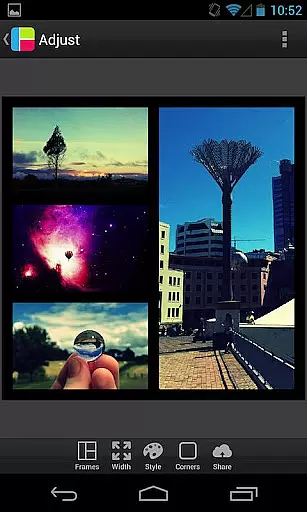
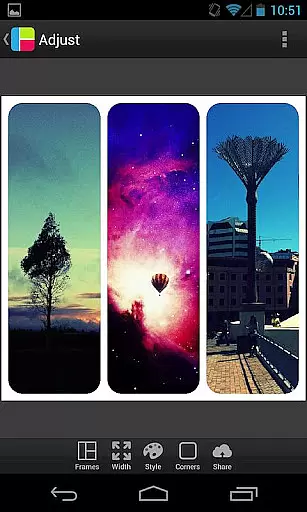

PicFrame is a versatile photography app that allows users to create stunning photo collages by combining multiple images into customizable frames. With 36 adjustable frame layouts, users can include up to five photos in a single composition, offering endless creative possibilities. The app provides advanced editing tools such as rounded corners, shape customization, and precise control over borders, colors, and patterns.
Designed for both casual users and photography enthusiasts, PicFrame supports various aspect ratios including square format, making it ideal for social media sharing. Its intuitive interface ensures ease of use while delivering professional-quality results. Whether you're looking to enhance your Instagram feed or create personalized gifts, PicFrame offers the tools to bring your vision to life.
PicFrame stands out with its extensive feature set tailored for creative expression. Users can customize every aspect of their photo frames, from adjusting border widths and corner styles to applying unique shapes like hearts and hexagons. The app includes 52 background patterns and an easy-to-use color picker, enabling users to match their designs with any theme or mood.
Each photo within a frame can be individually edited for brightness, contrast, and saturation, ensuring optimal visual balance. Additional functionalities include photo rotation, pinch-to-zoom, and drag-to-move capabilities for precise placement. With support for multiple output resolutions and seamless sharing to platforms like Instagram, Facebook, and Twitter, PicFrame empowers users to showcase their creativity effortlessly.
PicFrame offers a dynamic photo editing experience by allowing users to create stunning frames in real-time. This feature is crucial for photography apps as it enables users to see their adjustments instantly.
The app provides 36 fully adjustable frames where users can drag inner borders for endless customization. With options like rounded corners, adjustable border width, and various shapes, the real-time preview ensures that every modification appears exactly as intended before saving or sharing.
Users benefit from this immediate feedback loop, which allows them to fine-tune brightness, contrast, saturation, and even rotate photos with precision. The ability to pinch, zoom, and drag photos within frames enhances the creative process, making it both intuitive and efficient.
This real-time capture and preview functionality ultimately empowers users to produce unique, professional-looking collages effortlessly, elevating their photo-sharing experience with friends and family.
While PicFrame does not focus on AI beauty enhancements, it excels in providing natural and authentic photo adjustments that enhance the overall aesthetic without artificial alterations.
The app includes 52 background patterns and an easy-to-use border color picker, ensuring that each frame's look remains unique and visually appealing. These features allow users to experiment with different styles while maintaining the original essence of their photos.
Adjustable photo effects such as brightness, contrast, and saturation enable users to enhance their images naturally. By offering multiple output resolutions and aspect ratios, PicFrame caters to diverse sharing platforms without compromising quality.
Ultimately, PicFrameu2019s emphasis on genuine photo enhancement ensures that users can create beautiful, high-quality collages that reflect their personal style and creativity, making it a reliable choice for photography enthusiasts.
User-friendly interface
Extensive customization options
High-quality photo editing tools
Versatile frame designs
Excellent social media integration
Limited free features
Occasional ads in free version
Advanced tools require learning
Some design assets are premium
Heavy on device resources

Effortlessly organize, view and share your photos & videos with Gallery app!
 4.40
4.40
Photo editor: face & body editor, beauty cam, filters and quality enhancer.
4.00
1M influencer's special filter
4.60
How old age camera Gender Swap App Face Shape Hairstyle App Hair Styler App fun!
4.00
Create AI Photos, Improve and restore quality of blurry, old or damaged pics.
4.20
A must-have app for landscape photographers
4.60
Gallery Slideshow is slideshow maker app for slideshow from your gallery photos.
3.90
Easily create custom gifts, cards, photo books & more on the Shutterfly app!
4.60
RAW video capture with advanced controls
4.40
Find time and duration of different sunlight phases at any location
4.90
Photo prints, cards, & gifts at Walgreens. Easy ordering & fast local pickup !
4.80
Your personal guide to the sun and moon. Plan ahead, visualize and predict!
4.70
The original Rarevision VHS look seen everywhere!
4.70
PhotoSync Bundle Add-On License. Enables all features and services in PhotoSync.
4.60
Photo Exif Editor allows to view, add and modify EXIF data of multiple photos
4.50
Fit multiple photos on one post. Create carousels & scroll layouts for Instagram
4.50
AI-powered video creator by MiniMax - Where ideas meet cinema
4.20
Photobooth mini FULL app will allow you to add more fun to your parties
4.00
Superimpose one photo on top of another using the original Superimpose app!
3.20


User Reviews