
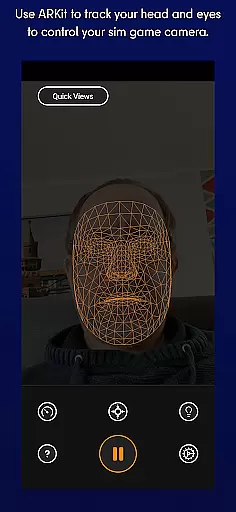
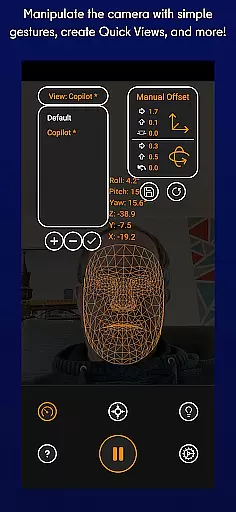
SmoothTrack is an innovative tool that transforms your mobile device into a 3D head tracking controller for simulation games. By leveraging the AR capabilities of your device, it allows you to intuitively control the game camera through simple head movements. This creates a near-magical experience where slight motions translate into precise in-game perspective changes.
The app supports any game compatible with TrackIR, FreeTrack, or similar protocols, making it ideal for flight simulators like Microsoft Flight Simulator and combat games like Elite: Dangerous. With no additional equipment required, SmoothTrack offers an immersive gaming experience by simply positioning your device to track your face. Its intuitive design and customizable settings make it a must-have tool for simulation enthusiasts.
SmoothTrack stands out with its advanced AR-based head tracking technology, enabling seamless interaction between real-world movements and in-game perspectives. The app magnifies your slight head motions, allowing you to peek out of cockpit windows or inspect overhead panels with minimal effort. It includes two display modes: a dark mode to conserve OLED screen battery and a bright mode for optimal visibility in low-light environments.
Compatibility is another key feature, as SmoothTrack works with a wide range of simulation games supporting FreeTrack or TrackIR protocols. From Microsoft FSX to Euro Truck Simulator 2, users can enjoy enhanced immersion across various titles. Additionally, the app provides responsive customer support via Discord and email, ensuring users receive timely assistance and feature updates.
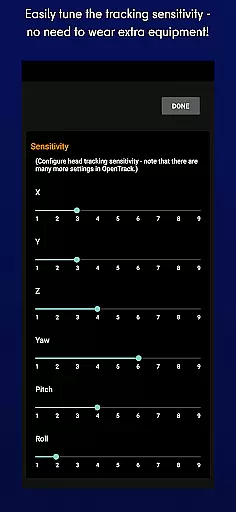
SmoothTrack delivers precise 3D head tracking functionality, revolutionizing how users interact with simulation games. By leveraging the AR capabilities of your device, it ensures accurate detection of even the slightest head movements.
The app's effectiveness is demonstrated through its ability to magnify in-game movements, allowing for intuitive camera control without the need for exaggerated physical motions. This creates a seamless and immersive experience that enhances gameplay realism.
Users benefit from complete freedom of perspective adjustment simply by moving their heads. Whether it's examining cockpit details or scanning surroundings, the precision of movement detection enables natural interaction with supported games.
This level of functional accuracy eliminates the need for additional equipment while maintaining professional-grade tracking performance, making advanced simulation control accessible to all players.
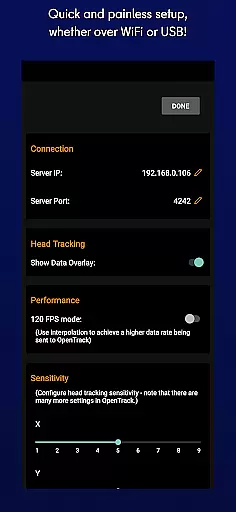
SmoothTrack features an exceptionally straightforward interface that requires no complex setup procedures. The application automatically utilizes your device's camera to track facial movements without any calibration process.
Its intuitive design allows users to start controlling their games immediately after installation. Simple on-screen instructions guide users through positioning their devices optimally for best tracking results.
The app maintains a clean UI with essential options like dark mode for battery saving and bright mode for visibility in different lighting conditions. These practical features are easily accessible without cluttering the main interface.
This thoughtful design approach ensures that both casual gamers and simulation enthusiasts can utilize SmoothTrack's advanced capabilities without facing a steep learning curve or technical hurdles.
Intuitive controls
No extra hardware
Wide game support
Battery-saving modes
Responsive support
Requires AR setup
Limited to supported games
Device compatibility
Minor learning curve
Premium pricing

Save any video in HD - paste the link, download fast and watch offline.
 4.2
4.2
Safely recover deleted photos, videos, and files with a single easy tap.
3.70
Small and simple app to Verify Root Access and BusyBox Install!
4.70
A non-root local ADB shell client. READ BELOW!
3.40
The ultimate tool for network analysis, wifi scanning and problem detection.
4.90
Create your own custom widget with endless possibilities
3.90
Download any file easily and quickly with Downloader
4.0
Clean up your phone, find files, play media, and share files offline
4.50
Enhance your Beats
3.70
WiFi Signal Strength Meter help you detect WiFi Signal Strength in real time.
4.80
Easily install aab(Android App Bundle) files on your Android device with our app
4.80
Remote Play with FSR upscaling, low latency & full controller support
4.80
The Ultimate Flex Drivers Utility App - Convenient Tapping & Block Filters
4.70
Quickly switch to an encrypted DNS server on Android TV
4.50
Mirror your screen to Fire TV - Super fast and simple
4.40
Remote for Roku, Fire TV, Samsung TV, LG TV, Android TV, Chromecast and VIZIO TV
4.20
Quickly & easily calculate the spacing of handrail balusters
4.20
Detect hidden spy camera with advanced scanning {{ Premium version }}
4.00
Amateur Radio app for APRS: Track friends, exchange messages, get tactical info.
3.90


User Reviews