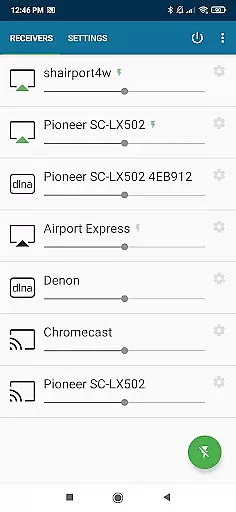
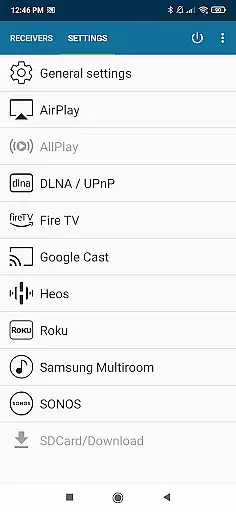
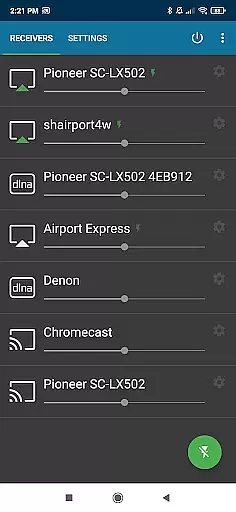
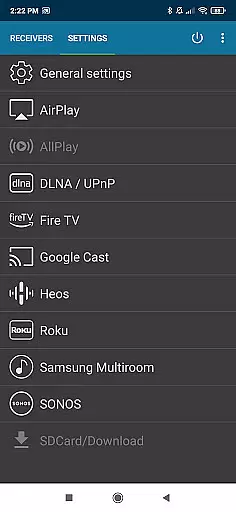
AirMusic is a versatile audio streaming application that allows users to stream audio from virtually any app to a wide range of receivers with just one click. Compatible with popular streaming services like YouTube Music, Deezer, Amazon Music, Apple Music, and Spotify, it supports various devices including SONOS, Apple TV, Chromecast, Fire TV, Smart TVs, AV-receivers, Homepod, Samsung Multiroom, Denon HEOS, Roku, Raspberry Pi, and Airport Express.
The app integrates seamlessly with multiple streaming technologies such as Apple AirPlay, SONOS, Google Cast, DLNA, Amazon Fire TV, Samsung Multiroom, Denon HEOS, and Roku. Whether you're using an Apple TV, Homepod, or even Bang & Olufsen, AirMusic ensures your music reaches every corner of your home effortlessly.
With its powerful features and broad compatibility, AirMusic enhances your entertainment experience by providing easy and seamless streaming options for all your audio needs.
AirMusic stands out with its robust feature set designed to enhance user experience. The app runs efficiently in the background, enabling users to stream audio with just one click. This ease of use extends to its ability to send information and artwork directly to AirPlay or Google Cast-enabled receivers, enriching the listening experience.
One of the key highlights is its support for automation tools like Tasker and MacroDroid. Users can create custom widgets or automate their music streaming processes, adding a layer of personalization and convenience. These integrations make AirMusic not only a powerful audio streamer but also a flexible tool adaptable to various user preferences.
Despite some limitations with certain apps on specific Android versions, AirMusic continues to offer a reliable and feature-rich solution for streaming audio across different platforms and devices.
AirMusic offers an extensive streaming solution that supports a wide range of music services including YouTube Music, Deezer, Amazon Music, Apple Music, and Spotify. This vast compatibility ensures users have access to an impressive music library size.
With its ability to stream audio from nearly any app, AirMusic guarantees that users can enjoy content from various platforms without worrying about copyright restrictions. The app supports the latest streaming technologies, ensuring that all streamed content is authentic and legally accessible.
The integration with multiple streaming services not only enhances the variety of available music but also assures users of the legitimacy of the content they are accessing. This feature is crucial for those who prioritize copyright authenticity in their listening experience.
AirMusic excels in providing top-notch audio quality options by supporting high-definition streaming technologies like Apple AirPlay, SONOS, Google Cast, DLNA, and more. These technologies ensure that audio is streamed in the highest possible quality to compatible devices.
Users can enjoy their favorite tracks on high-end receivers such as Bang & Olufsen, Bowers & Wilkins, Yamaha, Bose, and others, experiencing sound with clarity and depth. The support for advanced audio formats further enriches the listening experience.
Additionally, AirMusic's seamless streaming capabilities allow users to appreciate the nuances of their music without interruptions or quality loss. Whether using a Smart TV, AV-receiver, or software solutions like Kodi, listeners are guaranteed an exceptional auditory experience.
User-friendly interface
Wide device compatibility
Seamless streaming technology
Supports major music services
Efficient background operation
Limited support for some apps
Android version restrictions
Additional steps for certain services
No direct iOS support
Premium version required for full features

The Skullcandy App Experience
 3.20
3.20
Control your MIDI USB or Bluetooth devices in app and avoid some trampling
3.30
Enhance the sound quality of your devices, listen to what you want
4.50
Bass Booster & Volume Equalizer Pro improves your music and video sound quality
4.60
No wifi music app. Mp3 offline. Tuner radio, young radio music. Music downloader
4.20
Offline Music Player & MP3 Player.Powerful equalizer, Lyrics, Themes, Tag Editor
4.80
A complete sound package for the sound engineer or enthusiast
4.60
Slow music down without changing pitch.
3.70
Versatile MP3 recorder with auto-backup to Dropbox and Google Drive
4.10
Full-featured, High-Quality Groovebox Workstation, perfect for Live Performance!
4.80
Brian Eno and Peter Chilvers’ acclaimed music app Bloom, radically reinvented.
4.80
Responsive piano with great sounds, graphics, and songs
4.80
Walkout Song DJ is the most intuitive app to manage your sports music.
4.70
Pay Once, no monthly payment
4.60
Bass Booster Pro takes auto-equalizing to the next level!
4.30
Powerful 10-Band equalizer pro with sound booster improves Android audio quality
4.30
A High-Precision Audio Spectrum Analysis App
4.20
Powerful beat maker & DJ mixer to remix tracks, make music, & perform DJ mix
3.70
MilkDrop for Android TV
3.00


User Reviews