



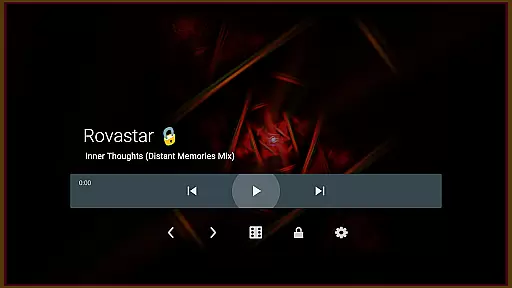

projectM Music Visualizer TV is a cutting-edge music visualization app designed specifically for Android TV. It transforms your audio experience by generating stunning visual effects that sync perfectly with any sound playing on your device. Whether you're streaming music through Spotify, Pandora, or other players, projectM brings your tunes to life with over 200 unique visual presets.
The app boasts advanced features like 60 FPS Pixel Shaded Rendering and seamless integration with popular music players. You can control playback directly within the app, eliminating the need to switch between apps. With customizable graphics settings and compatibility with MilkDrop presets, projectM offers both flexibility and superior performance for an immersive audio-visual journey.
projectM stands out with its comprehensive feature set tailored for music enthusiasts. The app includes over 200 built-in visual effects, providing users with diverse artistic interpretations of their favorite tracks. Its 60 FPS Pixel Shaded Rendering ensures buttery-smooth animations that respond dynamically to audio input.
One of projectM's key strengths is its universal music player control, supporting platforms like Google Music, Spotify, Pandora, and PowerAMP. Users can play, pause, and skip tracks without leaving the visualizer. The app also offers adjustable graphics quality settings, allowing users to optimize performance by modifying texture size and mesh parameters for their specific hardware capabilities.
projectM Music Visualizer TV offers an extensive library of over 200 visual effects, ensuring a rich and diverse audio-visual experience. This vast collection provides users with a wide array of visually stunning presets that cater to every musical genre and personal preference.
The visual effects are not only numerous but also compatible with MilkDrop (.milk) presets, enhancing the creative possibilities for users. This compatibility ensures that the artistry and complexity of these presets are preserved and rendered accurately within the projectM environment.
Copyright authenticity is at the core of projectM's offerings. Users can trust that all visual content has been developed respecting intellectual property rights, providing peace of mind while enjoying or creating mesmerizing visuals.
With its cutting-edge 60 FPS Pixel Shaded Rendering, projectM delivers unparalleled audio-reactive graphics that dance and transform in real-time with your music. This high frame rate ensures that animations are buttery-smooth, offering an immersive experience that captures every nuance of sound.
Users have the flexibility to adjust settings such as texture size and mesh size to optimize their visual quality or performance balance. These configurable graphics options allow for personalized optimization based on individual hardware capabilities or preferences.
In addition to supporting various music players like Stock Player, Google Music, Spotify, Pandora, and PowerAMP, projectM enhances audio playback by adding a dynamic visual layer. This integration creates a holistic entertainment experience where superior audio quality meets captivating visuals.
Stunning visual effects
Seamless music integration
High frame rate rendering
Customizable graphics
User-friendly interface
Requires modern hardware
Limited mobile support
No offline presets
Heavy resource usage
Premium pricing model

Turn your phone into a musical instrument from the future!
 3.90
3.90
A synth that really lets you shape your sounds!
4.50
Background pads for your band
3.80
Music Streaming suite for Ampache, Nextcloud Music and compatible backends.
4.0
Make songs with AI! Any genre, custom lyric, song generator for music creation!
4.80
Learn and play 2M+ music tabs & chords on guitar, ukulele, bass, and more
4.30
Offline Music Player & MP3 Player.Powerful equalizer, Lyrics, Themes, Tag Editor
4.80
The original SP-1200 experience on your iPad
4.20
Versatile MP3 recorder with auto-backup to Dropbox and Google Drive
4.10
Play your hearts out on TouchTunes jukeboxes & connect with fellow music lovers.
4.80
Full-featured, High-Quality Groovebox Workstation, perfect for Live Performance!
4.80
Most Advanced AI Song Generator and Music Creator. Rap, Pop, Rock, Gospel & more
4.70
Reverse your voice & songs instantly! Fun singing challenge with cool effects.
4.60
Fun & Easy Voice Changer – Record, Edit & Add Hilarious Effects!
4.50
DJ Music Mixer - DJ Remix: remix songs, make beat music & record mix of DJ.
4.40
Powerful 10-Band equalizer pro with sound booster improves Android audio quality
4.30
Smart piano keyboard, Classical to Pop, Real-time multiplayer connection!
4.20
Offline and always ad-free - stream in the highest quality available.
4.10
Control your MIDI USB or Bluetooth devices in app and avoid some trampling
3.30


User Reviews