
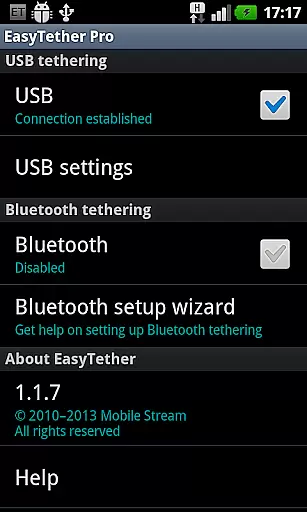
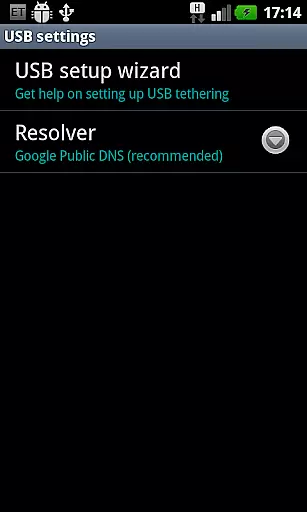
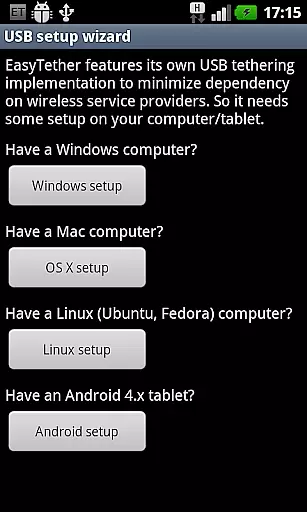
EasyTether Pro is a communication app designed to share your smartphone's Internet connection with other devices, including computers and tablets. It supports both USB and Bluetooth tethering, making it versatile for Windows, Mac OS X, Linux, and Android 4.x users. The app eliminates the need for root access or special tethering plans, ensuring ease of use while providing a reliable connection.
With additional support for gaming consoles like PS3, Xbox, and Wii through Internet connection sharing, EasyTether Pro offers broad compatibility. Whether you're working on a laptop, browsing on a tablet, or gaming on a console, this app ensures seamless connectivity without hidden fees or carrier restrictions.
EasyTether Pro stands out with its robust feature set tailored for diverse tethering needs. The app facilitates USB tethering for Windows, Mac, and Linux systems, alongside Bluetooth tethering for compatible devices. This dual-mode support ensures flexibility in how users connect their devices, whether through wired or wireless means.
Another notable feature is its compliance with FCC tethering rules, meaning it operates independently of carrier-imposed restrictions. Additionally, EasyTether Pro allows users to share connections with gaming consoles via Internet connection sharing on Windows or Mac. Its one-time fee structure adds further value, offering unlimited tethering without recurring charges.
Real-time messaging speed and reliability are crucial for seamless communication in any application. EasyTether Pro excels in this area by ensuring that your internet connection is shared instantly and consistently between devices.
The app employs advanced tethering technology that supports USB and Bluetooth connections, providing a stable and fast internet sharing solution across Windows, Mac OS X, Linux computers, and Android tablets. This ensures minimal latency and maximizes the efficiency of data transfer.
Users benefit from uninterrupted connectivity, which is particularly important for activities such as online gaming, video conferencing, or streaming media. The robust tethering capabilities mean you can rely on EasyTether Pro to maintain a steady connection without frequent dropouts or delays.
Moreover, EasyTether Pro's ability to share an internet connection with gaming consoles like PS3, Xbox, and Wii via Internet Connection Sharing enhances its versatility. This feature allows users to enjoy online gaming without being constrained by Wi-Fi availability, making it an invaluable tool for gamers and professionals alike.
Media sharing support is an essential feature for users who need to transfer files between devices quickly and efficiently. EasyTether Pro offers comprehensive media sharing capabilities that cater to a wide range of file types and sizes.
By utilizing USB and Bluetooth tethering, EasyTether Pro enables users to share various forms of media, including documents, images, and videos, across different platforms such as Windows, Mac OS X, Linux, and Android. This cross-platform compatibility ensures that users can access their files regardless of the operating system they are using.
The app's support for Internet Connection Sharing also extends to gaming consoles like PS3, Xbox, and Wii. This means users can stream media content directly to their consoles without requiring a separate Wi-Fi network, enhancing the entertainment experience.
Overall, EasyTether Pro's media sharing support provides a reliable and versatile solution for transferring files and streaming content. Whether for personal or professional use, users can count on EasyTether Pro to deliver a seamless media sharing experience.
Wide device compatibility
No root access required
One-time payment model
Supports multiple tethering methods
FCC rule compliance
Limited free version
Setup may require technical knowledge
Carrier restrictions possible
Removal of older versions needed
Bluetooth tethering limited to specific devices

Pure modern IRC experience for Android
 3.70
3.70
Secure Messaging App to Enhance Messenger Texting Experience and Organize SMS.
3.50
A web browser that respects your privacy.
4.30
Browse fast on Opera Mini, with Data Saving, News, Football Scores, and Download
4.60
Fast and mini browser with Ad Blocker,Video Downloader and Video Player
4.40
Caller ID App! Add names & photos to unknown calls & Call Recording
4.40
Fast, Simple And Secure Application That Provides SMBv3 Server On Your Device
3.30
Fast internet with AI, Adblock & VPN. Browse on a safe, incognito web browser.
4.70
Simple tool for businesses to talk to their customers.
4.40
Enhance browsing with AI-powered features and Copilot.
4.70
Identify unknown numbers, block spam calls, customize calls with cool themes.
4.60
Manage BoostMobile Account
4.60
The ultimate productivity solution for all your email communication needs.
4.40
Phone Dialer with Caller ID, Address Book & Contacts Manager.
4.30
2nd Phone Number Line for Anonymous Texting, Calling, and Picture Messages
4.30
Use this SMS app standalone or as a TREK: Total Interface companion.
4.30
Enjoy secure messaging & calling. Safe Messenger: group chats, calls, messages.
4.20
Call Forwarding is easy and simple application to use.
3.80
Official NDI app: turn your phone into a professional live-streaming IP camera.
3.20


User Reviews