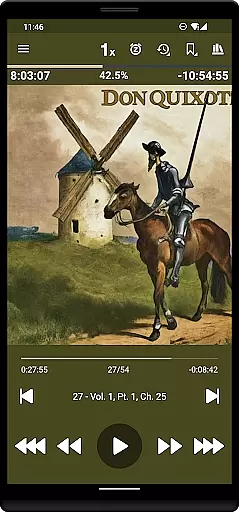
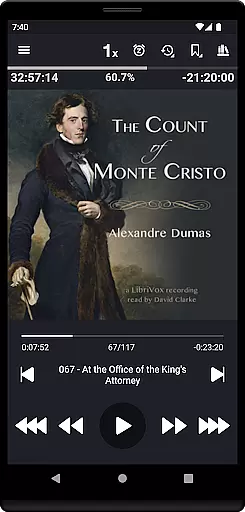
Listen Audiobook Player is a feature-rich audio player designed specifically for audiobook enthusiasts. This application allows users to play DRM-free audiobooks from various sources, including popular platforms like Librivox, Downpour, and Loyalbooks. The app supports multiple audio formats such as mp3, m4b, m4a, opus, ogg, aac, flac, and more, ensuring compatibility with a wide range of audiobooks.
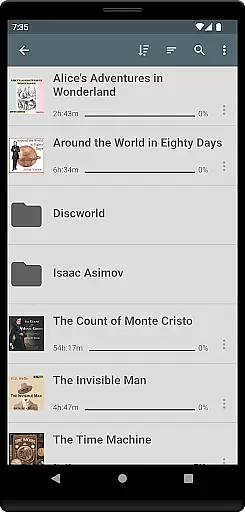
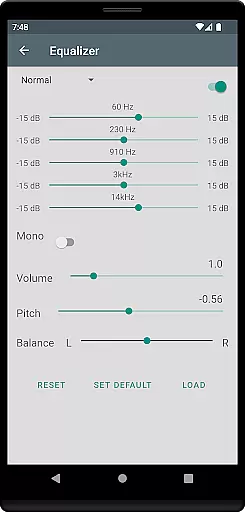
One of the standout features of Listen Audiobook Player is its folder-based library system that automatically syncs with your audiobook folder, allowing for easy organization and quick access to your entire collection. Additionally, it offers advanced playback options like variable speed playback (0.5x to 4x), pitch control, volume boost, and an equalizer, providing a customizable listening experience tailored to individual preferences.
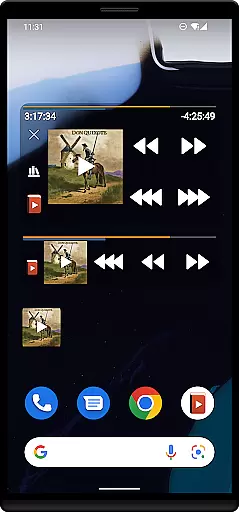
The app also integrates seamlessly with services like Plex and Audiobookshelf, enabling users to download books directly from their hosted servers to their local library. With support for Android Auto, Bluetooth controls, sleep timers, and widgets, Listen Audiobook Player ensures a versatile and user-friendly experience across different devices and scenarios.
Listen Audiobook Player boasts an impressive array of features that cater to audiobook listeners' needs. One of its key functionalities is the ability to handle embedded chapters in most audio codecs, making navigation through audiobooks seamless and efficient. Users can also enjoy enhanced audio quality with options like pitch control, volume boost, and an equalizer, which can be set globally or customized per book.
Another notable feature is the built-in synchronization support, which allows users to sync their current position and bookmarks across multiple devices. This ensures a consistent listening experience, whether at home or on the go. The app also includes a bookmarking system that lets users view and search bookmarks for all books in a single view, create audio clips of bookmarks, and share them with others.
Additional features include Android Auto integration, Bluetooth play/pause/skip support, lock-screen controls, and Tasker/Llama compatibility. These features provide users with extensive control over their listening experience, enhancing convenience and accessibility. Moreover, the app offers customization options for progress bars, action bars, and text colors, allowing users to personalize the interface to their liking.
When evaluating an audiobook player, the size and authenticity of its music library are crucial factors. Listen Audiobook Player offers a vast selection of DRM-free books that users can access from various sources like Librivox, Downpour, and Loyalbooks. This ensures that listeners have a wide array of choices without worrying about copyright infringement.
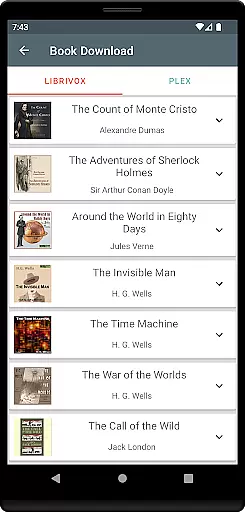
The app goes a step further by allowing users to download curated books directly from Librivox. Classics such as 'The Count of Monte Cristo' and 'Pride and Prejudice' are readily available. This not only enriches the user's library but also guarantees that all content is legally obtained and free from restrictions.
Moreover, Listen Audiobook Player supports multiple audio formats including mp3, m4b, and flac, ensuring compatibility with a broad range of DRM-free audio files. This versatility allows users to enjoy their personal collections without limitations, making it a reliable choice for audiobook enthusiasts.
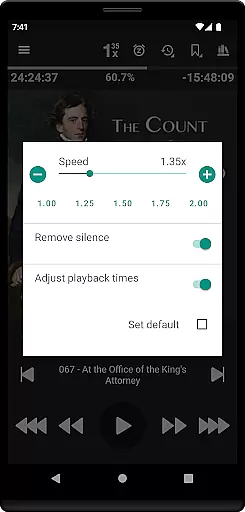
Audio quality is paramount for an immersive listening experience. Listen Audiobook Player excels in this area by offering variable playback speed ranging from 0.5x to 4x, allowing users to adjust the tempo according to their preference. This feature is particularly beneficial for those who wish to speed through content or savor every detail at a slower pace.
In addition to playback speed, the app provides advanced audio controls such as trim silence, pitch control, and volume boost. These options ensure that the audio output is clear and tailored to individual tastes. Users can also apply equalizer settings and balance adjustments, both globally and on a per-book basis, enhancing the overall sound quality.
Furthermore, the option to convert books to the Opus format is a standout feature. Files converted to Opus are generally much smaller with minimal change to sound quality, making it easier to store and manage large audiobook libraries without compromising on audio fidelity.
User-friendly interface
Wide format compatibility
Advanced playback options
Sync across devices
Customizable experience
No cloud storage
Limited language support
No automatic updates
Manual library management
Premium price tag

Fun & Easy Voice Changer – Record, Edit & Add Hilarious Effects!
 4.50
4.50
Make music anywhere. Turn your device into an instrument.
4.4
Advanced 10-Band Audio Graphic Equalizer Sound Booster Pro
4.30
Ultimate Sonos Controller
4.70
Music Streaming suite for Ampache, Nextcloud Music and compatible backends.
4.1
Record, Mix & Master with all n-Track effects, 64-bit audio and Stem Separation.
4.70
Offline Music Player&MP3 Player with themes, equalizer, lyrics, music play mode
4.60
Let your Android device with the sound effects you want
4.50
The Minimalistic Premium Music Player. Handmade with passion for music
2.20
Voice recorder - Audio recorder. Best recorder for recording
4.90
24,000 free audio books and no ads!
4.90
Responsive piano with great sounds, graphics, and songs
4.80 4.70
4.70
Enhance the sound quality of your devices, listen to what you want
4.50
DJ Music Mixer - DJ Remix: remix songs, make beat music & record mix of DJ.
4.40
Ringtone Maker is free app create ringtone from music files or your recording.
4.40
The alternative folder based music player.
4.20
Powerful beat maker & DJ mixer to remix tracks, make music, & perform DJ mix
3.70
The iconic iOS metronome app is now on Android.
3.70


User Reviews