
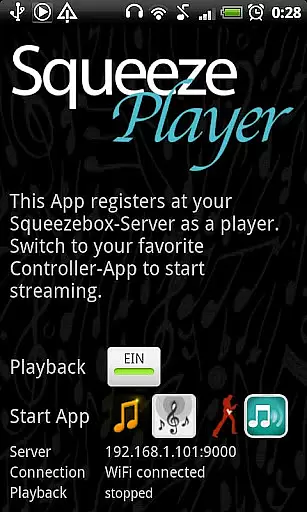
SqueezePlayer is a powerful music streaming application that transforms your Android device into a virtual Logitech Squeezebox. This app allows you to stream all your Squeezebox content directly to your phone or tablet, providing unparalleled access to your music library.
With support for WiFi and mobile connections, SqueezePlayer ensures you can enjoy your favorite tracks anywhere. It supports various formats including FLAC, MP3, WAV, and PCM natively, while also offering transcoding capabilities through the Squeezebox Server. Whether you're at home or on the go, this app delivers a seamless music experience.
The app's standout feature is its ability to function independently of a physical Logitech Squeezebox. By simply downloading the free Squeezebox Server, users can unlock the full potential of SqueezePlayer. It streams not only local music but also internet radio stations and services like Last.FM, Deezer, and WiMP.
SqueezePlayer offers advanced networking options, allowing playback over 3G with proper router configurations. While it focuses solely on playback, integration with control apps like OrangeSqueeze and SqueezeCommander provides comprehensive management capabilities. The app's versatility makes it an essential tool for any audiophile.
When it comes to streaming music, the size and authenticity of the library are crucial factors. SqueezePlayer offers an extensive music library that includes local music files, internet radio stations, and songs from various apps like Last.FM, Deezer, or WiMP. This vast selection ensures users have access to a wide range of music genres and artists.
The app supports popular music formats such as FLAC, MP3, WAV, and PCM natively, meaning these files are decoded directly on your Android device. Additionally, the Squeezebox Server can convert other file types like Ogg and mp4 to FLAC or MP3 on the fly, expanding the range of playable formats. This flexibility allows users to enjoy their music without worrying about compatibility issues.
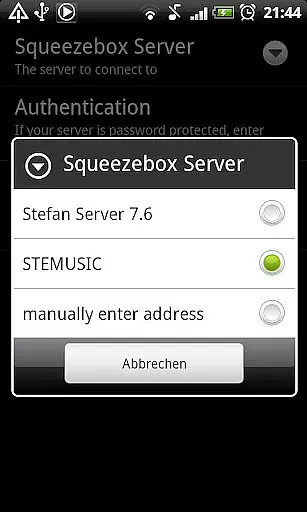
Copyright authenticity is another key aspect of SqueezePlayer. By integrating with the Logitech Squeezebox Server (recently renamed to Logitech Media Server), the app ensures that all streamed content is legitimate and properly licensed. This setup not only provides peace of mind regarding copyright compliance but also guarantees high-quality audio playback.
Audio quality is paramount for any music streaming application, and SqueezePlayer excels in this area by offering multiple audio quality options. The app supports high-fidelity formats such as FLAC and WAV, ensuring that audiophiles can enjoy their music in the best possible quality. These formats preserve the original sound quality, providing a listening experience that is as close to the studio recording as possible.
In addition to supporting lossless formats, SqueezePlayer also handles compressed formats like MP3 and PCM efficiently. Users can choose between different quality settings based on their preferences and network conditions. For instance, higher bitrate MP3 files can be selected for better sound quality when connected to a stable WiFi network, while lower bitrate options can be used to conserve bandwidth during mobile data usage.
Furthermore, the integration with the Squeezebox Server allows for real-time transcoding of unsupported formats to FLAC or MP3. This feature ensures that even if a particular file type isn't natively supported, it can still be played back without compromising too much on quality. Overall, SqueezePlayer's robust handling of various audio formats makes it a versatile choice for discerning listeners who demand top-notch audio performance.
User-friendly interface
Wide format compatibility
Excellent sound quality
Flexible server options
Comprehensive documentation
No standalone control features
Limited transcoding on Touch
Requires separate server setup
Occasional connectivity issues
Premium services need plugins

Your HD audio recorder on the go for music, meetings, ambience, animal sounds…
 4.30
4.30
Time Guru will strengthen your internal sense of musical time via random muting.
4.30
The Cubase remote control app
3.60
Gorgeous UI, Powerful music Search and Equalizer, the great choice for you!
4.70
Powerful beat maker & DJ mixer to remix tracks, make music, & perform DJ mix
3.70
Visualize the guitar fretboard, master scales & play through changes like a pro!
4.50
AI Music Maker: Generate And Compose AI Tunes & AI Songs & AI Music & AI Melody!
4.60
Ringtone Maker is free app create ringtone from music files or your recording.
4.40
Melody Beat: Great for travel, workouts, offline vibes, play your tunes anytime.
4.10
Music, News & Sports Radio Tuner App. Tune in Live FM & AM Radio Stations.
4.80 4.70
4.70
Walkout Song DJ is the most intuitive app to manage your sports music.
4.70
The best music and audio player, with beautiful UI, music search and equalizer.
4.60
Super Sound Editor, Song Maker & Mixer, Vocal Remover, Voice Recorder & Changer!
4.60
Formerly known as Spotistats! View your top tracks, artists, albums and more!
4.40
Full featured mp3 and audio player with Chromecast and Android Auto support.
4.40
Bass Booster Pro takes auto-equalizing to the next level!
4.30
VB-AUDIO Software / VBAN-Receptor allows listening to any VBAN Streams
4.10
Learn to play the piano using falling notes!
3.80


User Reviews