
BedrockTogether (Pro) is an innovative networking tool designed to simplify server connections for Minecraft Bedrock Edition players. This ad-free version allows any Bedrock server to appear as a LAN server on Xbox or PlayStation clients, enabling seamless connections without DNS rerouting.
The application facilitates quick server access through its intuitive interface and straightforward connection process. While it currently doesn't support Realms or Nintendo Switch compatibility, it provides reliable performance for local network gaming across supported platforms.
Ideal for Minecraft enthusiasts who frequently play with friends on local networks, this tool streamlines multiplayer sessions by eliminating complex network configurations, making it perfect for both casual and dedicated players looking to enhance their gaming experience.
BedrockTogether (Pro) distinguishes itself through several key features that enhance the Minecraft multiplayer experience. The app's core functionality lies in its ability to transform any Bedrock server into a recognizable LAN server for supported consoles, simplifying the connection process significantly.
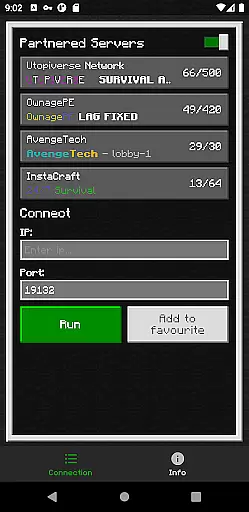
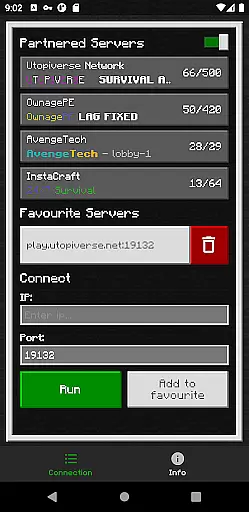
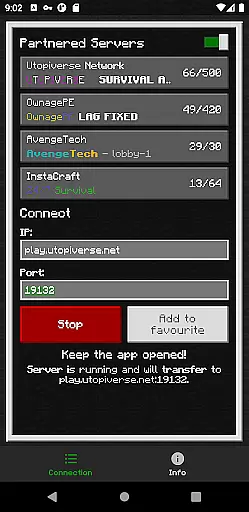
The application implements a straightforward four-step connection method that requires minimal technical knowledge. Users simply input server details, activate the connection through the app, and access the server via Minecraft's Friends tab. This streamlined approach eliminates the need for complicated network settings or DNS modifications.
Additional features include automatic network detection within local area networks and comprehensive troubleshooting guidelines. The app also maintains an active community support system through Discord and Telegram channels, ensuring users can quickly resolve any encountered issues while using the application.
BedrockTogether (Pro) delivers exceptional core functionality by enabling Bedrock Edition servers to appear as LAN servers on Xbox or PlayStation Minecraft clients. This seamless connection eliminates the need for complex DNS rerouting, making server access straightforward and efficient.
The app allows users to input their desired server IP and port, then simply hit the 'Run' button to facilitate a connection. By focusing on accurate IP handling and port management, it ensures that users can reliably connect to their intended servers without technical hiccups.
With an emphasis on real-time performance, BedrockTogether (Pro) provides an ad-free experience, ensuring uninterrupted functionality. This version is optimized for smooth operation, enhancing the overall user experience by delivering consistent and dependable server connectivity.
The interface of BedrockTogether (Pro) is designed with simplicity and user-friendliness in mind. Users can easily navigate through the app's clean layout, which focuses on essential functions such as entering server details and initiating connections with minimal steps.
By streamlining the connection process into just a few intuitive actionsu2014entering server information, clicking 'Run,' and accessing the LAN tab in-gameu2014the app removes barriers to entry for users of all technical backgrounds. Its straightforward design ensures that even beginners can operate it without confusion.
Additionally, the app offers troubleshooting tips directly within its description, guiding users through common issues. This approach not only simplifies problem-solving but also enhances the overall usability of BedrockTogether (Pro), making it accessible and easy to use for everyone.
Seamless LAN integration
User-friendly interface
Reliable connection stability
Active community support
Ad-free experience
No Nintendo Switch support
Limited to local networks
Realms compatibility absent
Requires manual setup
Third-party application

Just swipe the edge to do something!
 4.40
4.40
Extremely fast, secure, and protects your privacy
4.80
A recovery soft,it features photo recovery, video recovery, file recovery.
3.40
This app unlocks the Pro features of the Central for DayZ app
3.60
Best leveling tool for your Android device. Hang paintings like a pro.
4.90
A non-root local ADB shell client. READ BELOW!
3.40
View detailed information about your Nissan Leaf the dealer never shows you.
4.10
Mirror your screen to Fire TV - Super fast and simple
4.40
Enjoy a smooth mobile reading experience!
3.60
Connect wirelessly to your computer to watch movies, browse the web, play games
5.00
Excellent scientific calculator with symbolic algebra, integrals, derivatives
4.80
ADB support Android 4.X-Android 13(Support wireless pair mode).No root required!
4.70
Head tracking for PC sim games such as MSFS 2024 or Elite:Dangerous. No headset!
4.50
Game Booster, GFX Tool is now compatible with newer game update
4.50
Pro Emulator is an easy to use game console emulator for a range of consoles.
4.40
Clean up large files and similar photos, fast and easy to use
4.40
Screen Mirroring with sound for Samsung TV, LG TV, Sony TV, Smart TV and Browser
4.20
Automate everything from settings to photos, SMS to speech. ADC2 prize winner.
4.10
A convenient photo, video, and file recovery tool.
4.00


User Reviews