
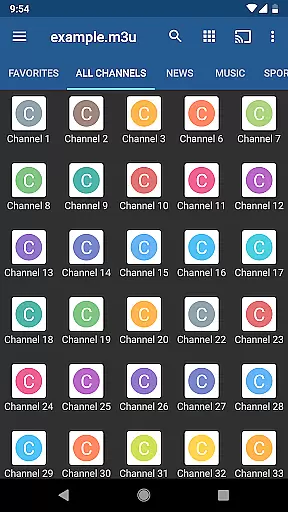
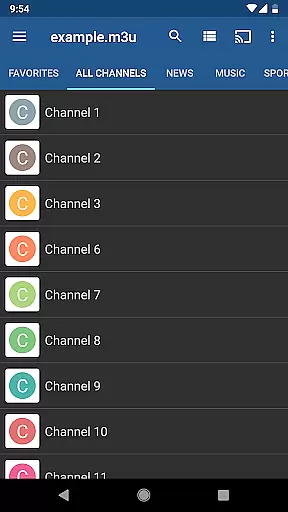
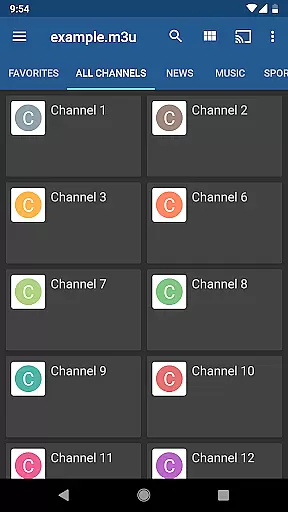
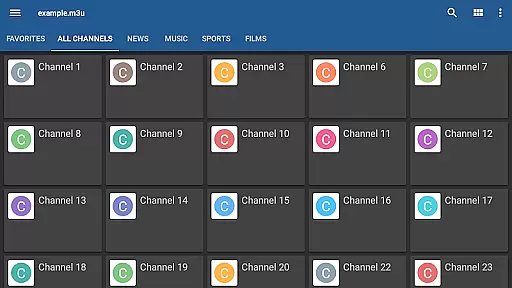
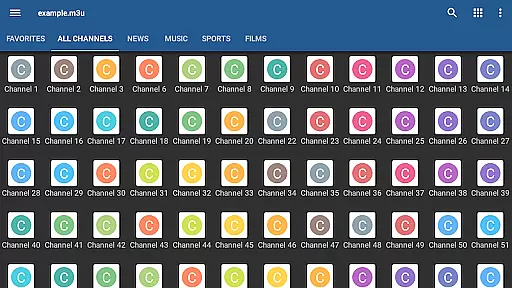
IPTV Pro is the premium version of IPTV app, offering an ad-free experience with advanced features for seamless TV streaming. It supports M3U and XSPF playlists, multicast streams via UDP proxy, EPG in XMLTV and JTV formats, and multiple viewing options like grid, list, or tile views.
Designed for users seeking uninterrupted entertainment, this app allows auto-play of the last channel and extended playlist history. With both internal and external video player support, parental controls, and compatibility across various devices, IPTV Pro ensures a customizable and secure viewing experience.
While IPTV Pro does not include built-in channels, it excels as a powerful tool for users who have their own playlists. Its integration with UDP proxies makes it ideal for set-top boxes and LAN environments, providing smooth playback for live TV channels from your internet provider or other web sources.
IPTV Pro stands out with its comprehensive feature set tailored for avid TV streamers. The app provides essential tools such as M3U and XSPF playlist support, enabling users to organize and access their favorite channels effortlessly. Its EPG support in XMLTV and JTV formats ensures accurate program scheduling information.
One of the key highlights is its ability to play multicast streams using a UDP proxy, which enhances performance in LAN setups. Additionally, users can choose between internal or external video players based on their preferences. Parental controls add a layer of security, while options like auto-playing the last channel and starting on device boot cater to convenience.
The app also offers flexible viewing modes, including grid, list, and tile views, ensuring a personalized user interface. These robust features make IPTV Pro a versatile choice for managing extensive TV channel libraries and enjoying high-quality streams without interruptions.
Video format compatibility is a crucial feature for any video player, ensuring that users can access content in various formats without technical barriers. IPTV Pro excels in this area by supporting both M3U and XSPF playlists, which are commonly used for internet television and radio broadcasts.
The application's ability to handle multicast streams with a UDP proxy further enhances its versatility. This feature allows users to stream content from local network sources, making it an ideal choice for set-top boxes and home entertainment systems. The support for different playlist formats ensures that users can enjoy uninterrupted streaming experiences regardless of the source.
Moreover, IPTV Pro offers flexibility in viewing options with grid, list, or tile views of TV channels. This variety caters to individual preferences and optimizes the user interface for different devices and screen sizes. Users benefit from a customizable viewing experience that adapts to their specific needs and setups.
In addition to format compatibility, IPTV Pro supports EPG in XMLTV and JTV formats, providing users with essential program information. This comprehensive approach to video format support ensures that IPTV Pro remains a top choice for those seeking a robust and adaptable video player solution.
While IPTV Pro does not focus on traditional AI-powered editing features like video trimming or color correction, it incorporates advanced functionalities that enhance the user experience through smart features. One such feature is the auto-play last channel option, which utilizes intelligent algorithms to remember user preferences and streamline the viewing process.
The app also includes extended playlist history, allowing users to easily revisit previously watched content. This feature employs a form of AI that learns from user behavior, creating a more personalized and efficient navigation system. By tracking viewing patterns, IPTV Pro helps users quickly access their favorite channels and programs.
Parental control features demonstrate another aspect of intelligent content management. While not traditional AI editing, these controls use sophisticated algorithms to filter and restrict access to inappropriate content. This ensures a safe viewing environment for families while maintaining ease of use across different user profiles.
Furthermore, IPTV Pro offers both internal and external video player options, adapting to various device capabilities and network conditions. This intelligent selection of playback methods optimizes streaming quality and performance, providing users with the best possible viewing experience based on their specific technical environment.
Ad-free experience
Advanced playlist options
Multicast stream support
Multiple viewing modes
Parental control included
No built-in channels
Requires technical setup
UDP proxy needed
Paid version only
Dependent on user content

Cast Videos from Web Browser, IPTV to Roku, Chromecast, DLNA, Smart TV +more
 4.60
4.60
Photo and Music Video Creator into Stunning Videos—Effortlessly
4.40
Watch a large amount of high-definition short drama content
4.60
Download videos easily & play them all in one smart, powerful video manager.
3.40
Play and download HD videos from all sources — fast, simple, and all-in-one.
4.2
AI Video Editor:AI Music, Text to Video,Text to Speech,Auto Caption,Video Effect
4.00
Web Browser for LG TV to stream webvideos, online movies and livestreams in HD
4.20
Enjoy your favorite videos and channels with the official YouTube app.
3.90
Capture the moment and Cut
3.40
GENRAL PRO - General Pro is the best video player that fully supports all formats.
4.70
IPTV Loader, loads your own Playlist. DOES NOT CONTAIN ANY LIST OR CHANNELS
4.60
KineMaster, Your Ultimate Video Editor!
4.40
Powerful Video Editor & Photo Editing App —— Quick Edits & Stunning Effects!
4.30
VLC for Android is the best open source video and music player, fast and easy!
4.10
HD video & music player - All format support with floating & PIP mode!
3.80
Manage your IPTV live channels and VOD playlists (no playlist included)
3.80
Connect EasyCap or UVC devices for recording and broadcast video/audio stream
3.60
Browser for Sony TV to stream web videos, online movies and live tv
3.20
The smartest M3U IPTV Player your playlists have ever seen.
4.4


User Reviews