
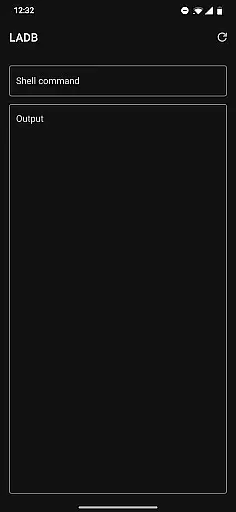
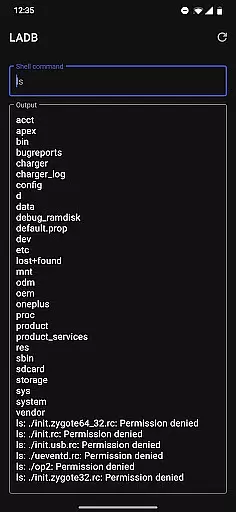
LADB is a powerful local ADB shell tool designed for Android developers and power users. The app bundles an ADB server within its libraries, enabling wireless debugging without requiring a USB connection. By leveraging Android's Wireless ADB Debugging feature, LADB allows seamless communication between the server and client on the same device.
One of the standout features of LADB is its ability to simplify the pairing process through both assisted and manual modes. Users can easily set up wireless debugging by copying pairing codes and ports directly into the app. This makes it an essential tool for debugging and testing Android applications locally.
The app is particularly useful for developers who need to troubleshoot apps or system issues directly on their devices. With its efficient workflow and reliable performance, LADB streamlines the debugging process while maintaining user privacy.
LADB offers several advanced features that cater to the needs of Android developers. First, it includes an integrated ADB server, which eliminates the need for external tools or USB connections. This allows users to execute ADB commands directly from their devices, making the debugging process faster and more convenient.
Another notable feature is the support for manual pairing, which ensures compatibility with newer Android versions. If the assisted pairing mode encounters issues, users can follow a straightforward tutorial to establish a reliable connection. This flexibility ensures consistent performance across different devices and Android versions.
In addition to its core functionality, LADB emphasizes user privacy and data security. The app does not collect or transmit any device data outside the app, ensuring that sensitive information remains protected. This commitment to privacy makes LADB a trusted choice for developers who prioritize security in their workflows.
For a tool like LADB, core function accuracy is paramount. The app bundles an ADB server within its libraries to facilitate local device connections through Android's Wireless ADB Debugging feature. This removes the necessity for constant USB connections, providing a seamless debugging experience.
The pairing process with the local device is intuitive yet robust. Users can establish a stable connection by entering the pairing code and port into LADB while keeping both the LADB and Settings windows open. This ensures that the dialog does not dismiss prematurely, which could invalidate the pairing information.
Despite some compatibility issues with other applications like Shizuku, LADB offers a reliable solution for developers needing to debug their applications wirelessly. By following the recommended troubleshooting steps, such as clearing app data and rebooting, users can maintain an effective and uninterrupted connection.
LADB excels in providing an interface that balances simplicity with functionality. The split-screen mode or pop-out window option allows users to manage Wireless Debugging connections without hassle, ensuring that all necessary settings remain accessible during the initial setup.
While the app requires users to navigate through a few technical steps, it guides them clearly through each stage of the process. This includes copying the pairing code and port into LADB, which simplifies what could otherwise be a complex procedure.
Moreover, LADB addresses common issues proactively by offering troubleshooting advice directly within its support section. This user-centric approach helps mitigate confusion and enhances the overall intuitiveness of the application, making it accessible even to those who may not be familiar with ADB tools.
User-friendly interface
Wireless debugging support
Integrated ADB server
Manual pairing option
Strong privacy protection
Incompatible with Shizuku
Requires initial setup
Occasional connectivity issues
Limited to Android devices
No official user builds on Play Store

Extremely fast, secure, and protects your privacy
 4.80
4.80
PDF Reader - Document Viewer: Read, Manage & Organize Your Documents
3.10
Remote for Roku, Fire TV, Samsung TV, LG TV, Android TV, Chromecast and VIZIO TV
4.20
Save any video in HD - paste the link, download fast and watch offline.
4.2
Universal TV remote control all TVs, Roku, LG, Samsung, Fire, Vizio, Sony, TCL.
4.40
Quickly & easily calculate the spacing of handrail balusters
4.20
Game Booster, GFX Tool is now compatible with newer game update
4.50
Automate everything from settings to photos, SMS to speech. ADC2 prize winner.
4.10
Clean up your phone, find files, play media, and share files offline
4.50
Connect wirelessly to your computer to watch movies, browse the web, play games
5.00
Monitor car performance in real time and troubleshoot malfunctions.
4.80
Optimize your WiFi network, turn your phone into Wifi Analyzer
4.70
NFC Tools can read and write NFC tags.
4.70
Connect instantly to a fast, encrypted VPN with one tap
4.60
Head tracking for PC sim games such as MSFS 2024 or Elite:Dangerous. No headset!
4.50
Quickly check the frequency of the Earth
4.30
Unleash gamepad precision for ultimate mobile gaming dominance.
3.90
Safely recover deleted photos, videos, and files with a single easy tap.
3.70
Undelete and recover your lost or deleted files with DiskDigger!
3.40


User Reviews