
My Invisalign is a specialized application designed for individuals undergoing Invisalign treatment. It serves as a one-stop platform for managing all aspects of the clear aligner process, from learning about the treatment to monitoring progress.
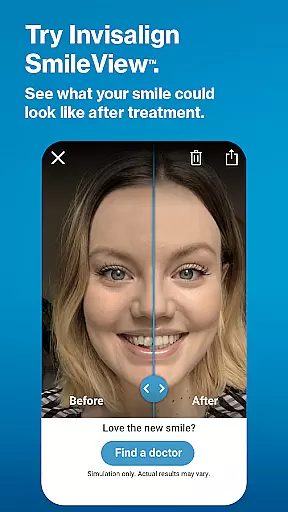
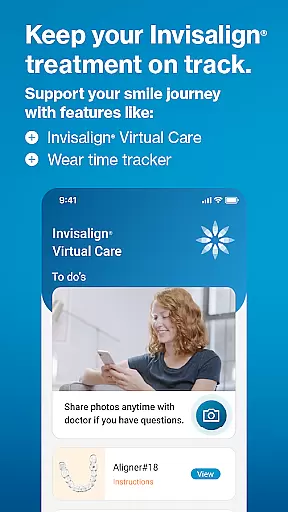
Key features include SmileView, which simulates potential smile outcomes, and ClinCheck integration for reviewing treatment plans shared by dentists. The app also supports Virtual Care, enabling remote consultations and progress tracking.
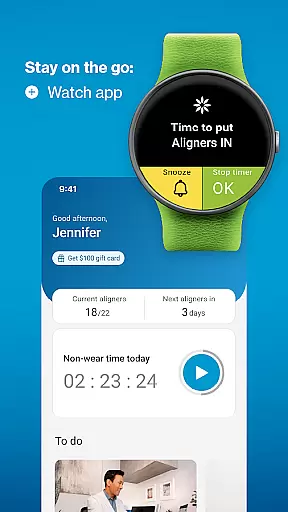
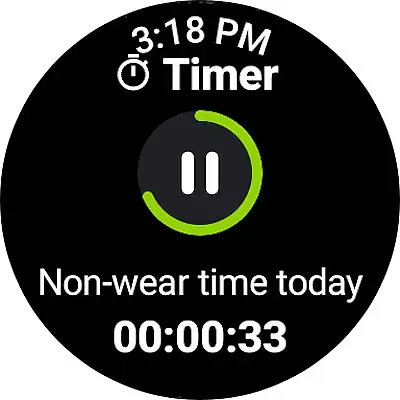
Available for Android Wear, My Invisalign ensures users stay on top of their treatment schedules through reminders, timers, and personalized calendars. By connecting with Wear OS, it extends functionality to smartwatches, offering real-time tracking and notifications.
The My Invisalign app offers comprehensive tools for managing orthodontic treatment. Users can simulate their future smile using SmileView, a feature that provides realistic previews of potential outcomes.
For patients undergoing treatment, the app includes advanced features such as ClinCheck treatment plan viewing and Virtual Care consultations. These allow seamless communication with doctors and help track progress effectively.
Additional functionalities include aligner wear-time tracking, personalized treatment calendars, and timely reminders for aligner changes. Integration with Wear OS devices enhances convenience, making this app a complete solution for Invisalign patients.
Companion app integration is crucial for users who want a seamless experience between their mobile devices and wearables. The My Invisalign app excels in this area by offering comprehensive features that sync with its Wear OS counterpart.
Through the companion app, users can access the custom aligner tracker directly on their smartwatches, ensuring they never miss an update on their treatment progress. This synchronization allows for real-time data sharing, making it easier to monitor wear-time and receive timely reminders.
The benefit of such integration is immense. Users can enjoy the convenience of having all their treatment information accessible from their wrist, which enhances the overall user experience. It ensures that patients stay on track with their treatment plans without needing to constantly check their phones.
This feature highlights the app's commitment to providing a cohesive ecosystem where users can manage their dental treatment efficiently, demonstrating the practical value of companion app integration in daily health management.
Device compatibility is a key factor when choosing an app, especially for those using wearable technology. The My Invisalign app offers robust support for Wear OS, ensuring that users can take full advantage of their smartwatches during treatment.
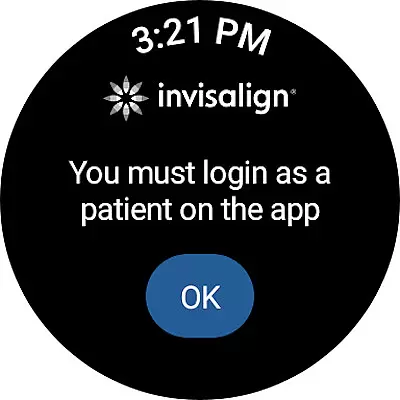
By connecting a Wear OS device to the smartphone, users gain access to the custom aligner tracker within the My Invisalign watch app. This compatibility extends the app's functionality beyond the phone, allowing for continuous monitoring and interaction.
For patients undergoing Invisalign treatment, this means they can easily track their progress, receive notifications, and manage their schedules right from their wrists. Such accessibility not only simplifies the process but also encourages better adherence to treatment protocols.
Ultimately, the compatibility with Wear OS devices underscores the app's dedication to innovation and user-centric design, providing a reliable and efficient solution for managing orthodontic care through modern technology.
Comprehensive tools
Realistic simulations
Remote consultations
Treatment reminders
Personalized calendar
Limited ClinCheck
Doctor invite-only
Wear OS required
Occasional bugs
Premium cost

WTW M17 is a premium and luxurious hybrid watch face
 4.70
4.70
Wear Os Watch Face - Animated Snow - Sesonal for Christmas & Winter
4.5
Digital watch face with big numbers and many customization for Wear OS devices
4.40
Structured watch face with seven complications and modular UI elements
3.90
Real-time weather radar with temperatures, warnings, hurricanes, and widgets
4.80
Bold weather Digital watchface with forecast & optional animated background
4.40
A digital watch face that celebrates Christmas.
4.00
Spam call blocker and caller ID for automatic call protection!
4.40
Toyota app currently supports 2010 or newer vehicles (2018 or newer for Hawaii).
4.50
Easy Voice Recorder is your everyday companion to record important moments.
4.70
Beautiful artistic animated digital watch face, with a customizable layout!
4.40
Elegant animated Christmas tree with multiple customization options
4.20
"PER27 Galaxy Digital" is a digital Wear OS watch face designed by PERSONA
4.10
sleep, alarm, snoring, stress, healing, focus, sound therapy, circadian rhythm
4.10
Authentic military-tactical design with ZULU time! Realistic and functional!
3.80
Wear Os Watch Face - Animated Snow Effect & Christmas Lights
4.4
Precision analog watch face with 7 complications and style options
4.1
Analog watch face with 8 complications and expedition styling
4.0
A heartwarming Christmas scene featuring a cute image of Santa and Rudolf
4.2


User Reviews