
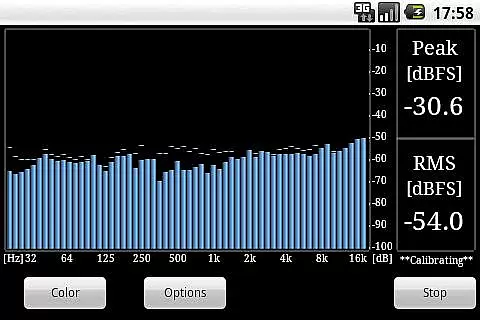
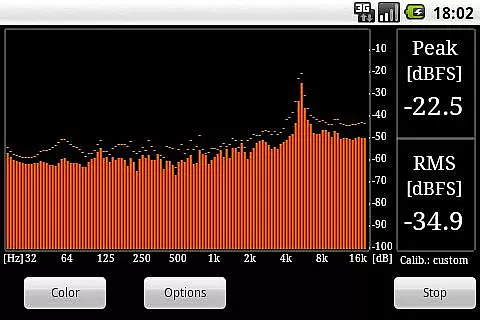
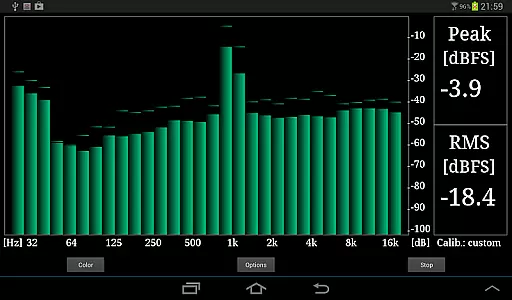
RTA Pro Analyzer is a professional audio analysis tool designed for music and audio enthusiasts. This application offers advanced features such as 1/4, 1/6, and 1/12 octave band analysis with up to 120 bands, providing users with detailed insights into their audio content. The app also includes scalable peak holds and multiple color schemes, enhancing the user experience during audio analysis sessions.
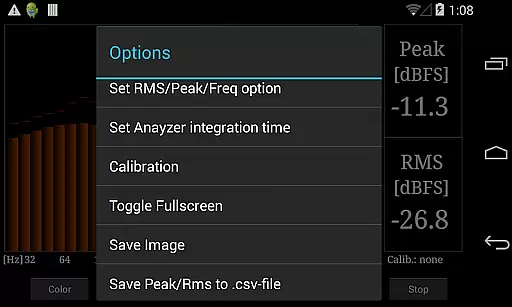
In addition to its core functionalities, RTA Pro Analyzer allows users to permanently store calibration data, ensuring consistent and reliable measurements over time. Users can save screenshots of their analysis and export peak/RMS values to a .csv file for further examination. Whether you're an audio engineer or simply passionate about sound quality, this app provides the tools necessary to analyze and optimize your audio projects effectively.
One of the standout features of RTA Pro Analyzer is its ability to perform detailed audio analysis through various band spacing options. With support for 1/4, 1/6, and 1/12 octave bands, users can choose the level of detail that best suits their needs. The app supports up to 120 bands, allowing for highly granular analysis that can reveal subtle nuances in audio signals.
RTA Pro Analyzer also offers several customization options, including scalable peak holds and a variety of color schemes. These features enable users to tailor the visual representation of their data to their preferences, making it easier to interpret results. Furthermore, the app's capability to store calibration data permanently ensures that users can maintain consistency across different sessions without needing to recalibrate each time.
For those who require documentation of their analysis, RTA Pro Analyzer allows users to save screenshots and export peak/RMS values to a .csv file. This functionality is particularly useful for professionals who need to share their findings with clients or colleagues, providing a convenient way to document and communicate audio analysis results.
When evaluating a music and audio application like RTA Pro Analyzer, the size and authenticity of its music library are crucial factors. This app provides users with advanced audio analysis tools that can be considered part of an extensive toolkit for sound professionals.
The application offers various band spacing options, including 1/4, 1/6, and 1/12, with up to 120 bands, ensuring detailed and customizable frequency analysis. These features expand the scope of its music analysis capabilities, making it highly versatile for different audio projects.
Regarding copyright authenticity, RTA Pro Analyzer respects intellectual property by allowing users to save screenshots and export peak/RMS values to a .csv file without infringing on any legal rights. This ensures that all exported data is fully compliant with copyright laws.
By providing these comprehensive features, RTA Pro Analyzer not only meets but exceeds the expectations of professionals who require reliable and legally sound audio analysis solutions.
RTA Pro Analyzer stands out in the realm of audio applications due to its superior audio quality options. The ability to analyze audio with precision is essential for professionals in the music and audio industry, and this app delivers just that.
One of the key features is the scalable peak holds, which allow users to maintain visual markers on their audio analysis over time. This function helps in identifying peaks and understanding the dynamics of sound with greater accuracy.
In addition to this, the app offers multiple color schemes, enhancing the user experience by allowing customization according to personal preferences or specific project requirements. These schemes make it easier to interpret complex data visually.
Furthermore, the permanent storage of calibration data ensures consistent and high-quality audio analysis across sessions. Users can rely on the accuracy of their results, knowing that their settings remain intact and ready for future use.
Advanced audio analysis
Customizable display options
Permanent calibration storage
Data export capabilities
User-friendly interface
Paid version only
Complex for beginners
Limited free support
No real-time collaboration
Requires technical knowledge

Formerly known as Spotistats! View your top tracks, artists, albums and more!
 4.40
4.40
A High-Precision Audio Spectrum Analysis App
4.20
Save hundreds of dollars for a physical strobe tuner and instead use this app.
4.50
The alternative folder based music player.
4.20
Recording studio w/ 10k beats, pro vocal FX and a network of 20M rappers & fans!
4.60
The official Sonos app
4.10
The Minimalistic Premium Music Player. Handmade with passion for music
2.20
Ringtone Maker is free app create ringtone from music files or your recording.
4.40
Melody Beat: Great for travel, workouts, offline vibes, play your tunes anytime.
4.10
Offline Music Player & MP3 Player.Powerful equalizer, Lyrics, Themes, Tag Editor
4.80
JBL PartyBox APP works with 110/310/710/120/320/520/Encore/Encore 2/Encore Ess 2
4.80
Gorgeous UI, Powerful music Search and Equalizer, the great choice for you!
4.70
Listen radio AM / FM Stations. Live AM / FM Radio App Station. Radio Com.
4.70
Manage your Sonos system directly from your home-screen!
4.40
Versatile MP3 recorder with auto-backup to Dropbox and Google Drive
4.10
Turn your phone into a musical instrument from the future!
3.90
The ultimate media player for Android devices
3.90
Learn to play the piano using falling notes!
3.80
Slow music down without changing pitch.
3.70


User Reviews