




Shazam is a powerful music recognition app that instantly identifies songs playing around you or in other apps, even with headphones on. With over 2 billion installs and 300 million users worldwide, it offers an impressive suite of features beyond just song identification.
The app allows users to discover artists, view song lyrics, watch music videos, and explore upcoming concerts. Its integration with popular streaming services like Apple Music, Spotify, YouTube Music, and Deezer makes it a comprehensive music discovery tool. Whether you're looking for new music recommendations or want to share your favorite tracks with friends, Shazam provides a seamless experience across multiple platforms.
One of the key strengths of Shazam is its versatility. The app works offline, supports Auto Shazam for continuous song detection, and includes useful features like time-synced lyrics and Wear OS compatibility. These capabilities make it an essential tool for music enthusiasts who want instant access to song information and related content.
Shazam stands out with its comprehensive feature set designed for music discovery and management. The core functionality allows users to instantly identify songs through their device's microphone, working seamlessly even with headphones or in noisy environments.
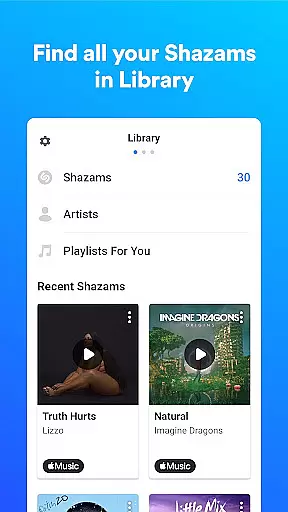
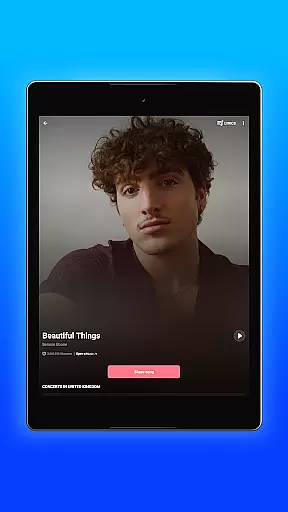
Beyond basic song recognition, Shazam offers advanced features including time-synced lyrics, music video playback from Apple Music and YouTube, and integration with major streaming platforms. The app maintains a complete history of identified songs, allowing users to easily revisit their discoveries. Its Auto Shazam feature enables continuous background listening, while the Shazam Widget provides quick access from the home screen.
The application also excels in personalization and convenience. Users can explore local music charts, receive personalized recommendations, and browse concerts based on location and artist preferences. The inclusion of Dark theme support, offline functionality, and cross-platform sharing options demonstrates Shazam's commitment to providing a versatile and user-friendly music identification experience.
Shazam offers seamless companion app integration, allowing users to identify songs across various platforms and apps. Whether you're on Instagram, YouTube, or TikTok, Shazam can recognize music playing within these apps through your Notification Bar.
The app's Auto Shazam feature continues to identify songs even when you're not actively using the app, ensuring you never miss a track. This functionality extends to offline use as well, making it versatile for different scenarios and connectivity statuses.
Users benefit from Shazam's deep integration with streaming services like Apple Music, Spotify, YouTube Music, and Deezer. Once a song is identified, it can be directly opened in any of these platforms, providing a smooth transition from discovery to listening.
Shazam supports Wear OS, offering users the convenience of identifying songs directly from their smartwatches. This compatibility ensures that whether you're commuting, exercising, or unable to access your phone, you can still capture music moments effortlessly.
The Wear OS version maintains core functionalities such as quick identification and offline mode, adapting seamlessly to smaller screen interfaces without compromising performance. Users can also access their Shazam history and enjoy time-synced lyrics right from their wrists.
This device compatibility enhances user experience by extending Shazam's capabilities beyond smartphones. It caters to tech-savvy individuals who value instant access and multitasking, affirming Shazam's position at the forefront of wearable technology integration.
Instant song recognition
Offline functionality
Auto Shazam feature
Cross-platform integration
Comprehensive music data
Limited offline features
Requires permissions
Ads in free version
Regional restrictions
Occasional errors

Highly customizable hybrid watch face for Wear OS, perfect for everyday use.
 4.60
4.60
Beautiful artistic animated digital watch face, with a customizable layout!
4.40
Let's celebrate Thanksgiving - Wear Os watch face
4.20
Structured watch face with seven complications and modular UI elements
3.90
The ultimate destination for kids ages 3-8 to explore the Marvel Universe!
4.30
Stay in touch with your friends and family using LINE!
3.40
Premium hybrid watch face with many customizations for Wear OS devices.
4.40
A realistic hybrid watch face with many customization options.
4.60
Control your Samsung Smart TVs, appliances, and SmartThings-compatible devices
4.60
Real-time weather radar with temperatures, warnings, hurricanes, and widgets
4.80
The most customizable hybrid watch face. For Wear OS 5.0, API 34+ and later
4.70
To-Do List: daily schedule planner, task organizer, to do reminder app, calendar
4.60
Fast and smart typing with Emojis, GIFs, and more
4.50
A white realistic classic analog watch face with many customization options.
4.40
Elegant animated Christmas tree with multiple customization options
4.20
Snowflake Rose Gold Watch Face - Digital, modern, & sleek with GYRO effect.
4.10
Connect, create, and collaborate with Gmail, part of Google Workspace.
4.10
Animated Watch Face and Customizable with 24 Backgrounds. Perfect for Christmas!
3.90
Simple Analog-Digital Watchface For Wear OS 3.0 and Up Smartwatches
4.0


User Reviews