
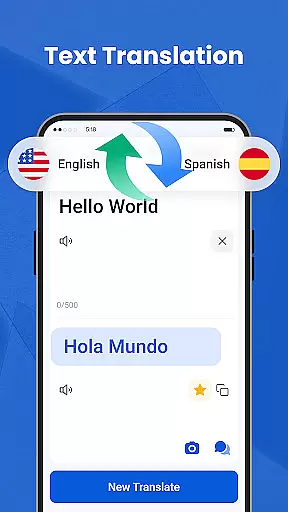
We Translate is a powerful productivity app designed to break language barriers and facilitate seamless global communication. With its comprehensive suite of translation tools, the app supports text, voice, image, and document translation across multiple languages.
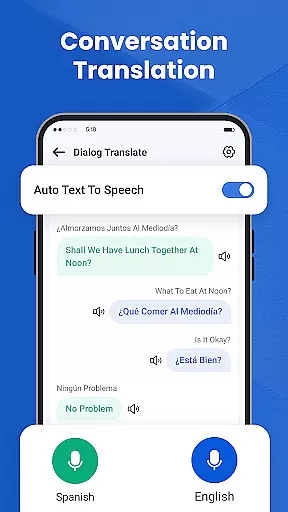
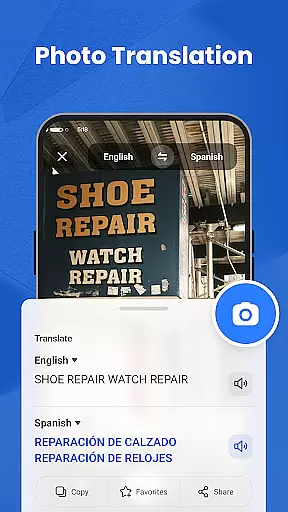
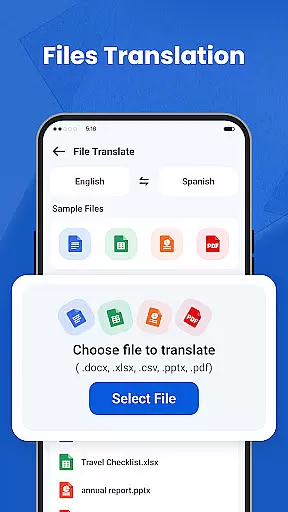
Key features include real-time conversation translation, photo translation for signs and documents, and one-tap document translation for PDFs, Word, and Excel files. The app also offers history tracking, favorites, and personalized settings, making it an essential tool for travelers, students, and professionals.
Whether you're traveling abroad, working on international projects, or learning new languages, We Translate provides accurate and efficient solutions to all your translation needs.
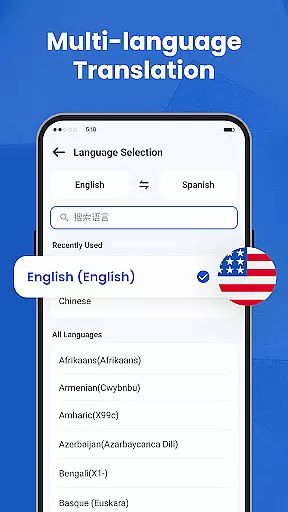
We Translate stands out with its diverse range of innovative features tailored for multilingual communication. The app's text translation function delivers instant results for typed content, supporting over 100 languages.
For verbal interactions, the real-time conversation translator automatically detects languages and translates speech instantly, perfect for face-to-face or phone discussions. The photo translation feature allows users to snap pictures of menus, signs, or documents and receive accurate translations without manual input.
Additional capabilities include document translation for various file formats, customizable settings for voice speed and display preferences, and easy access to past translations through the history and favorites sections.
In the realm of productivity, managing tasks efficiently is paramount. We Translate excels in organizing translation tasks through its intuitive interface and robust features.
Users can easily input text, utilize voice commands for conversation translations, or upload documents for comprehensive language conversion. This streamlined approach ensures that every translation need is met with precision.
The app's ability to save translation history and allow favoriting commonly used phrases enhances workflow efficiency. These features enable users to quickly access previous work without duplicating efforts.
By integrating personalized settings such as adjustable voice reading speed and preferred languages, We Translate offers a tailored experience that adapts to individual preferences and project requirements.
For professionals and students alike, having reliable cross-device synchronization is crucial for maintaining productivity. We Translate provides seamless integration across multiple devices.
Whether you're switching from your phone to a tablet or desktop, all your translation data including history, favorites, and settings remain consistent and up-to-date. This ensures continuity in your work process regardless of the device used.
The app supports various document formats like PDFs, Word files, and Excel sheets, making it versatile for different types of projects. Users can start a translation on one device and continue on another without missing a beat.
With secure cloud-based storage, We Translate guarantees that your information is safely stored and readily accessible whenever needed, enhancing collaboration and mobility.
Accurate translations
User-friendly interface
Multi-language support
Real-time voice translation
Photo translation feature
Limited free usage
Occasional inaccuracies
Premium subscription cost
Requires internet connection
Ads in free version

Client for Nextcloud Deck
 4.60
4.60
Native client for Forgejo and Gitea
5.00
Mind Map and brainstorm, note taking and idea collection
4.80
Todo reminder
4.10
App Lock with fingerprint, password: Lock apps & hide photos with lock screens
4.60
Code on-the-go with VScode for Android. Edit,debug and collaborate from mobile!!
3.10
Okta MFA
4.70
AI Chatbot and AI writing assistant powered by ChatGPT.
4.60
Seamlessly read, manage, and organize all your PDF files solution in one place
4.40
Best Tool for the professionals Electrician, Electrical contractors, etc.
4.90
The long-awaited modern gallery app for your Nextcloud server
4.70
aCalendar+ makes your day, week and month
4.70
App lock - lock apps with fingerprint, password, pin or pattern, protect privacy
4.70
Subscribe to Webcal & .ics calendars and keep them up-to-date!
4.50
Activate Two Factor Authentication (2FA or Multi OTP), Password manager and more
4.10
Customizable calendar widget for seamless event sync, planning & scheduling.
4.00
Smart PDF reader & editor to view, organize and manage PDF documents easily.
3.70
AI Video AI Image Private LLM AI Browser Llama Gemma Ollama Connect LLM Studio
4.0
Create study competitions, track your hours, and stay consistent with friends
4.1


User Reviews