

Alight Motion is a pioneering motion design app that brings professional-quality animation and video editing tools to your mobile device. With features like multi-layer editing, vector graphic support, and 160+ effect building blocks, it enables users to create sophisticated visual content on-the-go. The app supports keyframe animation, layer grouping, masking, and color adjustments, making it a versatile tool for both amateur and professional designers.
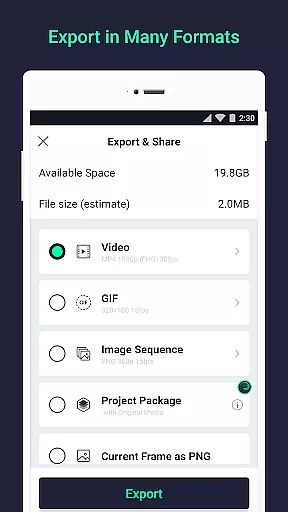
The application's standout feature is its ability to deliver fluid animations through customizable timing curves and velocity-based motion blur. It also offers exporting options for MP4 videos, GIFs, and PNG sequences. While the free version includes basic functionalities with watermarked output, paid memberships unlock premium effects and watermark-free exports. Alight Motion runs efficiently on devices with at least 1.5GB RAM, providing a powerful platform for creating high-quality motion graphics directly from a smartphone or tablet.
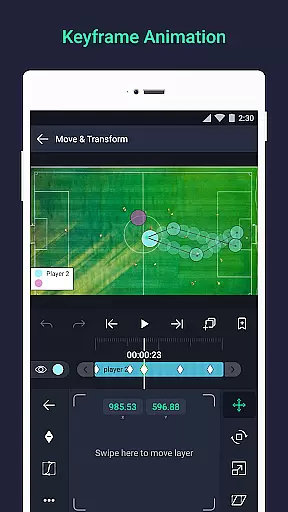
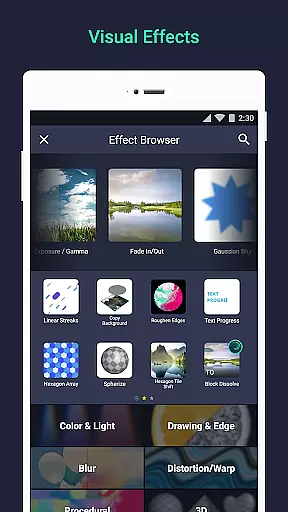
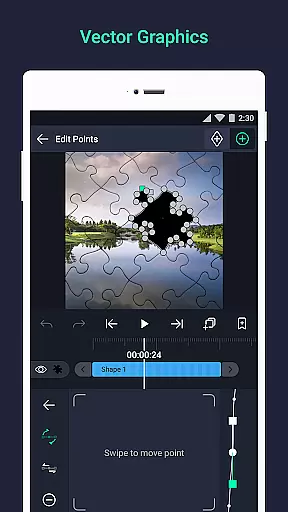
Alight Motion stands out with its comprehensive set of design tools tailored for motion graphics and video editing. Users can work with multiple layers of graphics, video, and audio, while enjoying both vector and bitmap editing capabilities. The app provides 160+ basic effect building blocks, allowing creators to build complex visual effects by combining different elements. Keyframe animation is available for all settings, giving precise control over every aspect of the motion design process.
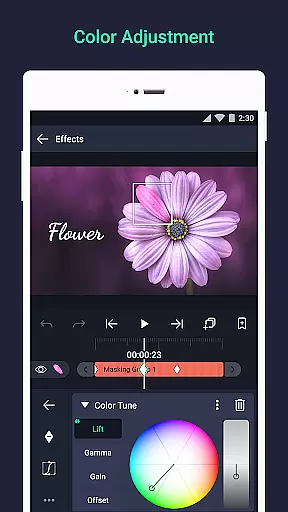
Advanced features include parent-child layer linking, character joint rigging, and camera effects such as pan, zoom, focus blur, and fog. The app supports group layering, masking, and detailed color adjustments. Animation easing presets help achieve more natural motion, while bookmarking facilitates easier navigation during editing. Additionally, users can save favorite elements for future projects and share project packages with collaborators, enhancing workflow efficiency and creative possibilities.
Video format compatibility is a crucial feature for any video editing application, ensuring that users can work with a wide range of file types. Alight Motion supports multiple formats including MP4 video, GIF animation, and PNG sequences, making it versatile for various creative projects.
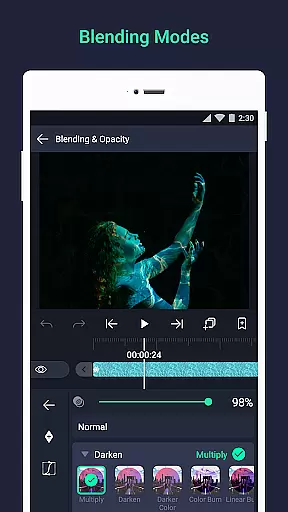
The app's ability to handle both vector and bitmap graphics adds another layer of flexibility. This means you can import and edit different types of visual content without worrying about format restrictions. The inclusion of solid color and gradient fill effects further enhances the creative possibilities.
Users benefit from this broad compatibility as it streamlines their workflow. Whether you're creating motion graphics or compositing videos, having support for diverse formats ensures your projects are not limited by technical constraints. Additionally, exporting options like MP4 and GIF allow for easy sharing and distribution.
Alight Motion's comprehensive format support empowers creators to focus on their artistic vision rather than technical limitations. With regular updates and new features being added, the app continues to improve its compatibility, ensuring it meets the evolving needs of video editors and motion designers.
AI-powered editing features represent the cutting edge of video editing technology, enabling users to achieve professional results with minimal effort. Alight Motion incorporates AI tools that assist in tasks such as color adjustment, animation easing, and velocity-based motion blur, enhancing the overall editing experience.
One standout feature is the ability to use AI for sophisticated visual effects. With 160+ basic effect building blocks, users can create complex animations and transitions. These AI-driven tools simplify the process of adding high-quality effects to borders, shadows, and strokes, allowing even beginners to produce polished work.
The advantages of these AI capabilities are significant. They reduce the learning curve associated with professional video editing while maintaining the depth needed for advanced projects. Users can also take advantage of keyframe animation and camera effects like focus blur and fog, which are enhanced by AI algorithms.
By integrating AI-powered features, Alight Motion not only simplifies the editing process but also opens up new creative avenues. As the app continues to evolve, users can expect even more innovative tools that leverage artificial intelligence to push the boundaries of what's possible in mobile video editing.
User-friendly interface
Extensive effect library
Professional-grade tools
Multi-platform support
Regular updates
Free version has limitations
High system requirements
Subscription-based model
Occasional bugs
Learning curve for beginners

HD Video player all format, HD Videos, Cast & Subtitle. No annoying ads.
 4.60
4.60
A Quick and Pro Video Editor
4.70
Search & download videos from net with all video downloader, auto-detect & safe.
4.60
AirMirror is Receiver for Screen Mirroring and Casting from Apple Devices.
3.60
Download website videos fast&privacy
4.40
Flud is a simple and beautiful BitTorrent client for Android.
4.80
Fast & Private HD Video Downloader with Built-in Proxy Browser and Video Player.
4.50
Screen recorder with audio to take live videos & Screenshot in high quality!
4.70
Enjoy your favorite videos and channels with the official YouTube app.
3.90
Tik & Story Saver-Download ALL social media videos, photos & reels no watermark.
4.80
GENRAL PRO - General Pro is the best video player that fully supports all formats.
4.70
Download videos and play them offline
4.70
Fast & easy HD video downloader for all formats, support 4K playback & download.
4.60
Auto video maker with music & exclusive filters. Video editing made simple.
4.50
Photo and Music Video Creator into Stunning Videos—Effortlessly
4.40
Fast & Private Video Downloader App. Save all videos easily from the Internet.
4.40
This app is an emulator of some specific IPTV boxes
3.50
A full editing room to accompany your Insta360 cameras and handheld gimbals.
3.30
IPTV Player - Watch live TV from m3m & m3u8 playlist, stream IPTV on mobile
3.30


User Reviews