

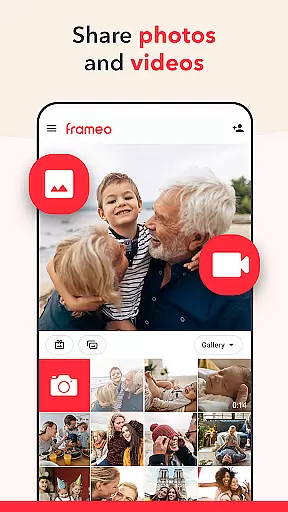
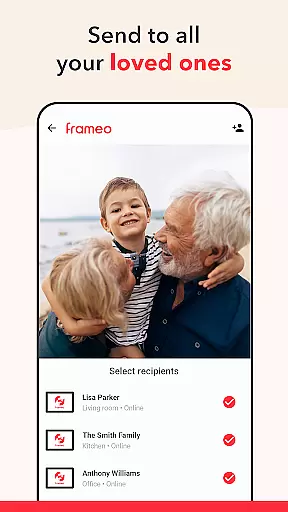


Frameo is a dedicated photography app that allows users to instantly share photos and videos with WiFi digital photo frames. The app serves as a seamless bridge between your mobile device and Frameo's smart photo frames, enabling real-time sharing of life's precious moments. Whether you're on vacation or want to keep loved ones updated with family milestones, Frameo makes it easy to send media directly to connected frames.
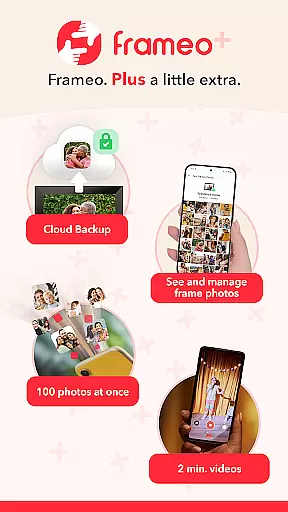
The app supports sending multiple photos and short video clips at once, adding captions, and even applying themed graphical greetings for special occasions. With end-to-end encryption, your shared content remains secure. For power users, Frameo+ offers enhanced features like cloud backup, managing frame content remotely, and sending up to 100 photos at once, making it an ideal choice for those who value both convenience and privacy in photo sharing.
Frameo stands out with its specialized functionality tailored for digital frame users. The app allows sending up to 10 photos simultaneously, along with 15-second video clips, directly to WiFi-enabled frames. Its unique Greetings feature lets users enhance photos with themed graphics for holidays and special events, adding a personal touch to every shared moment.
Advanced features include instant notifications when frame owners interact with your content, remote management of frame photos with permission, and Google Cast support for viewing frame content on larger screens. Frameo+ subscribers gain access to exclusive benefits such as seeing frame photos within the app, cloud backups with client-side encryption, and extended video length up to 2 minutes. These capabilities ensure users can maintain meaningful connections through visual storytelling while enjoying top-notch security and convenience.
Real-time capture and preview functionality is essential for ensuring that users can instantly see the photos or videos they wish to share. Frameo excels in this area by allowing users to send images directly from their smartphones to connected digital photo frames.
The app supports sending up to 10 photos at once, with instant transmission so recipients can enjoy shared moments as they happen. This immediacy enhances user engagement and satisfaction, making it ideal for sharing experiences like family vacations or important milestones.
Additionally, Frameo offers a feature called Greetings, which lets users add special graphical themes to their photos for occasions such as birthdays or holidays. These enhancements make each photo more meaningful and visually appealing, further enriching the sharing experience.
AI beauty and enhancement features are crucial for refining images before sharing them with loved ones. While Frameo does not explicitly market itself as having AI-driven beautification tools, its ability to manage and optimize media content ensures high-quality delivery.
Users can enhance their photos with fitting captions and thematic overlays through the Greetings feature. This allows for personalization without compromising the natural essence of the original image, maintaining authenticity while adding creative flair.
Furthermore, Frameo+ subscribers gain access to advanced functionalities like sending longer video clips (up to 2 minutes) and managing frame content remotely. Such features ensure that all shared media maintains optimal quality and presentation, providing a seamless blend of technology and user intent.
User-friendly interface
Secure photo sharing
Real-time updates
Customizable greetings
Remote management
Premium features locked
Device compatibility limited
Subscription cost
Video length restricted
Internet dependency

Trendy TikTok time warp scan funny filter app brings you unique photos & videos.
 4.40
4.40
Find time and duration of different sunlight phases at any location
4.90
How old age camera Gender Swap App Face Shape Hairstyle App Hair Styler App fun!
4.00
Create & Edit with AI: AI Remove, Enhance, Retouch, Filter
4.10
A must-have app for landscape photographers
4.60
Raw Image Viewer. Gallery with support of raw images (.cr3, .cr2, .nef, .raf).
2.00
Collage your moments in one tap: 1000+ layouts, filters, stickers, and texts.
4.90
Enhance, retouch & create your story - Share the moment with Photoshop Express.
4.60
A light meter for true photographers.
4.20
Take videos and pictures with the popular TikTok TIME WARP SCAN filter.
4.60
PhotoSync Bundle Add-On License. Enables all features and services in PhotoSync.
4.60
Add Watermark - Sign your pictures with a text or logo. Effective, quick, easy!
4.50
Easily stitch panoramas from multiple photos or video.
4.40
RAW video capture with advanced controls
4.40
AI portrait generator and polaroid AI selfie, fun AI generated AI photo creator!
4.30
Luminar: Photo Editor - easy picture editing with AI
4.20
All-in-One Editor & AI Photo Enhancer, Collage, Cartoonify, Funny Stickers & BGS
4.10
Photo editor: face & body editor, beauty cam, filters and quality enhancer.
4.00
Application for remote controlling DSLR
3.00


User Reviews