
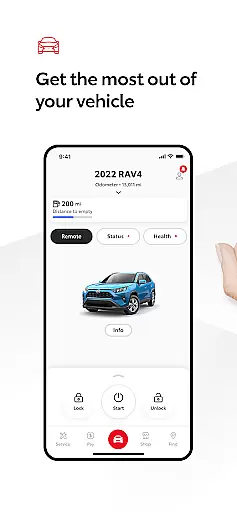
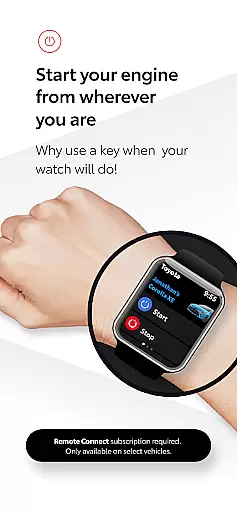
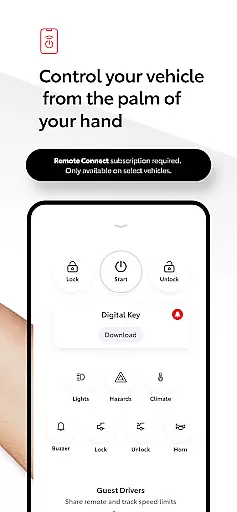
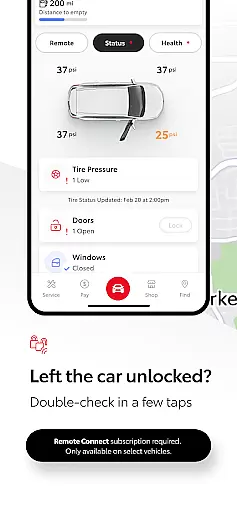
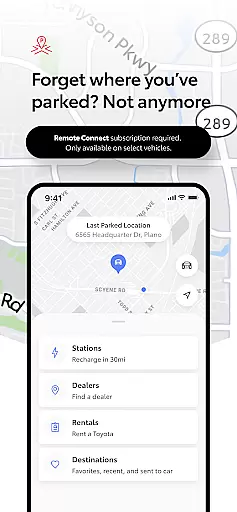
The Toyota app is a comprehensive vehicle management solution designed for Android Wear users. It allows drivers to stay connected to their Toyota vehicles through a range of remote services. Key features include Remote Connect, which enables engine start/stop, door lock/unlock, and provides a Digital Key and Last Parked Location functionality.
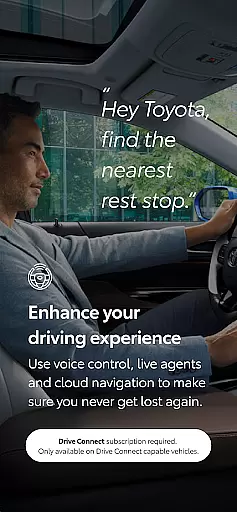
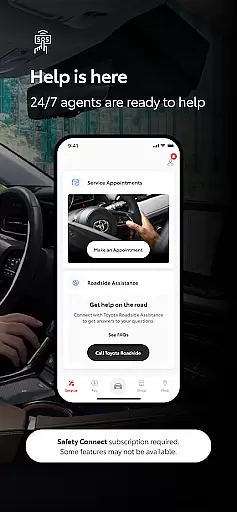
Additionally, the app offers Service Connect for scheduling dealer maintenance, Drive Connect with cloud navigation and voice commands, and Safety Connect with roadside assistance. Owner Resources provide access to manuals and warranty information. The app also supports Wear OS, offering convenient control over remote services directly from your smartwatch.
The Toyota app stands out with its robust integration of Connected Services tailored for smartwatch users. Remote Connect allows you to manage your vehicle's engine and locks remotely, while the Digital Key feature lets you use your smartwatch as a key. The app's Service Connect simplifies vehicle maintenance by enabling direct service scheduling with Toyota dealers.
Drive Connect enhances navigation with cloud-based mapping and intuitive voice commands like 'Hey Toyota. Take me home.' Safety Connect ensures peace of mind with 24/7 roadside assistance and emergency support. The Companion Wear OS app extends these capabilities to your wrist, providing seamless access to essential vehicle functions anytime, anywhere.
Companion app integration is a crucial feature for modern vehicle owners who desire seamless connectivity between their smart devices and automobiles. The Toyota app excels in this area by providing users with the ability to operate remote services directly from their Wear OS devices.
This integration allows drivers to conveniently start or stop their engine, lock or unlock doors, and access other essential features without needing to take out their smartphones. Such functionality not only enhances user experience but also contributes significantly to safety, as it minimizes distractions while driving.
By leveraging the capabilities of Wear OS, Toyota ensures that its customers can enjoy an uninterrupted connection with their vehicles at all times. This level of integration reflects Toyota's commitment to innovation and customer-centric design, making vehicle management more accessible than ever before.
Ensuring broad device compatibility is essential for any wearable technology application, including those designed for automotive use like the Toyota app on Wear OS. This compatibility enables a wide range of smartwatch users to benefit from integrated vehicle control features regardless of their specific device model.
The Toyota app supports various Wear OS devices, allowing drivers to utilize its full suite of functionalities such as remote engine start/stop, door lock/unlock, and location tracking. By maintaining high standards of system adaptability, Toyota guarantees that most Wear OS users will find the app compatible with their smartwatches.
This inclusive approach not only expands the potential user base but also reinforces Toyota's dedication to creating universally accessible connected car solutions. As wearable tech continues to evolve, maintaining robust cross-device support remains key to delivering consistent performance across different platforms.
User-friendly interface
Comprehensive vehicle control
Convenient Wear OS integration
Reliable safety features
Efficient service scheduling
Limited to select models
Dependent on 4G network
Subscription required
Potential connectivity issues
Varied regional availability

Calming & relaxing sounds for sleeping and stress relief. Stay focused all day!
 4.20
4.20
A heartwarming Christmas scene featuring a cute image of Santa and Rudolf
4.4
Elegant animated Christmas tree with multiple customization options
4.20
Simple Analog-Digital Watchface For Wear OS 3.0 and Up Smartwatches
4.4
Authentic military-tactical design with ZULU time! Realistic and functional!
3.80
Nutrition, Macro tracker: Food, fitness & healthy diet tracking for weight loss
4.60
Funny animated watch face for Thanksgiving
4.3
The most customizable hybrid watch face. For Wear OS 5.0, API 34+ and later
4.70
Simple, helpful messaging by Google
4.60
Christmas Theme Watch Face for Wear Os
5.00
Digital, flexibly customizable watch face. For Wear OS 5.0, API 34+ and later.
5.00
The most customizable minimal watch face. For Wear OS 5.0, API 34+ and later
4.70
Find EV charging stations
4.30
Your music, your playlists, and more—offline and unlimited.
4.20
Hyper-Realistic Airplane Dashboard Watch Face With 10 Skins and Custom AOD
4.00
Professional weather radar and more
3.90
Stay in touch with your friends and family using LINE!
3.40
Analog watch face with 8 complications and expedition styling
4.5
3 Complications. All shadow on/off. 30 Themes color palette...
4.4


User Reviews