
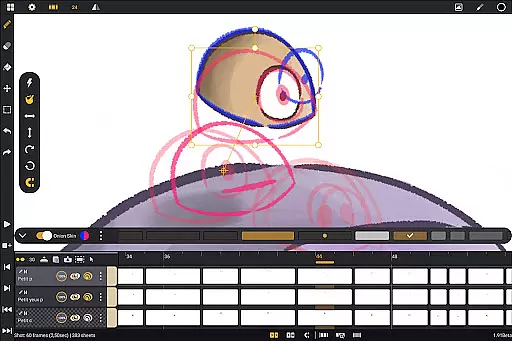
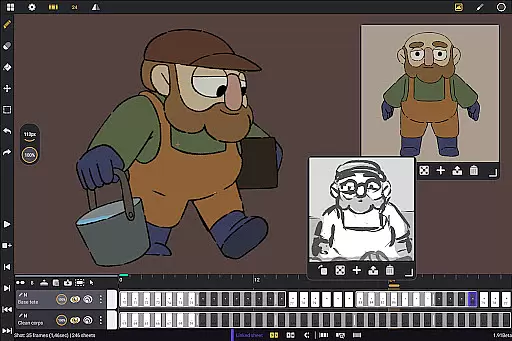
Callipeg is a professional-grade 2D hand-drawn animation application tailored for both seasoned animators and beginners. The app brings the functionality of a complete animation studio to Android devices, offering tools for frame-by-frame and keyframe animation, storyboarding, and shot production. With support for stylus input and optimization for Android tablets, Callipeg provides an accessible platform for creating high-quality animations without subscription fees.
The app includes advanced features such as adjustable frame rates up to 60 frames per second, canvas sizes reaching 4K resolution, and unlimited layer support for various media types. Its intuitive interface allows users to organize projects with color tags, filters, and search functions while providing essential animation tools like onion skinning and customizable brushes. Whether producing feature-quality shots or simple sketches, Callipeg equips creators with everything needed to streamline their workflow.
Callipeg's value extends beyond its robust toolset by offering flexible import and export options in industry-standard formats, making it compatible with other professional software. Additionally, users can access tutorials and join a supportive community via YouTube and Discord channels. This combination of powerful features, ease of use, and educational resources makes Callipeg an ideal choice for animators seeking a mobile solution that doesn't compromise on quality or functionality.
Callipeg stands out with its comprehensive suite of animation tools designed to replicate a professional studio environment on Android devices. One of its core strengths is the studio-like organization system, which allows users to manage their projects efficiently through drag-and-drop functionality, scene and folder structures, and asset tagging. These organizational tools ensure that even complex projects remain easy to navigate, enhancing productivity.
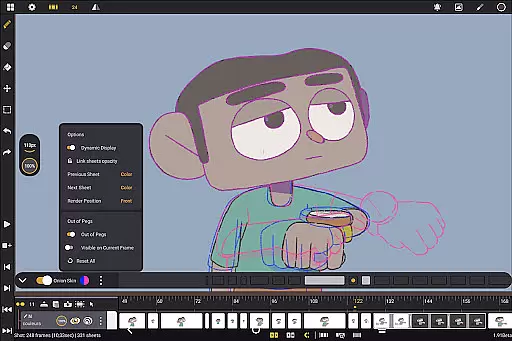
The app also excels in creative flexibility, supporting large canvases up to 4K resolution and unlimited layers for drawing, video, audio, and transformations. Artists can customize their workspace with adjustable sidebars, inverted canvas views, and gesture-based controls for playback and frame manipulation. Features like onion skinning—with up to eight frames visible at once—and a diverse brush set further empower animators to refine their work with precision. By combining these capabilities with pressure-sensitive stylus support, Callipeg delivers a natural drawing experience that rivals desktop applications.
Another notable aspect is its adaptability across workflows, facilitated by extensive import and export options. Users can save animations in multiple formats, including .mp4, .gif, and layered files like .psd, ensuring compatibility with industry standards. Moreover, Callipeg fosters learning and collaboration through detailed tutorials and an active Discord community. This blend of technical prowess, customization, and educational resources positions Callipeg as a top-tier choice for 2D animators on the go.
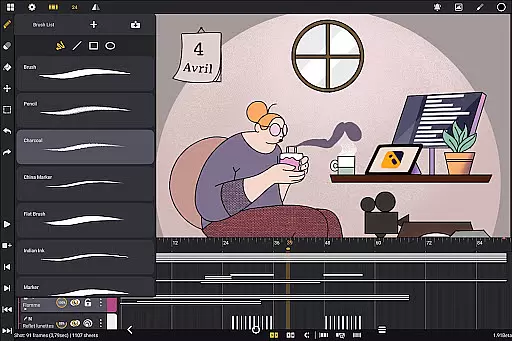
In the realm of digital art and animation, having a comprehensive suite of creative tools is essential for bringing ideas to life. Callipeg stands out by offering a complete set of features that rival professional animation studios. The app provides users with an extensive array of drawing tools including pencils, charcoal, and ink brushes, each customizable with adjustable smoothing, tip shapes, and textures.
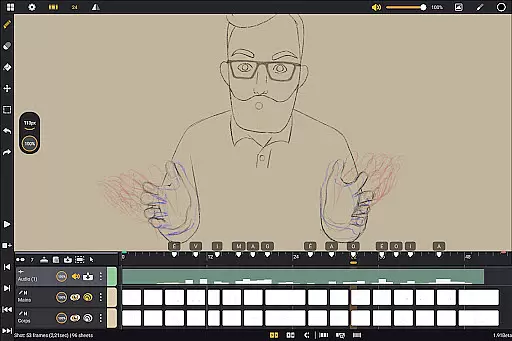
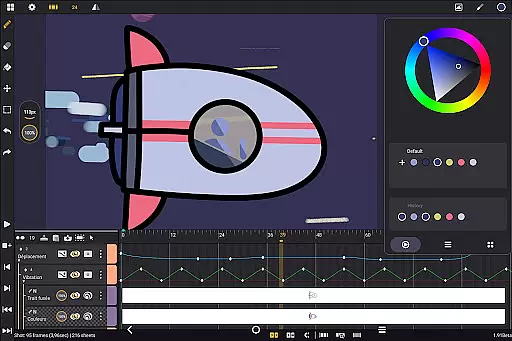
Furthermore, animators can enjoy the flexibility of unlimited layer support, allowing them to add as many layers of different types such as drawing, video, transformation, audio, or group layers. This feature enables complex animations and seamless integration of various media types, enhancing the creative process.
Callipeg also includes studio-like organization capabilities, enabling users to arrange their shots efficiently through drag-and-drop functionality, scene and folder organization, and asset management using color tags and filters. With these robust organizational tools, artists can focus more on their creative work and less on file management.
Flexibility in canvas size and format options is crucial for accommodating diverse project requirements and ensuring high-quality outputs. Callipeg addresses this need by providing a large canvas size that supports up to 4K resolution, catering to professional standards and allowing detailed artwork creation. Users can adjust frame rates to their preference, choosing from 12, 24, 25, 30, or 60 frames per second, which is vital for achieving desired animation effects.
The app's adaptable workspace further enhances its canvas/format flexibility. Artists can switch between right- and left-handed interfaces, position sidebars according to their workflow preferences, and import unlimited reference images. Additionally, the ability to invert the canvas helps in checking proportions and maintaining accuracy in drawings.
Exporting animations in multiple formats such as .mp4, .gif, .png, .tga, .psd, and .peg underlines Callipegu2019s commitment to versatility. By supporting industry-standard software interoperability via .json, .xdts, and .oca formats, it ensures that projects retain timing and layer structure across different platforms, thus facilitating collaboration and post-production processes.
User-friendly interface
Unlimited layer support
Professional-grade tools
No subscription model
Active community support
Limited to Android
Stylus-dependent features
Advanced tools may overwhelm beginners
Fewer integrations than desktop apps
Occasional performance lags

Premium version of Shimeji-ee app with no ads & no limit active shimeji
 4.0
4.0
Sketch, plan, take notes and illustrate on an infinite canvas.
4.20
AI Assistant, powered by ChatGPT GPT-4 & GPT-4o. Your intelligent companion.
3.50
Photo blender app to create overlay photos & double exposure.
4.40
Art of Combination Wear OS Watch Faces
4.0
Draw anime easily with AR guidance, sketch templates & trace tools!
3.10
Design unique, funny and adorable cat stickers that reflect your own style!
3.80
Get creative and make art with your Sesame Friends!
4.00
Get an overview over all your embroidery threads, projects and more.
4.60
Passport size photo maker, create ID photo and visa photo in seconds
4.80
Draw on screen: FP sDraw is a simple and lightweight drawing app
4.70
Minecraft & Roblox Clothes
4.70
Photo stitcher for automatically screenshot stitching into a long screenshot
4.70
AI Tattoo Generator: Create Tattoo Designs & Get Ideas! Ink & Stencil Maker
4.50
Trace, draw, and create art with AR - from memes to masterpieces!
4.30
Floor Plan Creator lets you create, edit and share floor plans.
4.00
Create cute cat emojis & PFPs! Fun, custom avatars for cat lovers.
3.70
Experience next-gen icons with a modern liquid glass look.
3.60
Your Essential Color Theory Guide: Red, Yellow, Blue (RYB)
4.4


User Reviews