






Photo Collage Maker - FunPic is a versatile photography app designed to help users create stunning photo collages and video stories. With over 300 layouts, users can combine photos into eye-catching arrangements while utilizing various creative tools such as filters, text, stickers, and brushes. The app also features AI-powered editing options like background removal and object erasing, allowing for professional-quality edits with minimal effort.
In addition to its collage-making capabilities, FunPic offers video collage functionality that lets users merge videos and photos, add music, and apply decorative elements. Whether you're crafting an Instagram feed or reliving memories through dynamic slideshows, this app provides all the necessary tools to express creativity and share your unique story effortlessly.
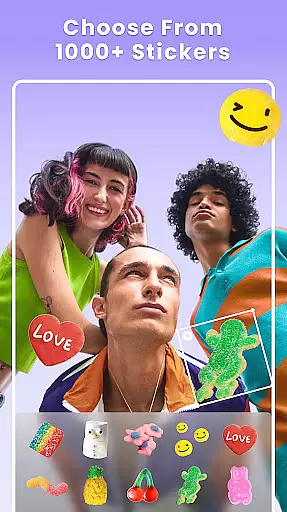
FunPic stands out with its extensive range of features tailored for creative expression. Users can access more than 300 customizable layouts, including standard grids and special shapes, ensuring every collage is unique. The app's library includes thousands of stickers, backgrounds, and templates updated weekly, providing fresh content for every project. Additionally, the ability to adjust photo ratios makes it ideal for social media platforms like Instagram and WhatsApp.
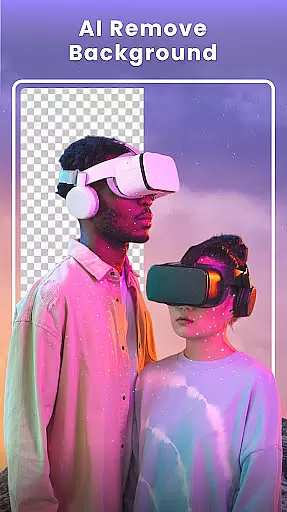
One of the app's key innovations is its AI-driven tools, which simplify complex editing tasks. The AI background remover allows users to erase and replace backgrounds seamlessly, while the object removal feature helps eliminate unwanted distractions from images. These advanced functionalities, combined with artistic filters and drawing tools, empower users to produce polished, professional-looking collages and videos without needing extensive editing skills.
Real-time capture and preview functionality is essential for any photography app as it allows users to see exactly what their final output will look like before they commit to taking a photo. This feature ensures that users can make necessary adjustments on the fly, thus improving the overall quality of their images.
Photo Collage Maker - FunPic offers an extensive real-time preview system that lets users experiment with different layouts, filters, stickers, and text options. As users modify their collages, they can instantly see how these changes affect the final composition, ensuring that their creative vision is accurately represented.
The benefit of this real-time interaction is significant for users who want to produce professional-looking collages without the need for post-processing. It saves time and effort by allowing immediate adjustments, which is particularly useful when combining multiple photos or adding decorative elements.
Ultimately, the real-time capture and preview features in Photo Collage Maker empower users to create visually stunning collages with confidence. The ability to visualize changes instantly greatly enhances the user experience, making the process both intuitive and enjoyable.
AI beauty and enhancement features have become increasingly popular in photography apps, offering users the ability to refine and beautify their images with minimal effort. The challenge lies in maintaining the natural appearance of the subjects while enhancing their best features.
FunPic incorporates advanced AI algorithms that intelligently apply enhancements such as skin smoothing, blemish removal, and facial feature refinement. These tools are designed to preserve the authenticity of the original image, ensuring that edits look realistic rather than over-processed.
Users benefit from this technology by achieving polished yet genuine-looking results. Whether preparing images for social media or personal albums, the enhancements provide a professional touch that elevates the visual appeal without compromising the image's integrity.
In conclusion, the AI beauty and enhancement capabilities of Photo Collage Maker strike a balance between aesthetic improvement and natural presentation. This ensures that users can achieve high-quality, visually pleasing images that retain their original charm and character.
User-friendly interface
Extensive layout options
AI-powered editing tools
Regular content updates
Versatile design features
Limited free content
Subscription required
Ads in free version
Occasional bugs
Learning curve for new users

How would you look like with a differently shaped nose, chin or lips?
 3.90
3.90
Add Watermark - Sign your pictures with a text or logo. Effective, quick, easy!
4.50
Create Business Headshots, Polaroid Filter, Retake Photos,Profile Pics,AI Photos
4.50
Gallery Slideshow is slideshow maker app for slideshow from your gallery photos.
3.90
Professional quality photo edits with the new Snapseed.
4.00
Pro version: AR sun/moon tracker for any date. Tool for photographers & planners
4.90
A light meter for true photographers.
4.20
Remote control the phone camera shutter from your smartwatch and take a picture
1.60
Discover & download millions of art for The Frame TV or Hisense CanvasTV
4.60
Photo editor: AI filters, photo enhancer, pic collage maker, AI art generator.
4.80
Easily view, share, delete photos with Gallery.
4.70
Light-weight Media Gallery app for Android made with Jetpack Compose
4.60
Edit like a pro with Hypic. Apply filters, AI effects, & magic touch.
4.40
Professional photography on your mobile phone
4.20
Catch sunlight, sunrise sunset times and sun phases with the AR sun tracker.
4.10
Photo editor: face & body editor, beauty cam, filters and quality enhancer.
4.00
Photobooth mini FULL app will allow you to add more fun to your parties
4.00
Professional video recording application with manual controls for filmmakers!
2.80
Over 800 film simulation recipes for Fujifilm. Black Friday Offer!
4.4


User Reviews