
Solocator is a professional GPS camera app designed for fieldwork and photo documentation across various industries. It allows users to overlay critical metadata such as location, direction, altitude, date, and time directly onto photos. With the optional Industry Pack, users can capture additional field notes like project names and descriptions, making it ideal for professionals who require detailed and organized photo records.
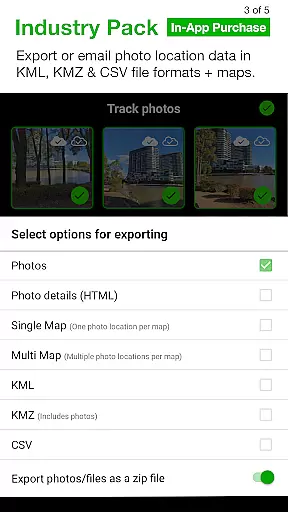
The app supports both front and back cameras, includes advanced features like UTM/MGRS coordinates, tilt and roll angles, and street address overlays. Solocator also offers cloud storage integration, batch editing, and multiple export options, including KML, KMZ, and CSV formats. Its comprehensive feature set ensures that users can document, organize, and share their fieldwork photos with precision and ease.
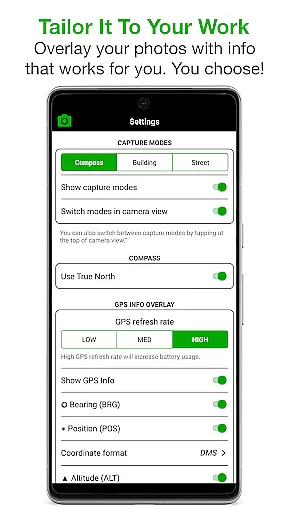
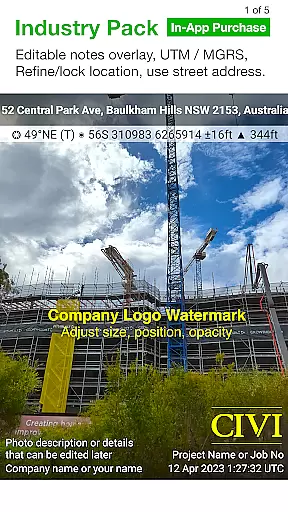
Solocator stands out with its extensive customization options for photo overlays. Users can select from a wide range of data points to stamp on their images, including GPS positions in multiple formats, compass direction, altitude, tilt and roll angles, and even local and UTC time zones. The optional Industry Pack enhances these capabilities by adding editable note fields, custom export filenames, and street address functionality.
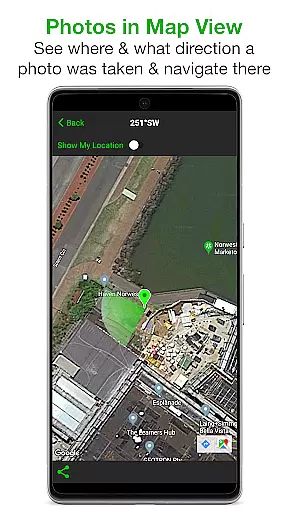
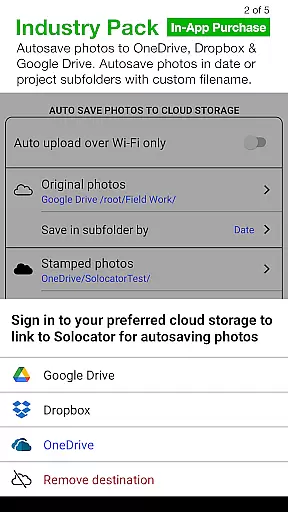
Additional features include autosaving photos to the camera roll with or without overlays, sorting and sharing options, and map-based navigation to photo locations. The app also supports cloud storage services like Google Drive and Dropbox, enabling automatic backups and easy access to files. These robust features make Solocator an indispensable tool for professionals who need reliable and detailed photo documentation.
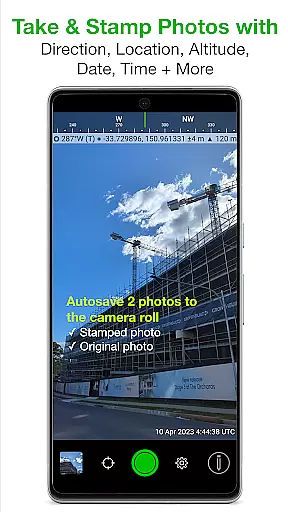
Solocator excels in real-time capture and preview, ensuring that every photo taken is immediately overlaid with crucial metadata. This feature is particularly valuable for professionals who require accurate documentation of fieldwork.
The app provides live previews of location data, compass direction, altitude, and tilt angles directly on the camera screen. Users can customize these overlays to display only the information they need, streamlining their workflow and ensuring precision in every shot.
With support for both front and back cameras, Solocator offers flexibility for various use cases. Whether capturing geotagged evidence or documenting project progress, users benefit from the immediacy and accuracy of real-time data overlay.
This functionality not only enhances productivity but also serves as a reliable tool for industries relying on photographic proof, such as construction, surveying, and environmental monitoring.
While primarily focused on professional photo documentation, Solocator incorporates features that enhance image quality without compromising authenticity. The app's enhancement tools maintain the natural appearance of photos while improving clarity and detail.
Through its Industry Pack, users can refine GPS locations and lock asset positions, ensuring that each photo accurately represents its geographical context. These enhancements are subtle yet effective, preserving the integrity of the original scene while providing additional contextual information.
The ability to autosave two versions of each photo u2013 one with overlays and one without u2013 allows users to maintain both enhanced and original images. This dual-saving feature supports professional standards where unaltered documentation may be required alongside enhanced versions.
By balancing enhancement with authenticity, Solocator ensures that all photos remain credible evidence while benefiting from improved visual quality and additional metadata that adds value to professional documentation processes.
User-friendly interface
Comprehensive metadata options
Industry Pack enhances functionality
Cloud storage integration
Batch editing capabilities
Industry Pack is paid
No compass on some devices
Occasional GPS inaccuracies
Interface may overwhelm new users
Limited free features

Remote control of the phone camera from your Wear OS smartwatch
 3.70
3.70
Effortlessly organize, view and share your photos & videos with Gallery app!
4.40
Create funny photos and videos with the popular Time Warp Scan filter.
4.90
Professional video recording application with manual controls for filmmakers!
2.80
The #1 app for B&W film developing featuring an advanced darkroom timer.
4.10
USB Storage Access for Photos, Videos, Music and Documents
3.80
See your baby AI baby face generator AI baby maker Face generator babymaker fun!
4.70
Transform Photos: Edit, Beautify and Craft Memories & Make Collages!
4.10
Edit photos with the picture generator: PS2 & AI Clay filters, cartoon effects.
4.50
Gallery show photo, video, slideshow, is perfect 3D effect private photo albums.
4.80
Easily view, share, delete photos with Gallery.
4.70
Search, tag and rate your way to an organized image gallery
4.40
RAW video capture with advanced controls
4.40
Create AI Photos, Improve and restore quality of blurry, old or damaged pics.
4.20
Catch sunlight, sunrise sunset times and sun phases with the AR sun tracker.
4.10
Photobooth mini FULL app will allow you to add more fun to your parties
4.00
How would you look like with a differently shaped nose, chin or lips?
3.90
Over 800 film simulation recipes for Fujifilm. Black Friday Offer!
4.1
Add a dreamy vibe to your selfies and videos with soft style filters
4.1


User Reviews