
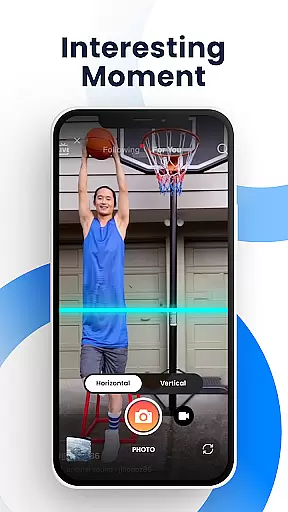
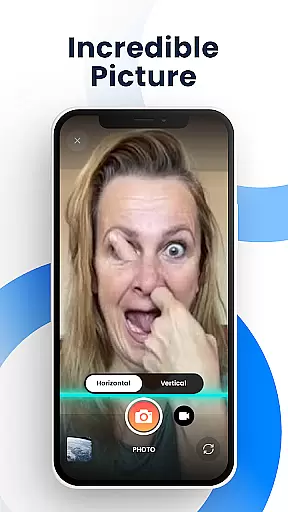
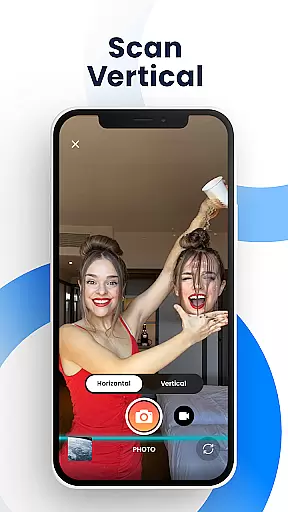
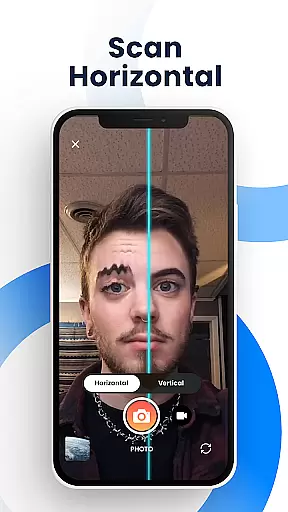
Time Warp Scan - Face Scanner is an innovative photography app that brings the popular TikTok-like time warp scan effect to your fingertips. This free application allows users to create unique and funny videos and pictures by applying a special filter that transforms faces and objects as the 'blue line' passes over them. The app's core functionality lies in its ability to freeze images at specific moments, creating visually striking and humorous content that has become a viral sensation on social media platforms.
The application stands out with its versatile features including adjustable scan directions, customizable blue line speed, and various effects that can alter facial features or object shapes. Users can experiment with modern art-style photos, elongate body parts, or create surreal imagery using the slit-scan effect. These capabilities make it especially appealing for younger audiences who are active on social media and looking to create engaging content for platforms like TikTok, Instagram, and Snapchat.
Perfect for content creators and social media enthusiasts, Time Warp Scan offers a powerful toolset for producing creative visual content without limitations. Whether you're aiming to participate in viral challenges or simply want to impress your friends with unique photo manipulations, this app provides endless possibilities for artistic expression and entertainment.
Time Warp Scan - Face Scanner distinguishes itself through a comprehensive set of features designed to maximize creativity and user engagement. The app offers both photo and video filters, allowing users to apply the signature time warp scan effect across different media formats. Its sophisticated algorithm enables precise control over the 'blue line' movement, which can be adjusted vertically or horizontally, giving users complete creative freedom to produce customized content.
Among its notable features is the ability to modify brightness settings, adjust scanning speed, and choose between different scan directions by simple swipe gestures. The app maintains professional quality output by providing watermark-free results, ensuring that your creations remain pristine and ready for sharing. Additionally, the face transformation feature lets users manipulate facial features in real-time, creating bizarre and entertaining distortions as the scan bar moves across the frame.
What truly sets Time Warp Scan apart is its seamless integration with popular social media platforms. Users can directly share their modified images and videos to TikTok, Snapchat, Facebook, Instagram, and other applications. The app's intuitive interface makes these advanced features accessible to all users, regardless of their technical expertise. With support for saving high-quality media files and easy sharing options, Time Warp Scan empowers users to become active participants in current social media trends while maintaining complete creative control over their content.
Real-time capture and preview functionality is essential for photography apps like Time Warp Scan - Face Scanner. This feature allows users to see the effects applied to their images or videos instantly as they are being captured.
The app provides a unique time warp scan effect that freezes the image when the blue line passes, giving users immediate visual feedback. This real-time preview ensures that users can adjust their poses or settings to achieve the desired outcome before capturing the final image or video.
With options to change the direction of the scan and adjust the speed of the blue line, users have complete control over how the effect is applied. This level of customization enhances the user experience by allowing them to fine-tune the creative process in real time.
Ultimately, real-time capture and preview empower users to create content that stands out on social media platforms. By offering instant feedback and adjustments, the app helps users produce high-quality, engaging content that captures attention and sparks conversations.
AI beauty and enhancement features are increasingly popular in photography apps, aiming to improve the aesthetic quality of photos while maintaining a natural look. Time Warp Scan - Face Scanner incorporates such enhancements subtly into its filters without making the results appear overly processed.
This app uses advanced algorithms to modify facial features gently, such as elongating fingers or reshaping heads, which adds an element of fun without distorting reality too much. The AI works behind the scenes to ensure that these transformations blend seamlessly with the original image, preserving authenticity.
Users can also alter brightness settings and choose from various effects, ensuring their creations remain vibrant yet believable. These subtle enhancements contribute to more appealing visuals without sacrificing the genuine essence of the subject matter.
By focusing on natural-looking enhancements, Time Warp Scan - Face Scanner enables users to craft images that are both entertaining and true-to-life, enhancing their storytelling capabilities on social networks while keeping the viewer's engagement authentic and meaningful.
User-friendly interface
Versatile editing tools
Real-time effects preview
High-quality output
Extensive sharing options
Limited advanced features
Occasional processing delays
Basic tutorial information
Ads may interrupt workflow
Device compatibility issues

A collection of tools and reference tables for DPs, ACs, DITs and Operators.
 4.70
4.70
All-in-One Editor & AI Photo Enhancer, Collage, Cartoonify, Funny Stickers & BGS
4.10
Pet Camera
3.70
Photo prints, cards, & gifts at Walgreens. Easy ordering & fast local pickup !
4.80
Fit multiple photos on one post. Create carousels & scroll layouts for Instagram
4.50
Professional camera app that brings DSLR manual photography controls to Android.
4.20
Catch sunlight, sunrise sunset times and sun phases with the AR sun tracker.
4.10
Enhance, upscale, and transform your images — on your device, without limits
4.70
Try an anime version, cartoon yourself, and generate AI hug or aging videos!
3.70
Create funny photos and videos with the popular Time Warp Scan filter.
4.90
Collage your moments in one tap: 1000+ layouts, filters, stickers, and texts.
4.90
AI Photo Editor with 100+ Filters, Effects! Remove BG, Retouch & Photo Enhancer.
4.80
Easily view, share, delete photos with Gallery.
4.70
Create collages easily! Nice pic collage maker & background eraser for Instagram
4.50
All-in-One Editor & AI Photo Enhancer, Beautify & Retouch, Collage, Cartoonify
4.20
AI-powered video creator by MiniMax - Where ideas meet cinema
4.20
USB Storage Access for Photos, Videos, Music and Documents
3.80
Raw Image Viewer. Gallery with support of raw images (.cr3, .cr2, .nef, .raf).
2.00
HD Photo gallery and photo manager to edit, hide private photos, videos & albums
4.4


User Reviews