




XPlay Browser is a versatile mobile application designed for users seeking a fast, private, and video-focused browsing experience. This app combines speed, privacy protection, and seamless video tools into one lightweight package. With its modern interface and efficient performance, XPlay Browser ensures smooth navigation even on older devices while offering features like Private Browsing Mode to safeguard user data.
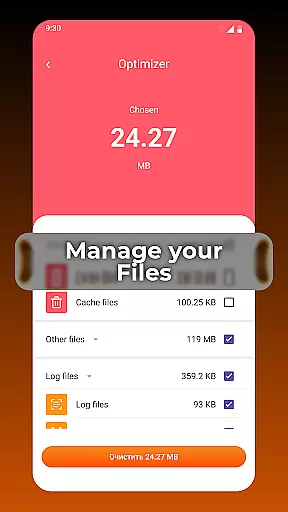
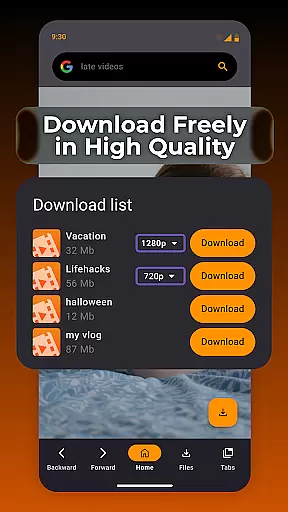
One of the standout capabilities of XPlay Browser is its support for easy video downloads from compatible websites, allowing users to save and watch content offline without requiring additional apps. Additionally, it includes smart file management tools that help keep device storage organized by identifying unnecessary files. Whether you're streaming videos or managing your device efficiently, XPlay Browser provides an all-in-one solution tailored for convenience and privacy.
XPlay Browser stands out with its comprehensive set of features designed to enhance both browsing speed and user privacy. The app's Fast & Smooth Browsing functionality ensures quick page loads through a lightweight design that minimizes resource usage, making it ideal for devices with limited processing power. Its clean UI further enhances the browsing experience by providing intuitive controls and effortless navigation.
Privacy is another cornerstone of XPlay Browser, thanks to its robust Private Browsing Mode. This feature eliminates browsing history and restricts permission usage, ensuring secure sessions without compromising confidentiality. For multimedia enthusiasts, the Easy Video Downloads option allows users to save videos directly from supported websites, enabling offline playback anytime. Furthermore, the Smart File Management system helps maintain device efficiency by organizing files and highlighting redundant data, contributing to better overall performance.
Video format compatibility is a crucial feature for any video player, ensuring that users can enjoy content in various formats without technical barriers. XPlay Browser excels in this area by supporting an extensive range of video formats, making it versatile and user-friendly.
The app's advanced decoding capabilities allow seamless playback of both common and less-known video formats. Whether you're streaming online or playing locally stored files, XPlay Browser ensures smooth performance across different media types.
For users, this means freedom and flexibility in consuming multimedia content. You no longer need to worry about converting file formats or downloading additional codecs. XPlay Browser simplifies your video experience by removing compatibility issues.
This comprehensive support for multiple video formats enhances the overall utility of the browser. It positions XPlay Browser as an all-in-one solution for web browsing and video playback needs.
AI-powered editing features represent the cutting-edge integration of artificial intelligence into video processing, offering users unprecedented convenience and efficiency. XPlay Browser incorporates these smart tools to enhance its video-focused functionalities.
Through machine learning algorithms, the app can automatically optimize video quality, adjust settings based on content type, and even suggest edits for better viewing experiences. These AI-driven enhancements work behind the scenes to improve every aspect of video handling.
Users benefit from time-saving automation and professional-grade editing options without requiring technical expertise. The intelligent system adapts to individual preferences while maintaining optimal performance standards.
By implementing AI-powered editing features, XPlay Browser sets itself apart from conventional browsers. This technological advantage not only streamlines video management but also elevates the entire browsing experience to new levels of sophistication.
Fast page loading
Private browsing
Video download
File management
Battery efficient
Limited video sites
No sync feature
Basic UI design
Few customization
Offline only

KMPlayer Plus (Divx Codec) officially support Divx codec.
 4.30
4.30
Stream Web Videos to Chromecast, Samsung, LG, Sony, Roku, Fire TV, DLNA + more
4.00
Download website videos fast&privacy
4.40
Fast & easy HD video downloader for all formats, support 4K playback & download.
4.60
Add date and time watermark to photos and videos
4.50
This app is an emulator of some specific IPTV boxes
3.50
Browser for Fire TV to stream webvideos, online movies, livestreams in HD
4.40
Livestream, news, & gaming content. Watch, chat, and upload. Join Rumble today!
3.80
Viddo: Generate Action Figure, AI Anime, AI kiss, AI hug Video from image & text
4.40
A Quick and Pro Video Editor
4.70
Screen recorder with audio to take live videos & Screenshot in high quality!
4.70
Search & download videos from net with all video downloader, auto-detect & safe.
4.60
Fast, private downloading, video saving, social media
4.50
HD video maker with no watermark, no ads & vlog maker with music, PIP, text
4.50
KineMaster, Your Ultimate Video Editor!
4.40
IPTV-Smarters Player Pro M3U - Watch Live Stream TV Channels with Chromecast
4.00
Make your own Animations, Video and Photo Edits, Visual Effects, and more!
4.00
IPTV Player - Watch live TV from m3m & m3u8 playlist, stream IPTV on mobile
3.30
Client application for NextPVR software
3.00


User Reviews