

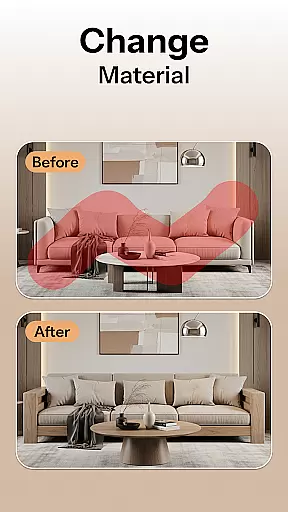
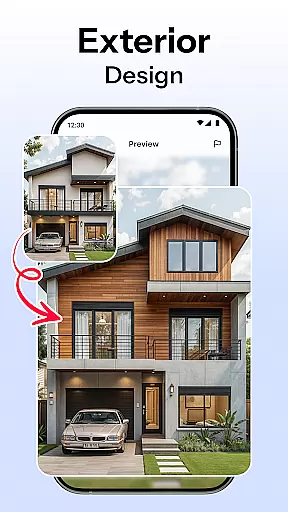

HomeMagic is an innovative AI-powered interior design application that transforms the way users approach home decoration. The app's core functionality lies in its ability to instantly generate professional-grade interior designs by simply uploading a photo of any room. Using advanced artificial intelligence, HomeMagic can suggest multiple design styles ranging from Modern and Retro to Bohemian and Cyberpunk, allowing users to visualize various aesthetic possibilities for their spaces.
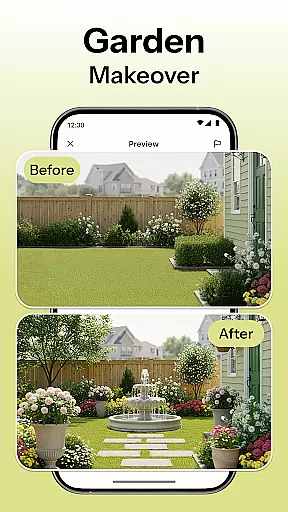
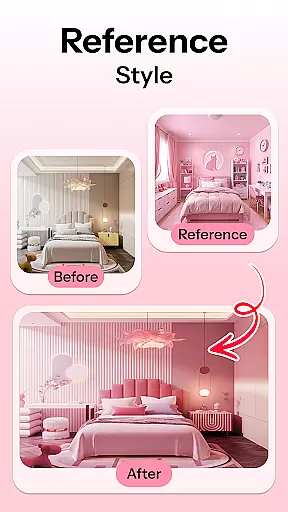
Beyond basic design generation, HomeMagic offers practical tools such as smart furniture layout planning, decor ideas with customizable style filters, and before-and-after comparisons. These features enable users to optimize space utilization, experiment with color schemes, and preview realistic room makeovers. Whether planning a full-scale renovation or refreshing a small corner, this app caters to homeowners, renters, and design professionals alike, providing an accessible platform to bring creative visions to life.
The true value of HomeMagic lies in its ability to save time and resources by offering a risk-free way to explore design options. Users can create personalized galleries of their favorite designs, share them with others, or export high-quality images for further use. This makes it an invaluable tool for anyone involved in home improvement projects or interior design work.
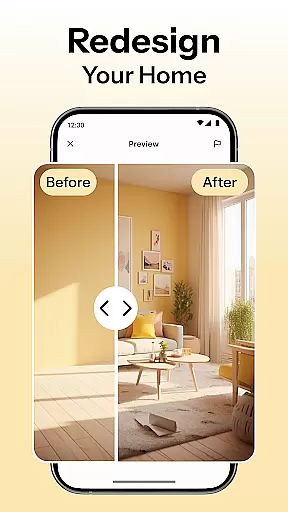
HomeMagic distinguishes itself through a comprehensive suite of AI-driven design tools tailored to meet diverse user needs. One standout feature is the AI Interior Design Generator, which uses machine learning algorithms to analyze uploaded photos and produce photorealistic renderings of redesigned spaces. This process takes mere seconds and supports a wide array of design aesthetics, ensuring there's something for every taste.
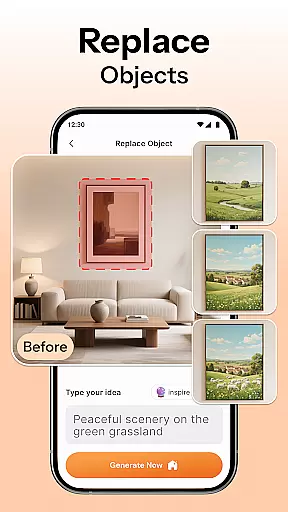
In addition to design generation, the app includes a Smart Furniture Layout Planner that optimizes spatial arrangements by suggesting ideal placements for furniture, lighting fixtures, and decorative elements. The Room Makeover Preview function allows users to see potential transformations in vivid detail, while the Home Decor Ideas & Style Filters let them experiment with different textures, colors, and furnishings. Each feature is designed to enhance creativity without overwhelming the user.
Another notable aspect is the Before & After Comparison tool, which provides side-by-side visuals of the original and redesigned spaces. This helps users make informed decisions about their projects. Furthermore, the ability to save and organize designs into personal galleries adds a layer of convenience, making it easy to revisit and refine ideas over time. These robust features collectively position HomeMagic as a leader in AI-assisted interior design solutions.
When it comes to designing your dream space, having access to a comprehensive set of creative tools is essential. HomeMagic offers an extensive suite of features that cater to all your interior design needs.
The app's AI Interior Design Generator allows you to upload photos and transform them into various design styles such as Modern, Retro, Tropical, Bohemian, Vintage, and Cyberpunk. This versatility ensures that no matter your taste, there's a style option for you.
Additionally, the Smart Furniture Layout Planner optimizes your space by suggesting layouts for furniture, lighting, and wall art. The Room Makeover Preview feature lets you visualize different rooms with realistic design samples before making any commitments.
With HomeMagic, users can experiment with wall colors, flooring textures, and trendy furniture sets using the Home Decor Ideas & Style Filters. This complete toolset empowers users to explore countless possibilities and find their perfect combination.
A crucial aspect of any design application is its ability to adapt to various formats and sizes, ensuring that creativity isn't hindered by technical limitations. HomeMagic excels in providing canvas and format flexibility.
Users can take a photo of their space and instantly receive AI-generated designs tailored to their specific room dimensions. This feature not only enhances accuracy but also provides a realistic preview of potential makeovers.
The Before & After Comparison tool further highlights this flexibility by allowing users to view their current space alongside the AI-designed version. This comparison helps in making informed decisions about design changes.
Moreover, HomeMagic enables users to save and organize their designs in high quality, which can be shared with friends or interior designers. This ensures that whether you're a homeowner, renter, or professional designer, the app adapts to your workflow and requirements seamlessly.
User-friendly interface
Wide range of styles
High-quality renderings
Smart layout suggestions
Easy sharing options
Limited free features
Subscription required
Occasional glitches
Steep learning curve
Device compatibility issues

Convert image to JPG PNG HEIC PDF, support almost all kinds of image formats
 4.70
4.70
Digital, Abstract, Classic - all types of color wheels in one app!
4.60
Minecraft & Roblox Clothes
4.70
Art of Combination Wear OS Watch Faces
3.30
Mobile pixel art editor. Simple. Fast. Portable.
4.80
Resize photos and print photos in exact size with our powerful photo printer!
3.80
Your homescreen as an elegant glass with customized blur, lighting, and visuals.
3.70
Multiplayer Drawing game, Coloring, Painting・Sketch, Handwriting・Paint, draw
4.30
All-in-One art, logo & collage maker. Design photos and edit video backgrounds
4.80
Photo stitcher for automatically screenshot stitching into a long screenshot
4.70
Get an overview over all your embroidery threads, projects and more.
4.60
Draw, fidget, and spin glow art! Relax and express your creativity with a finger
4.60
Digital illustration drawing & painting pad app to paint Anime and Manga art
4.50
Kling AI is an image and video generation and editing studio powered by AI.
4.50
Nano Banana AI Image Generator, Anime Filter, AI Portrait, AI Photo Generator
4.30
Beauty Camera - Selfie Camera is the ultimate beauty camera and selfie app
4.30
Custom Character Creator & PFP Maker!
4.20
Unleash Your Creativity with Draw Cartoon - AR Drawing App
4.10
Premium version of Shimeji-ee app with no ads & no limit active shimeji
4.1


User Reviews