
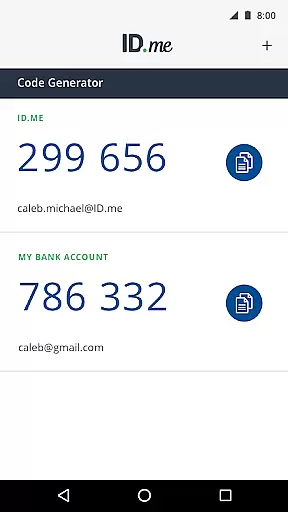
ID.me Authenticator is a productivity app designed to enhance account security through Two Factor Authentication (2FA). It generates 6-digit Time-Based One-Time Passwords (TOTP) and provides PUSH notification-based authentication. The app ensures secure access to online accounts on websites supporting 2FA, making it an essential tool for safeguarding digital identities.
With its TOTP code generator, users can produce verification codes without needing a network or cellular connection. Additionally, the PUSH-based authentication allows users to approve login attempts via notifications sent directly to their devices. This dual approach not only strengthens security but also offers convenience by streamlining the authentication process.
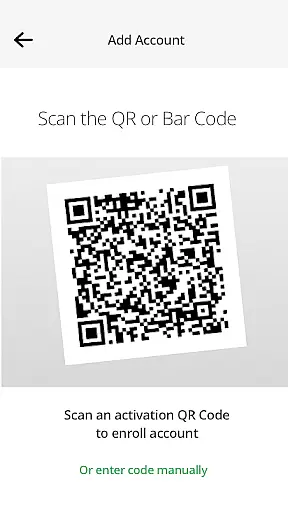
The ID.me Authenticator stands out with its robust set of features tailored for secure and efficient account access. As a TOTP Code Generator, it creates 6-digit codes that serve as an additional layer of security when logging into accounts. Users can configure this feature by scanning a QR code during setup, ensuring they always have access to verification codes even without internet connectivity.
For those preferring a seamless login experience, the app offers PUSH-based authentication. After entering their username and password, users receive a push notification on their device which they can approve with a single touch. This method significantly reduces the time and effort required for secure logins while maintaining high-security standards.
Both features are designed to work in tandem, providing flexibility and reliability. Whether you're at home or traveling, ID.me Authenticator ensures your accounts remain protected against unauthorized access, giving peace of mind in an increasingly digital world.
In the realm of productivity, core task management is pivotal for organizing and prioritizing tasks efficiently. ID.me Authenticator excels in this area by simplifying the Two Factor Authentication process, ensuring that users can focus on their primary tasks without distraction.
The app generates 6-digit Time-Based One-Time Passwords and facilitates PUSH notification-based one-touch authentication. This streamlined approach to task management allows users to maintain security across multiple platforms without complicating their workflow.
By integrating TOTP code generation and push notifications, ID.me Authenticator removes the need for network or cellular connections, making the authentication process seamless and efficient. Users can thus manage their online security as a background task, enhancing overall productivity.
Cross-device synchronization is essential for maintaining consistency and reliability across different platforms. ID.me Authenticator ensures that your authentication data is synchronized reliably across all your devices, providing a seamless user experience.
Whether you're using the app as a TOTP code generator or for push-based authentication, ID.me Authenticator keeps your account secure and up-to-date. The ability to enroll and connect the app to your account via QR code scanning at setup time guarantees that all devices are aligned with current security protocols.
This reliable synchronization means that users can switch between devices without compromising their security settings. As a result, ID.me Authenticator not only boosts productivity but also enhances the robustness of your digital identity management.
Enhanced Security
User-Friendly Interface
Offline Access
Quick Authentication
Free to Use
Limited Customization
Requires Initial Setup
Dependent on Device
No Backup Codes
QR Code Only

Experience real multitasking on your Android!
 4.00
4.00
Create study competitions, track your hours, and stay consistent with friends
4.1
Unlock AutoNotification
4.00
We're working to become the best machining app on the market! www.cncdirt.com
4.80
CalenGoo is a very flexible and feature-rich calendar app
4.40
Make apps & sites with natural language prompts
4.10
Best Tool for the professionals Electrician, Electrical contractors, etc.
4.90
Use powerful, industry-leading AI tools to generate visual charts from any data
4.80
AI Chatbot and AI writing assistant powered by ChatGPT.
4.60
Great calculator for Android named one of USA TODAY's "25 Essential Apps".
4.90
A beautiful digital clock with autostart and many other functions
4.70
Functional QR scanner and barcode reader that requires little storage space.
4.60
Lightweight PDF, Word, Excel reader.
4.60
This small app MUST BE INSTALLED after purchase, else license won't work
4.40
Automates browsing any website and notifies you of important changes or events
4.30
Professional calendar app for Google Calendar, MS Outlook & Exchange
4.20
Intelligent AI Assistant
4.10
Find and delete junk files & block unwanted notifications & manage files
3.70
A simple, portable logger for POTA, SOTA, Field Day, and more
4.0


User Reviews