
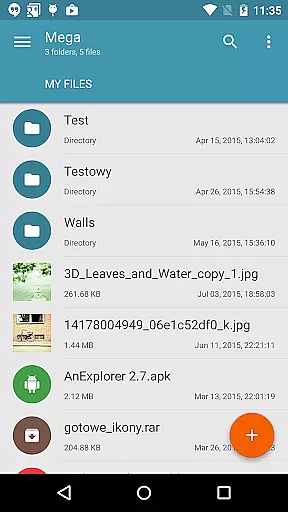
Mega Plugin for Solid Explorer is a productivity-focused extension that seamlessly integrates with your Solid Explorer file manager. This plugin enables direct access to your Mega cloud storage account, allowing you to manage files efficiently without switching between applications. With comprehensive functionality including file management, media streaming, and easy navigation, it serves as an essential tool for users seeking to streamline their cloud-based workflows.
The plugin supports all basic file operations such as copying, moving, renaming, downloading, and uploading files. Additionally, it allows users to stream music and videos directly from their Mega accounts. Whether you're organizing documents or accessing multimedia content on the go, this app ensures smooth performance across both personal and professional use cases.
This plugin stands out due to its robust feature set tailored for efficient cloud storage management. It provides seamless integration with Mega's secure cloud service through an intuitive interface within Solid Explorer. Users can perform various actions like creating new folders, transferring files between local and cloud storage, and renaming items effortlessly.
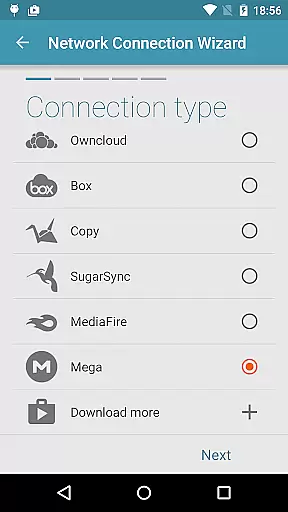
One of the key highlights is its ability to handle media files. You can stream music and videos directly without needing to download them first. The setup process is straightforward: simply add a cloud connection in Solid Explorer, select Mega, enter your credentials, and start managing your files immediately. These capabilities make it ideal for individuals who require quick and reliable access to their digital assets stored in the cloud.
Task management is a critical aspect of productivity applications, enabling users to organize and execute their work efficiently. The Mega Plugin for Solid Explorer exemplifies this by allowing users to perform a wide array of file operations directly within their Mega cloud storage.
This plugin supports essential tasks such as copying, moving, renaming, and viewing files, which are fundamental for effective file management. These capabilities ensure that users can maintain an organized workspace without needing to switch between multiple applications.
Additionally, the ability to download and upload files enhances workflow continuity. Users can seamlessly transfer files between their local device and Mega cloud storage, ensuring that important documents and media are always accessible.
The plugin's integration with Solid Explorer streamlines these tasks, offering a cohesive user experience that maximizes productivity. By centralizing these functions, users save time and reduce the complexity often associated with managing cloud storage services.
Cross-device synchronization is vital for users who operate across multiple devices and need reliable access to their data. The Mega Plugin for Solid Explorer ensures that files are consistently synchronized between your local device and Mega cloud storage, providing peace of mind and seamless transitions.
By supporting real-time updates, this plugin allows users to make changes on one device and see those updates reflected immediately on others. This feature is particularly beneficial for individuals who rely on up-to-date information to make informed decisions quickly.
Moreover, the plugin's robust connection processu2014where users tap the + button, choose 'Cloud connection,' select the Mega option, and enter their login credentialsu2014ensures a secure and stable link to their cloud storage. This reliable setup minimizes the risk of data loss or sync failures.
Overall, the Mega Plugin for Solid Explorer offers dependable cross-device synchronization, empowering users to manage their digital lives effortlessly and efficiently, regardless of the device they are using.
Seamless integration
Comprehensive file management
Media streaming support
User-friendly interface
Secure cloud access
Limited to Mega users
Requires Solid Explorer
No standalone version
Premium account recommended
Occasional sync delays

QuickBooks Workforce lets teams view pay info and track time in one place.
 4.70
4.70
Smart PDF reader & editor to view, organize and manage PDF documents easily.
3.70
Secure, fast, open-source, Remote Desktop Client for Windows and Linux with SSH
4.60
Todo reminder
4.10
All in One PDF Reader: Manage, Read and Edit your Documents
4.20
ID.me Authenticator is a simple and free Two Factor Authentication solution
3.50
A Pixel Art watchface inspired by other iconic 90s designs for Wear OS devices!
4.40
Scientific calculator for Android - looks and operates like the real thing!
4.90
Intelligent AI Assistant
4.10
Understand anything with a personalized AI research assistant
4.80
Mind Map and brainstorm, note taking and idea collection
4.80
aCalendar+ makes your day, week and month
4.70
Okta MFA
4.70
Experience Reading - Night Mode for Documents
4.40
A lightweight JSON & XML files creator, editor and viewer (Premium Version)
4.40
Font maker keyboard with your own handwriting
4.10
Unlock AutoNotification
4.00
Ads Free App! Editor, Hide File, Copy, Move, Delete and Rename.. all facility av
1.70
A comprehensive suite of tools designed specifically for Lactation Consultants
4.1


User Reviews