


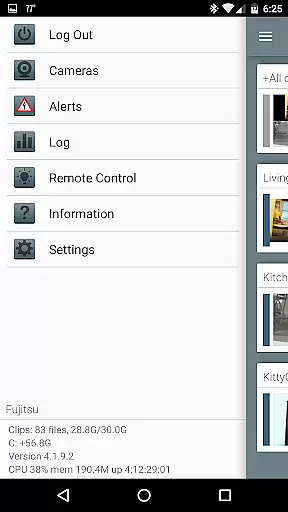
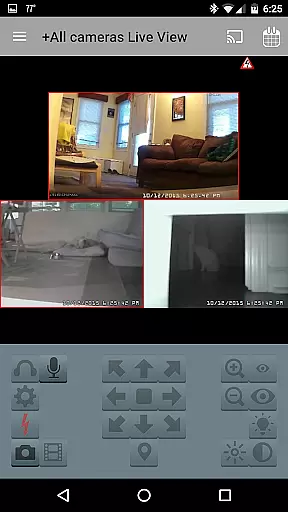

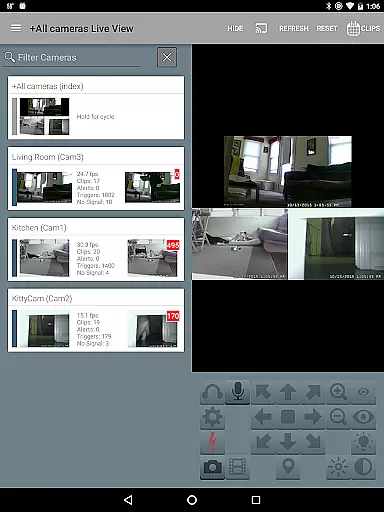
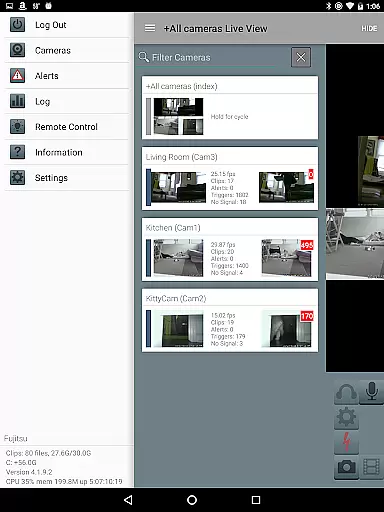
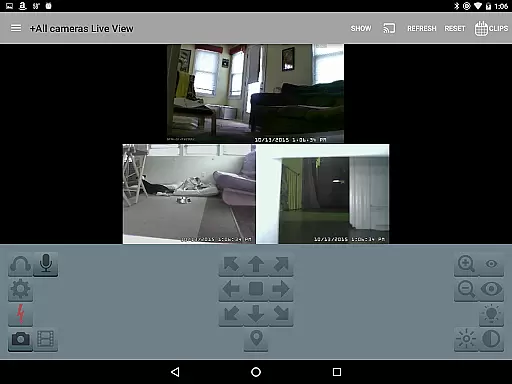
Blue Iris is a specialized client application designed for users who have the Blue Iris Windows PC software installed. This app serves as a secure gateway to your home camera network, eliminating the need to expose individual cameras directly to the Internet. By connecting through a session-based protocol, it ensures that your data remains protected without transmitting passwords in plain text.
The app's core functionality revolves around providing comprehensive control over your Blue Iris setup. Users can manage multiple installations, control traffic signals, and receive instant Android push alerts for triggered cameras or critical status updates. With support for fast H.264 streaming, PTZ (pan-tilt-zoom) controls, audio communication, and remote DIO signal management, Blue Iris offers an all-in-one solution for advanced video monitoring needs.
Whether you're reviewing recorded footage at up to 64x speed or selectively deleting files from your Blue Iris PC, this app proves invaluable for both casual surveillance and professional security operations. Its intuitive interface allows easy navigation between cameras while maintaining robust performance across various devices.
Blue Iris stands out with its extensive feature set tailored specifically for video monitoring enthusiasts. One of its key strengths lies in its ability to securely connect to multiple Blue Iris installations without compromising system integrity. The app employs a session-based protocol that prevents unauthorized access by avoiding plain-text password transmission.
Among its notable features are advanced camera controls such as PTZ manipulation, IR adjustments, and two-way audio communication for supported devices. These capabilities allow users to interact with their surveillance system remotely while maintaining high-quality H.264 video streaming. Additionally, the app provides convenient tools for managing recordings - from fast playback options up to 64x speed to selective file deletion directly from the Blue Iris PC storage.
Another significant advantage is the integrated alert system that delivers real-time Android push notifications when cameras are triggered or when there are important status updates. This ensures that users stay informed about critical events as they happen. The app also enables precise control over various system parameters including traffic signal icons, schedule configurations, and profile selections, making it an indispensable tool for sophisticated home security management.
Blue Iris stands out in video format compatibility, ensuring users can work with a wide range of camera types and brands. The app supports H.264 streaming, which is known for its efficiency and widespread adoption in the industry.
This compatibility allows users to connect and manage multiple cameras seamlessly within a single platform. Regardless of the camera's origin, Blue Iris provides a unified interface for all video streams.
Furthermore, the ability to review recordings at up to 64x speed without compromising quality showcases the app's robust handling of different video formats. This feature is crucial for quickly analyzing events or incidents.
While Blue Iris focuses primarily on video monitoring and management, it incorporates AI-powered features that enhance user interaction and control. The app enables users to receive Android push alerts when specific triggers occur, such as motion detection or critical status updates.
Additionally, Blue Iris offers advanced PTZ (pan-tilt-zoom) control for compatible cameras, allowing users to adjust camera angles remotely. This feature, combined with IR control and two-way audio communication, reflects an intelligent integration typical of AI-enhanced systems.
The app also facilitates efficient navigation through intuitive tapping and swiping gestures, making camera management straightforward and responsive. These smart features collectively contribute to a more dynamic and interactive video management experience.
User-friendly interface
Secure connection protocol
Comprehensive camera controls
Real-time push notifications
Multi-installation management
Requires Windows PC software
No standalone functionality
Limited to Blue Iris ecosystem
Complex initial setup
Dependent on network stability

IPTV-Smarters Player Pro M3U - Watch Live Stream TV Channels with Chromecast
 4.00
4.00
Cast Videos from Web Browser, IPTV to Roku, Chromecast, DLNA, Smart TV +more
4.60
Watch a large amount of high-definition short drama content
4.60
Video player with powerful streaming playback and various convenient features.
2.10
Download website videos fast&privacy
4.40
Cast to Smart TV, Fire TV. Cast video, photo - Fast & Stable!
3.90
Add date and time watermark to photos and videos
4.50
#1 Torrent App on Android ** No Ads Ever + Battery Saver **
4.80
Viddo: Generate Action Figure, AI Anime, AI kiss, AI hug Video from image & text
4.40
Seamlessly connect and control your smart devices, anytime, anywhere with ease.
4.60
Support 1000+ Video Format, Subtitle Download, mp3 & Background Play, Cast On TV
4.60
Fast & easy HD video downloader for all formats, support 4K playback & download.
4.60
Cast movies, tv shows and live streams to Chromecast, Roku, DLNA, Fire TV & more
4.60
Full HD Video mp3 Player, MP4 player play 1080p, File manager, Video Downloader
4.40
Movie maker & video editing app with AI effects and green screen
4.30
1)AirPlay/DLNA Mirroring/Streaming, up to 4 connections; 2)Samba/NAS/DMS Player.
4.00
Connect 2 UVC devices for recording and broadcast video/audio stream
3.90
AirMirror is Receiver for Screen Mirroring and Casting from Apple Devices.
3.60
A full editing room to accompany your Insta360 cameras and handheld gimbals.
3.30


User Reviews