
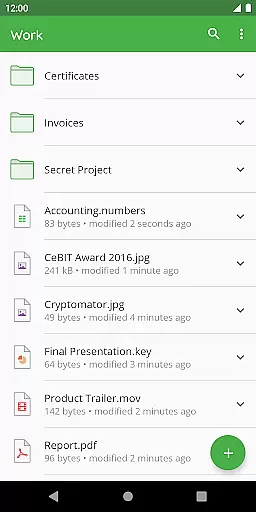
Cryptomator is a user-friendly encryption tool designed to secure your cloud-stored data. This productivity app allows you to create secure vaults, protecting your files with robust AES encryption and 256-bit key length. With compatibility across major platforms like Dropbox, Google Drive, and OneDrive, Cryptomator ensures your data remains accessible yet private.
The app simplifies digital self-defense by enabling users to protect their information independently. It eliminates the need for additional accounts or complex configurations. Users can unlock their encrypted vaults conveniently using fingerprint authentication. Whether you're working on mobile devices or computers, Cryptomator provides a seamless experience in safeguarding your sensitive data.
Cryptomator stands out with its advanced security features tailored for privacy-conscious users. The app employs AES encryption with a 256-bit key length, ensuring top-tier protection for both file content and filenames. Additionally, it enhances security by using scrypt to protect vault passwords, making them resistant to brute-force attacks.
One notable feature is the automatic locking of vaults when the app is sent to the background, providing an extra layer of safety. Its open-source nature allows tech-savvy users to verify the integrity of its cryptographic implementations. Compatible with various cloud services including WebDAV-based storage, Cryptomator empowers users to maintain control over their data security without compromising accessibility.
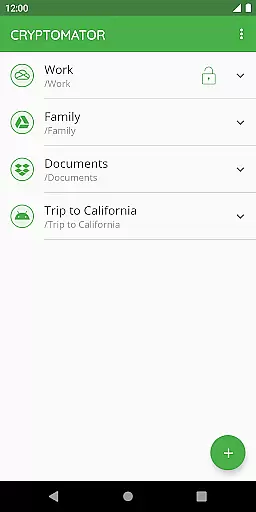
At the heart of Cryptomator lies its robust core task management system, designed to simplify how users handle sensitive data. This feature allows you to create secure vaults effortlessly, where each vault operates as an encrypted storage space for your files.
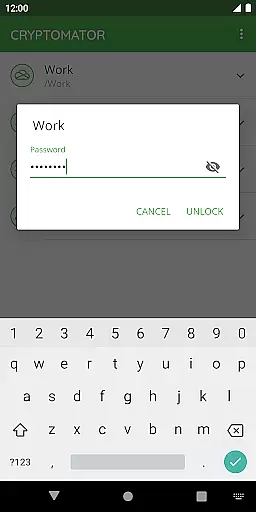
The application ensures that managing these vaults is straightforward, eliminating the need for additional accounts or complex configurations. With just a password, users gain access to their encrypted data, streamlining the process of safeguarding digital information.
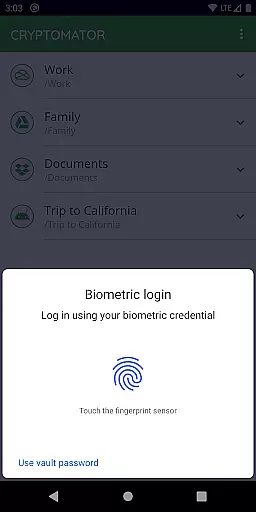
Furthermore, Cryptomator enhances user convenience by supporting biometric authentication, enabling vault unlocking via fingerprint recognition. This seamless integration of security and accessibility underscores the app's commitment to protecting user data without compromising on usability.
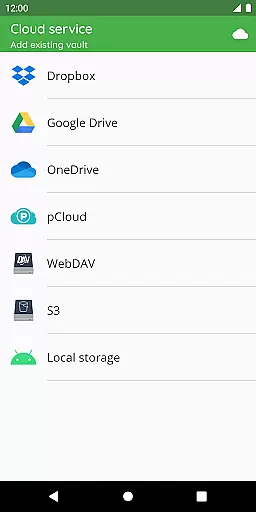
Cryptomator excels in providing reliable cross-device synchronization, ensuring that your encrypted files are accessible across all your devices. Whether you're using Dropbox, Google Drive, OneDrive, or other cloud services, Cryptomator maintains consistent and secure file syncing.
This synchronization process is not only reliable but also transparent. Users can track their files' status in real-time, receiving updates as data moves between devices. Such visibility reinforces trust in the appu2019s ability to manage sensitive information securely.
Moreover, Cryptomator supports local storage options on Android, allowing integration with third-party sync apps. This flexibility ensures that no matter where or how you store your data, Cryptomator delivers a dependable solution for maintaining up-to-date and protected files across platforms.
Strong AES encryption
User-friendly interface
Automatic vault locking
Open-source transparency
Cross-platform support
No built-in cloud sync
Fingerprint sensor required
Limited free version
Occasional performance lag
Advanced settings needed

When you Focus, so will your Bean in this cozy focus timer
 4.30
4.30
Unlock AutoNotification
4.00
All in one sketching tool. Technical and General drawing. Online Maps support.
3.70
Remotely view listen control and record cameras.
3.70
CalenGoo is a very flexible and feature-rich calendar app
4.40
Stay on top of your to-dos with Google Tasks, part of Google Workspace.
4.60
PDF scanner & converter for files, photos, lottery, QR codes. One swipe away!
4.50
Best Tool for the professionals Electrician, Electrical contractors, etc.
4.90
Note taking, handwriting, record audio, PDF annotation, planner & journal
4.20
Mind Map and brainstorm, note taking and idea collection
4.80
A beautiful digital clock with autostart and many other functions
4.70
Functional QR scanner and barcode reader that requires little storage space.
4.60
Send files, sync SMS, notifications & clipboard across devices via local network
4.40
Secure your apps with lock screens, use custom themes and different features.
4.40
Device's storage information in a simple and clear graphical form (infographics)
4.10
Cloud storage, automatic phone backup, and more.
4.10
Find and delete junk files & block unwanted notifications & manage files
3.70
Easiest event planning, volunteer signups & parent teacher conference scheduling
2.20
AI Video AI Image Private LLM AI Browser Llama Gemma Ollama Connect LLM Studio
4.3


User Reviews