


Notes Launcher is a productivity app designed to streamline note-taking and task management. The application allows users to jot down thoughts, create to-do lists, and organize important information with ease. Its intuitive swipe-right feature from the home screen enables instant access to note creation, making it an ideal tool for capturing ideas on the go.
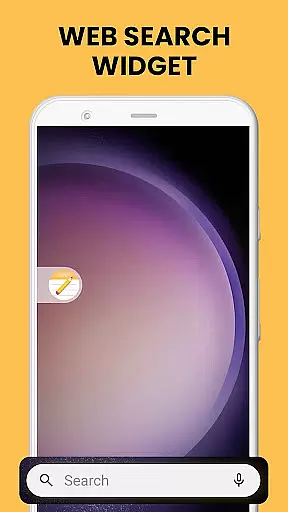
Beyond basic note-taking, Notes Launcher offers advanced features such as text formatting tools, color-coding, and note locking for enhanced security. Users can categorize and sort their notes, ensuring efficient information management. With its home screen widget, users can view time, weather, and more without opening the app. The app also provides multi-touchpoint search capabilities, allowing users to find installed apps or perform web searches powered by Yahoo.
This app is particularly useful for professionals and students who need to stay organized and manage their tasks effectively. By combining functionality with user-friendly design, Notes Launcher delivers significant value to anyone looking to improve their productivity while maintaining data security and accessibility.
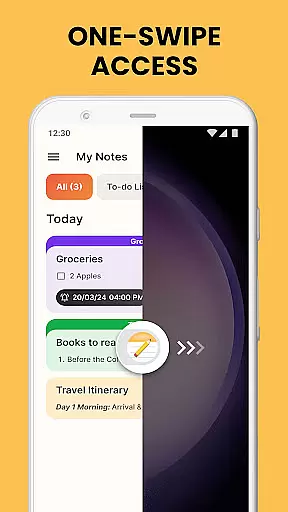
Notes Launcher stands out with its comprehensive set of features tailored for productivity enthusiasts. One of its key highlights is the ability to create notes and checklists instantly through a simple swipe-right gesture from the home screen. This one-swipe access ensures that users can capture important information without delay, whether it's a grocery list, a wish list, or a detailed to-do list.
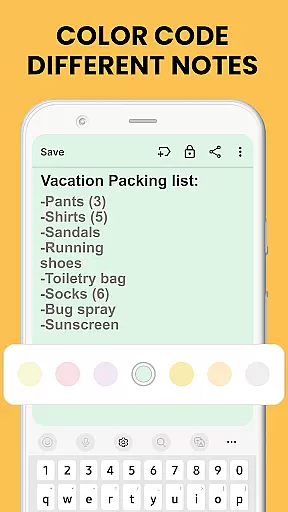
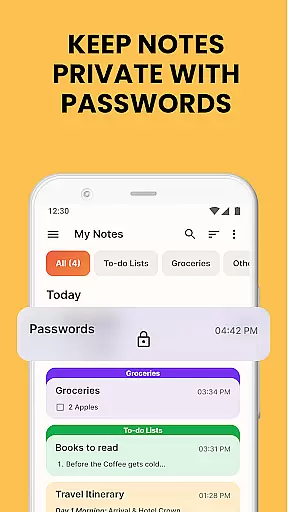
The app includes robust text formatting tools that allow users to enhance their notes with various font sizes, styles like italic and underline, and the ability to create bulleted or numbered lists. Additionally, the color-coding feature helps users prioritize and categorize their notes visually, making it easier to manage work tasks or personal plans. For sensitive information, the lock notes feature provides an added layer of security, protecting details such as passwords and bank account information.
Notes Launcher also excels in organization and accessibility. Users can categorize notes into custom groups, sort them by modification date or creation order, and quickly find specific notes using the intuitive search function. Sharing capabilities further extend the app's utility, enabling collaboration on travel itineraries or group projects via email and social media platforms. These features collectively ensure that Notes Launcher is not just a note-taking app but a complete productivity solution.
Effective task management is essential for productivity, and Notes Launcher excels in this area. The app provides a comprehensive suite of tools to help users organize their daily tasks efficiently.
With features like note-taking, checklists, and text formatting tools, the app allows users to create structured and visually appealing task lists. Users can format their notes with different font sizes, bullet points, and colors, making it easier to prioritize and categorize tasks.
Additionally, the app offers sorting and filtering options that enable users to arrange their notes by date modified or creation order. This ensures that users can quickly find and focus on the most urgent or relevant tasks without getting overwhelmed by less important information.
The ability to lock sensitive notes adds an extra layer of security, ensuring that personal or confidential task details remain private. Overall, Notes Launcher empowers users to manage their tasks effectively while maintaining data security and privacy.
In today's interconnected world, reliable cross-device synchronization is crucial for maintaining productivity. Notes Launcher addresses this need by providing seamless integration across multiple devices.
Users can access their notes, to-do lists, and other important information from any device with the app installed. This ensures that whether they are at home, in the office, or on the go, their data is always up-to-date and accessible.
The synchronization process is designed to be fast and reliable, minimizing delays and ensuring that changes made on one device are immediately reflected on others. This real-time update capability helps users stay organized and responsive, no matter where they are.
Furthermore, the app supports multi-touchpoint search, allowing users to find installed apps or perform web searches (powered by Yahoo) from various access points. This feature enhances the overall user experience by providing quick and easy access to information and resources, further boosting productivity.
User-friendly interface
Advanced security features
Efficient task management
Customizable organization
Multi-platform search
Home screen layout changes
Limited design customization
No cloud sync in free version
Occasional ads in free version
Learning curve for new users

Mega cloud explorer plugin for Solid Explorer
 3.80
3.80
Professional calendar app for Google Calendar, MS Outlook & Exchange
4.20
Secure, fast, open-source, Remote Desktop Client for Windows and Linux with SSH
4.60
Customizable calendar widget for seamless event sync, planning & scheduling.
4.00
Todo reminder
4.10
Find and delete junk files & block unwanted notifications & manage files
3.70
Calendar 2023 widget for Android. Appointment scheduler, planner, and reminder
4.60
Access, manage and transfer files on Android, PC, Mac, NAS and cloud storages.
4.30
AT&T Internet customers can use this app to personalize their Wi-Fi network.
4.40
Native client for Forgejo and Gitea
5.00
Seamlessly integrate data and reports to build your presentation to impress
4.80
App lock - lock apps with fingerprint, password, pin or pattern, protect privacy
4.70
To do list widget with a notebook organizer, checklist, simple shopping list
4.60
Subscribe to Webcal & .ics calendars and keep them up-to-date!
4.50
A Pixel Art watchface inspired by other iconic 90s designs for Wear OS devices!
4.40
This small app MUST BE INSTALLED after purchase, else license won't work
4.40
Pwnagotchi companion app
4.20
Easily read and manage all your PDF files
4.10
Smart PDF reader & editor to view, organize and manage PDF documents easily.
3.70


User Reviews