
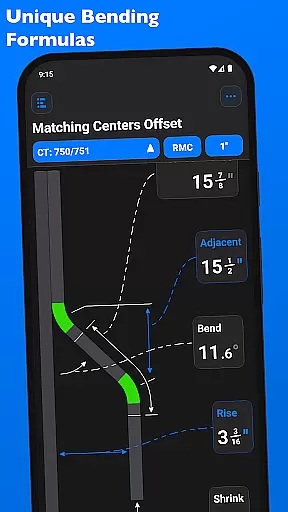
QuickBend is a cutting-edge conduit bending calculator app designed for precision and efficiency. It stands out by offering the most accurate measurements through its unique centerline radius algorithm, accounting for shoe and bender radius, conduit type, and size diameter. The app has been rigorously field-tested to ensure reliability.
Built with electricians in mind, QuickBend caters to both professionals and DIY enthusiasts. Its intuitive interface helps avoid common mistakes, saving users time and money. The app provides detailed documentation for individual bends, enhancing user understanding and productivity.
QuickBend supports various bend types and allows users to toggle between inches and centimeters. With features like QuickCheck, it offers real-time feedback on bend feasibility, making the tool not only powerful but also convenient for everyday use.
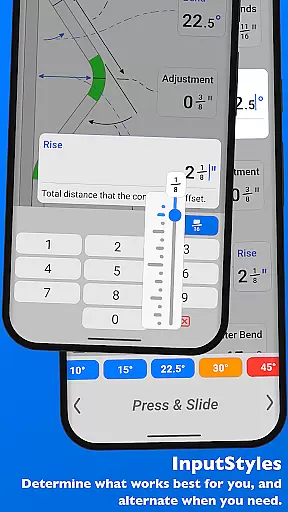
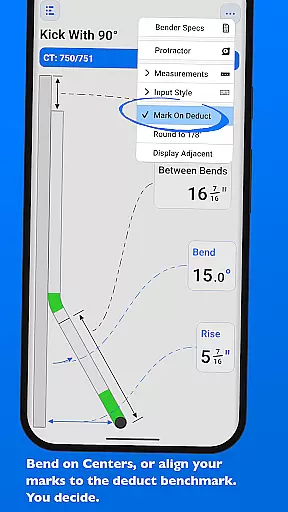
QuickBend boasts an array of advanced features tailored for productivity. One standout feature is its ability to switch between different input styles such as a number pad or slider bar (Press & Slide), catering to diverse user preferences. This flexibility ensures that users can choose the method that best suits their workflow.
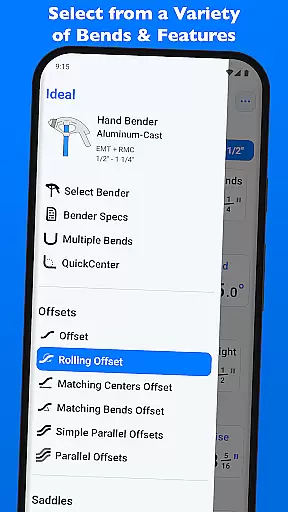
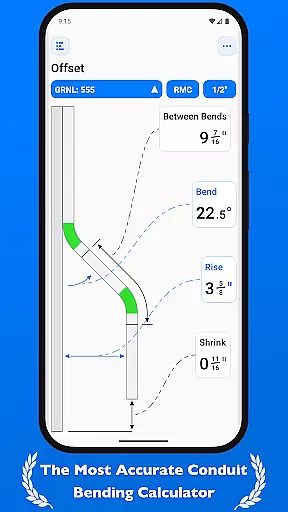
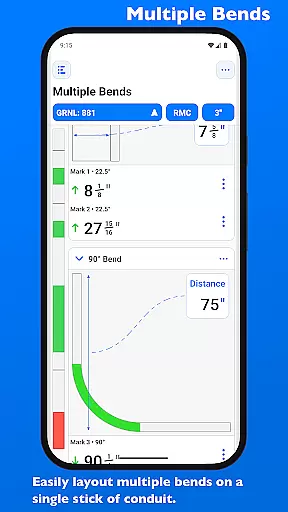
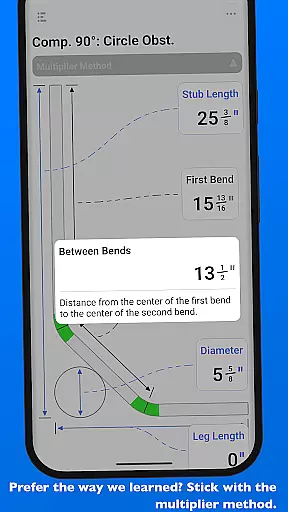
The app supports a wide range of bends including Offset, Rolling Offset, Three-Point Saddle, and more. Each measurement is meticulously calculated using the centerline radius algorithm, ensuring unparalleled accuracy. Additionally, QuickBend allows users to layout multiple bends on a single conduit and easily adjust individual marks per bend.
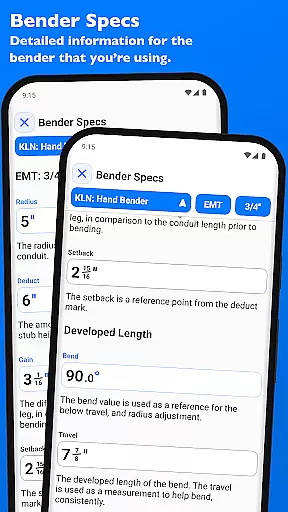
Another remarkable feature is the Bender Specs section where users can edit and view detailed specifications of their benders. This includes information on centerline radius, deduct, gain, setback, and more. Such comprehensive tools make QuickBend an indispensable asset for anyone working with conduits.
QuickBend revolutionizes the way electricians and conduit workers manage their bending tasks through its advanced calculation engine. At the heart of this app is a robust task management system that allows users to input, adjust, and review complex conduit bends with precision.
The app supports a wide range of bend types, from simple offsets to intricate compound 90u00b0 bends. Each task can be customized with specific parameters such as shoe radius, bender type, and conduit dimensions. This level of detail ensures that every bend is calculated using the most accurate centerline radius algorithm available.
What sets QuickBend apart is its ability to handle multiple bends on a single conduit run. Users can layout and measure each mark without limitation, while maintaining complete control over individual bend specifications. The app's intuitive interface allows seamless switching between different measurement systems and input methods.
This comprehensive approach to task management saves valuable time on the job site and helps prevent costly mistakes. By providing detailed documentation for each bend and visual feedback through QuickCheck, the app ensures maximum productivity and accuracy in every project.
In today's fast-paced work environment, having reliable access to your conduit bending data across multiple devices is crucial. QuickBend addresses this need through its sophisticated synchronization system designed specifically for professional use.
The app maintains consistent access to your entire library of benders, saved calculations, and custom specifications regardless of which device you're using. This includes detailed information about centerline radius, deduct values, gain measurements, and setback calculations for all your preferred bender models.
QuickBend's synchronization extends beyond simple data backup. The app intelligently updates your most-used bender settings across devices, ensuring that your pinned benders and frequently used configurations are always available. This feature is particularly useful when working on large projects that require multiple workstations or when transitioning between job sites.
While maintaining data integrity, the app also provides real-time updates to your bend calculations and specifications. This means that any changes made on one device are immediately reflected across all others, guaranteeing that you're always working with the most current and accurate information available.
User-friendly interface
Highly accurate calculations
Wide range of supported bends
Real-time bend feasibility checks
Detailed bender specifications
Premium version required for full access
Steep learning curve for beginners
Limited free features
Occasional performance lags
Requires internet connection

Seamlessly integrate data and reports to build your presentation to impress
 4.80
4.80
When you Focus, so will your Bean in this cozy focus timer
4.30
The upgraded version of Name Wheel with AI and the power to add your own wheels.
4.0
The Pro Version of Android's tiniest Notepad app. Just 0.3MB but feature-packed!
4.60
Todo reminder
4.10
A beautiful digital clock with autostart and many other functions
4.70
To do list widget with a notebook organizer, checklist, simple shopping list
4.60
Experience and share your SolidWorks designs on your Android® phone and tablet.
2.50
QuickEdit is a fast, stable and full featured text and code editor.
4.20
Protect and view your important info on your phone and tablet with eWallet®
4.80
Use powerful, industry-leading AI tools to generate visual charts from any data
4.80
Secure, fast, open-source, VNC and SSH Remote Desktop for Windows, Linux and Mac
4.70
App lock - lock apps with fingerprint, password, pin or pattern, protect privacy
4.70
Secure, fast, open-source, Remote Desktop Client for Windows and Linux with SSH
4.60
The AI assistant that thinks with you - write, code, and solve complex tasks
4.60
A customizable calendar for your Wear OS watch
4.20
Total remote control for your Android device, PC and cloud services (IFTTT)!
4.20
Professional calendar app for Google Calendar, MS Outlook & Exchange
4.20
A comprehensive suite of tools designed specifically for Lactation Consultants
4.2


User Reviews